SEO Keyword Research: A Step-by-Step Guide to Finding Keywords Worth Targeting
Keyword research isn't the same thing as making a long list of phrases with search volume next to them. A spreadsheet of 500 keywords doesn't tell you what to write, in what order, or why. The actual job is deciding what deserves a page on your site, based on what real people search for and how realistic it is that you'll be the answer.
This is the process, start to finish. We'll use running shoes as an example throughout.
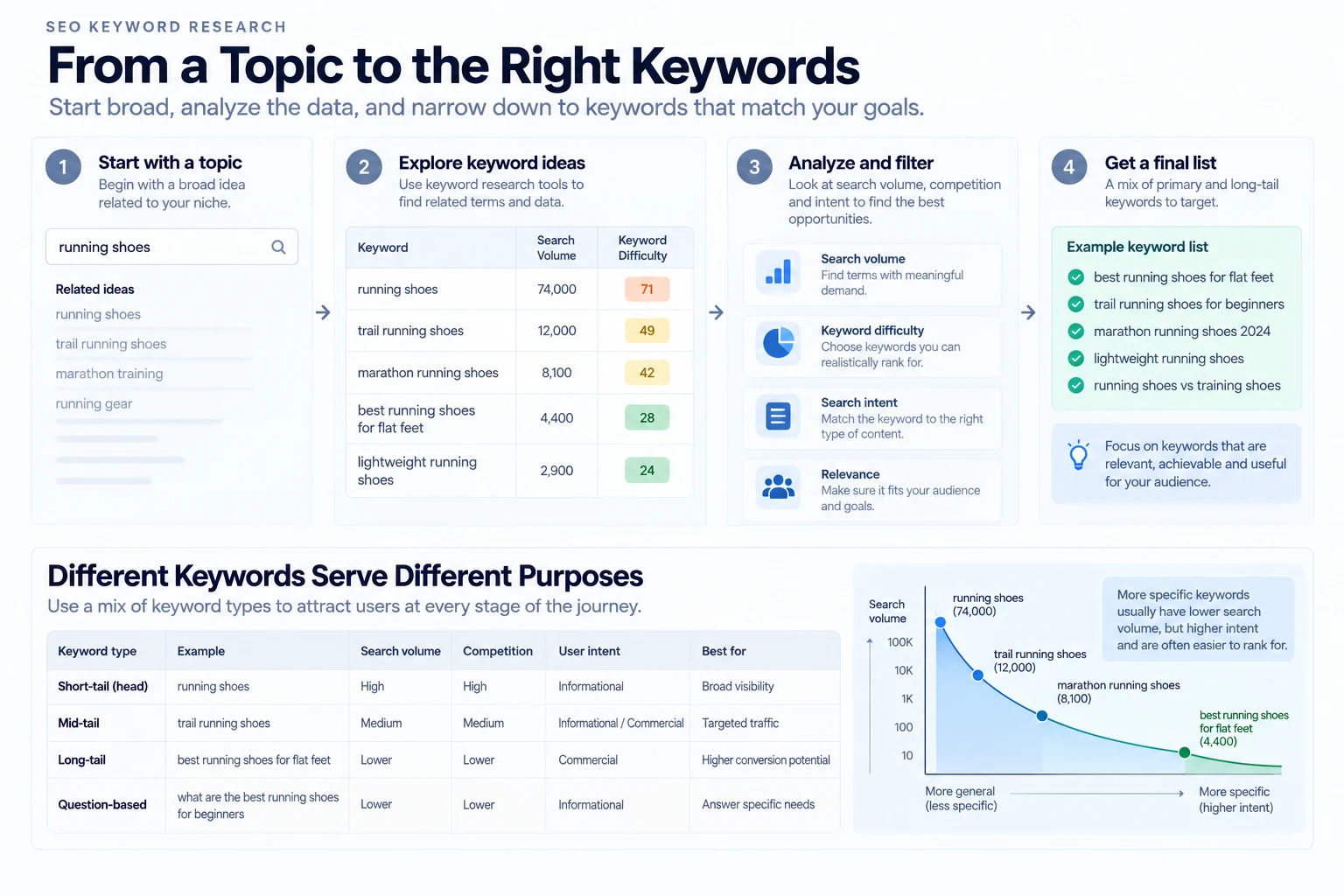
Step 1: Start With Seed Keywords, Not a Tool
Before opening any tool, write down the actual topics your business covers, in your own words, the way a customer would say them. Google's own Keyword Planner guidance also recommends thinking like your customers and describing your product or service category in the language they use.
If you sell running shoes, your seeds might be "running shoes," "trail running shoes," "marathon training," "shoe fit." These don't need to be clever. They just need to be true to what you actually do.
The mistake worth avoiding here: starting inside a keyword tool and letting its suggestions define what your business is about, instead of the other way around. The tool expands a list you already understand. It shouldn't be where the list starts.
Step 2: Expand the List
Once you have seed keywords, grow them into a real list using a few different sources, since no single one shows the whole picture:
- A keyword research tool's "related keywords" or "keyword ideas" feature, run against each seed. Google Keyword Planner also recommends using multiple relevant keyword phrases when looking for ideas.
- Google's autocomplete, what actually populates when you start typing a seed keyword into the search box.
- "People also ask" and related searches on the results page for your seed keywords, questions and related searches that appear around the topic in Google Search.
- Your own site search or customer support queries, if you have them, since this is real language your actual customers already use.
Running the "running shoes" seed through these sources might turn up: trail running shoes, running shoes for beginners, running shoes for flat feet, marathon running shoes, best running shoes for shin splints.
By the end of this step you should have more keywords than you'll ever use. That's fine. Filtering happens next.
Step 3: Check Search Intent Before Anything Else
Search volume isn't useful if the keyword doesn't match what your page is for. A keyword tool will show you volume and a difficulty estimate, but it won't tell you intent. That's a judgment call you make by looking at what's currently ranking for that term.
Four intent categories are worth knowing, since they change what kind of page you'd need to build:
- Informational: the searcher wants to learn something. "What is a running gait," "how to choose running shoes."
- Navigational: the searcher already knows where they want to go. "RankAnalyze login," "[brand] pricing." If a search is clearly navigational for another brand, it usually isn't a realistic target for your own page.
- Commercial investigation: the searcher is comparing options before deciding. "Best running shoes for flat feet," "trail vs road running shoes," "Brooks vs Hoka for beginners."
- Transactional: the searcher is ready to act. "Buy running shoes," "order trail running shoes," "running shoes sale."
These categories are widely used across SEO, not a rigid classification every keyword cleanly fits into. The fastest way to check intent for any keyword: search it yourself and look at what's actually ranking. If the top results are all product pages and you're planning a blog post, that keyword's intent doesn't match your plan, regardless of the volume.
Our guide on what SEO actually means covers this same idea for a single page — worth a look if intent is a new concept.
Step 4: Look at the Pages Already Ranking
This is the step many keyword research workflows skip, and it matters more than the difficulty number a tool gives you.
A keyword can have decent volume, a low reported difficulty score, and perfect intent, and still be a poor target if the pages already ranking for it are far stronger than anything you can currently publish.
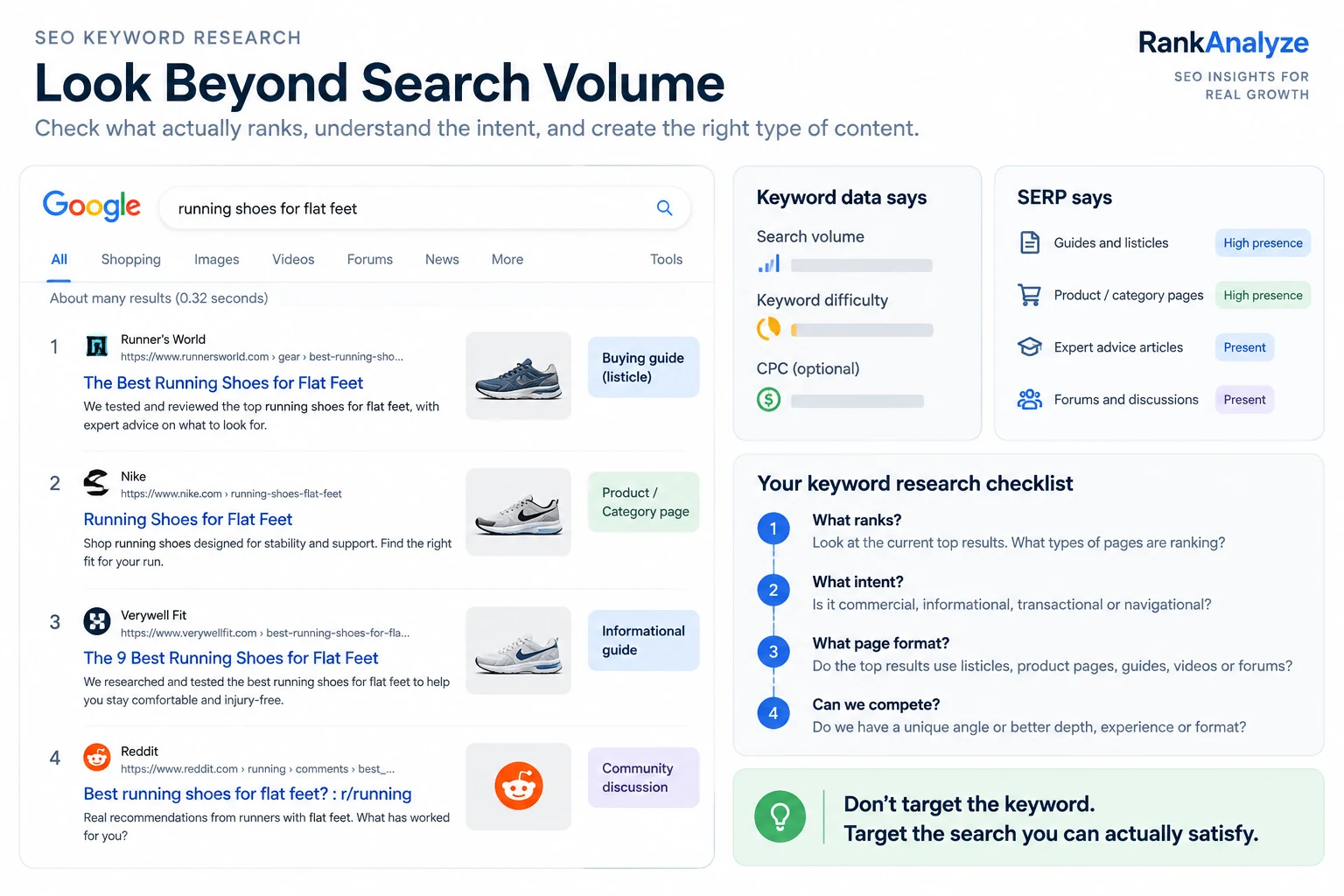
Before choosing a keyword, look at the first page of Google for it. A few questions worth asking:
- Are the results mostly pages from large, established sites, or is there room for a smaller site to compete?
- Are they guides, product pages, category pages, forums, videos, something else? That tells you what format actually wins this search.
- Does your planned page genuinely have something the current top results don't, whether that's more specific coverage, better evidence, or an angle they're missing?
You're not trying to beat a difficulty number. You're trying to decide honestly whether your page can compete with the pages Google already considers useful for that search.
For example, if the results for "running shoes for flat feet" are mostly running-specialty retailers with buying guides rather than big-box sporting goods sites, that could be a sign a focused, well-written guide has a real shot.
Step 5: Weigh Search Volume Against Competition
Two things are easy to get wrong here.
The first: treating search volume as traffic. A keyword with 10,000 monthly searches doesn't mean your page would get 10,000 visits, even at a strong ranking. Multiple pages compete for those clicks, and some searches are also answered directly in the search results, so not every search leads to a click. Volume is a ceiling, not a guarantee.
The second: comparing volume without looking at competition. A keyword tool's difficulty score is a third-party estimate of how competitive a keyword looks, not a Google metric. Different tools calculate it differently and use different signals. Treat it as a way to compare keywords within the same tool, not as an absolute number.
A high-volume keyword may also be highly competitive, which can make it harder for a newer or less established site to rank. That's why Step 4's look at the actual SERP matters more than the score.
Put together: a lower-volume keyword you can realistically rank for, based on what you saw in Step 4, can be more useful than a high-volume keyword where your site has little real chance of competing.
Step 6: Group Keywords Into Topics, Not One Page Per Keyword
Once you have a filtered, intent-checked list, the next mistake is building one page per keyword. Many keyword variations — "running shoes for beginners," "beginner running shoes," and "running shoes for new runners" — can represent the same search intent in different words. They can often be covered by the same page rather than three thin ones competing with each other.
Group your list into clusters, where every keyword in a cluster could realistically be answered by the same page. Each cluster becomes one piece of content. A keyword is usually worth its own separate page when it represents a meaningfully different intent, audience, or stage of the buying decision, not simply a different way of phrasing the same question.
For the running shoes example: "running shoes for beginners" and "beginner running shoes" cluster together into one page. "Running shoes for flat feet" is a different enough audience and intent to justify its own.
Step 7: Turn Topics Into a Content Plan
For each cluster, decide:
- Does an existing page already answer this? Before creating a new URL, check whether a page you already have could cover this intent well with some expansion. If two pages target the same intent, they can end up competing with each other instead of giving you one stronger page.
- What format actually fits the intent? An informational cluster might call for a guide. A commercial-investigation cluster might be better served by a comparison, review, or buying guide. Don't force every cluster into the same template.
- What's the realistic priority order? Keywords where Step 4's SERP check looked winnable, paired with real volume, go first. Stronger-competition clusters are worth planning for, not necessarily building first.
A Quick Keyword Research Checklist
Before you call a keyword "chosen," you should be able to say yes to:
- It came from a real seed keyword tied to what your business actually does.
- You checked what's currently ranking for it and the intent genuinely matches your planned page.
- You looked at the actual pages ranking for it and have a real reason to think you can compete.
- You weighed its volume against that competition, not just against a difficulty number.
- It's grouped with the other keywords that share its intent, not left as an isolated one-off.
- It has a clear home: a specific existing page to expand, or a specific new page you're planning to build.
Make SEO Keyword Research Faster With RankAnalyze
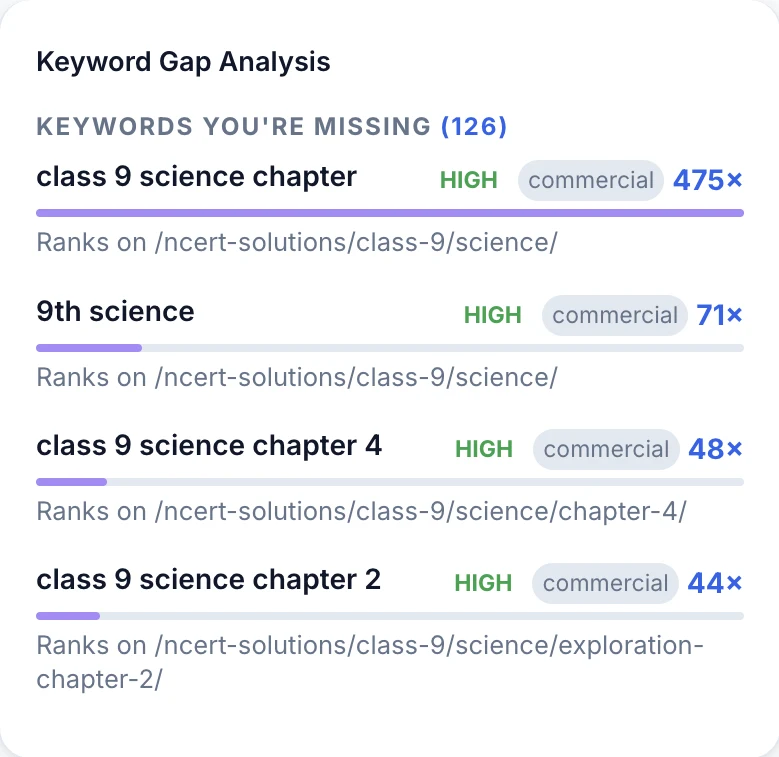
Manually running every seed keyword through search, checking intent by eye, and cross-referencing the SERP takes real time. RankAnalyze's Ranking Audit surfaces topic coverage, white space opportunities, and a keyword difficulty estimate together against a specific page, and Head-to-Head's keyword gap analysis shows keywords a competitor ranks for that you don't, along with the specific page they're ranking on.
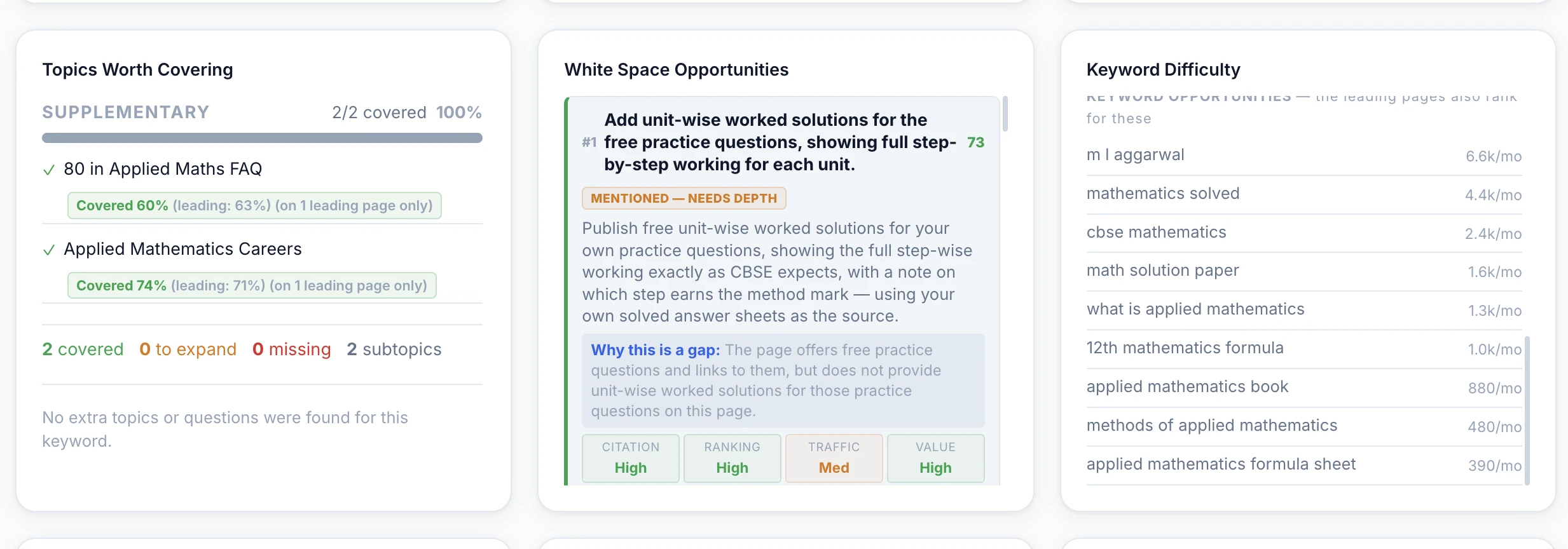
RankAnalyze's Ranking Audit and Head-to-Head turn manual keyword checking into a single report: topic coverage, white space, keyword difficulty, and exactly which keywords a competitor ranks for that you don't.
Frequently Asked Questions
What's the difference between keyword research and keyword analysis?
In practice, the terms get used interchangeably. If there's a distinction worth keeping, keyword research is the process of finding and expanding a keyword list; keyword analysis is evaluating that list once you have it, checking intent, volume, and competition to decide what's actually worth targeting. Most people mean the whole process when they use either term.
Is Google Keyword Planner free?
It's free to use, but Google currently requires you to complete Google Ads account setup, including billing information, to access basic keyword-idea features.
How many keywords should I target per page?
There's no fixed number. A page may naturally cover several related phrases because they describe the same topic, but the goal isn't to hit a keyword count. The goal is to cover the intent completely.
Does keyword research still matter with AI search and tools like ChatGPT?
Yes. AI search hasn't made it useless to understand what people are searching for. Keyword research can still reveal the questions, problems, and language people use. But don't treat a keyword list as the content strategy by itself. The page still needs to give people a useful, trustworthy answer. See our guide on generative engine optimization for more on writing for AI answer engines specifically.
What's a realistic keyword difficulty to start with for a new site?
There's no universal number that works for every new site, difficulty scores vary by tool and don't account for your specific site's strength. Start by comparing keywords within the same tool, then look at the pages already ranking (Step 4) and ask honestly whether your site can compete with them.
See exactly how ChatGPT, Claude, Gemini, Perplexity and Copilot describe you today.