Google AI Mode: What It Is and What It Means for SEO
Google AI Mode changes how search results work. Instead of only showing a list of links, it can create an AI-generated answer using information from several sources. It also creates a new SEO question: ranking first may not be enough if your page isn't also used as a source.
What is Google AI Mode?
Google AI Mode is a separate AI-powered search experience from the usual Google results page. Google first introduced it through Search Labs in March 2025 and later began rolling it out more widely.
It uses Google's Gemini models to handle longer, multi-part questions and follow-up questions.
Normal Google Search gives you a list of pages to visit. AI Mode looks at several sources and creates one answer from them. It also shows the sources it used. You can keep asking follow-up questions in the same thread, so it feels more like a conversation than a single search.
How does Google AI Mode work?
Google says AI Mode is built for questions that need more exploring, reasoning or comparing, the kind that might otherwise take several separate searches.
To answer, it uses a technique Google calls query fan-out: it splits your question into smaller related searches, runs them at the same time, and brings the results together into one answer with links to web sources. If Google isn't confident enough in an AI answer, AI Mode may show a set of web links instead. That's why AI Mode can cite pages that don't rank in the top 10 for your exact question.
Our Query Fan-Out guide explains how this works in detail, with examples, and what it means for your content.
Is Google AI Mode conversational?
Yes. After the first answer, you can ask a follow-up question and AI Mode keeps the context of the conversation, so you don't have to repeat yourself. If you're signed in, you can also go back to earlier AI Mode searches in your AI Mode history and pick up where you left off, or delete them.
How AI Mode is different from the AI Overview box
AI Mode and AI Overviews are not the same thing. An AI Overview is a box that appears above or within a normal set of search results. The regular results page is still there underneath it.
AI Mode is different. It is a separate search mode rather than a box added to the normal results page. The AI answer is the main part of the experience, with links to web sources alongside or below it. If your page isn't cited or linked, it may not appear as a source for that search.
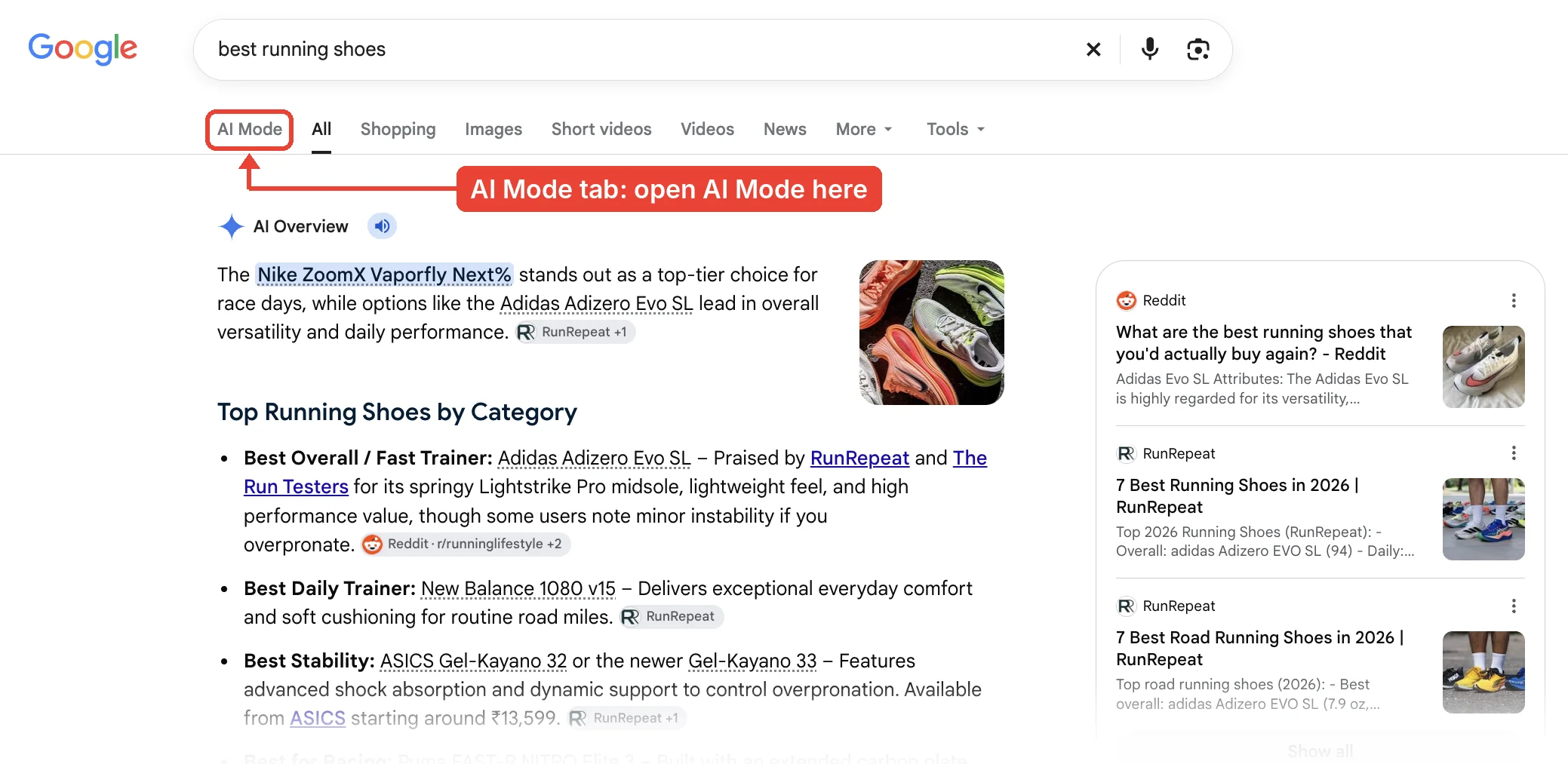
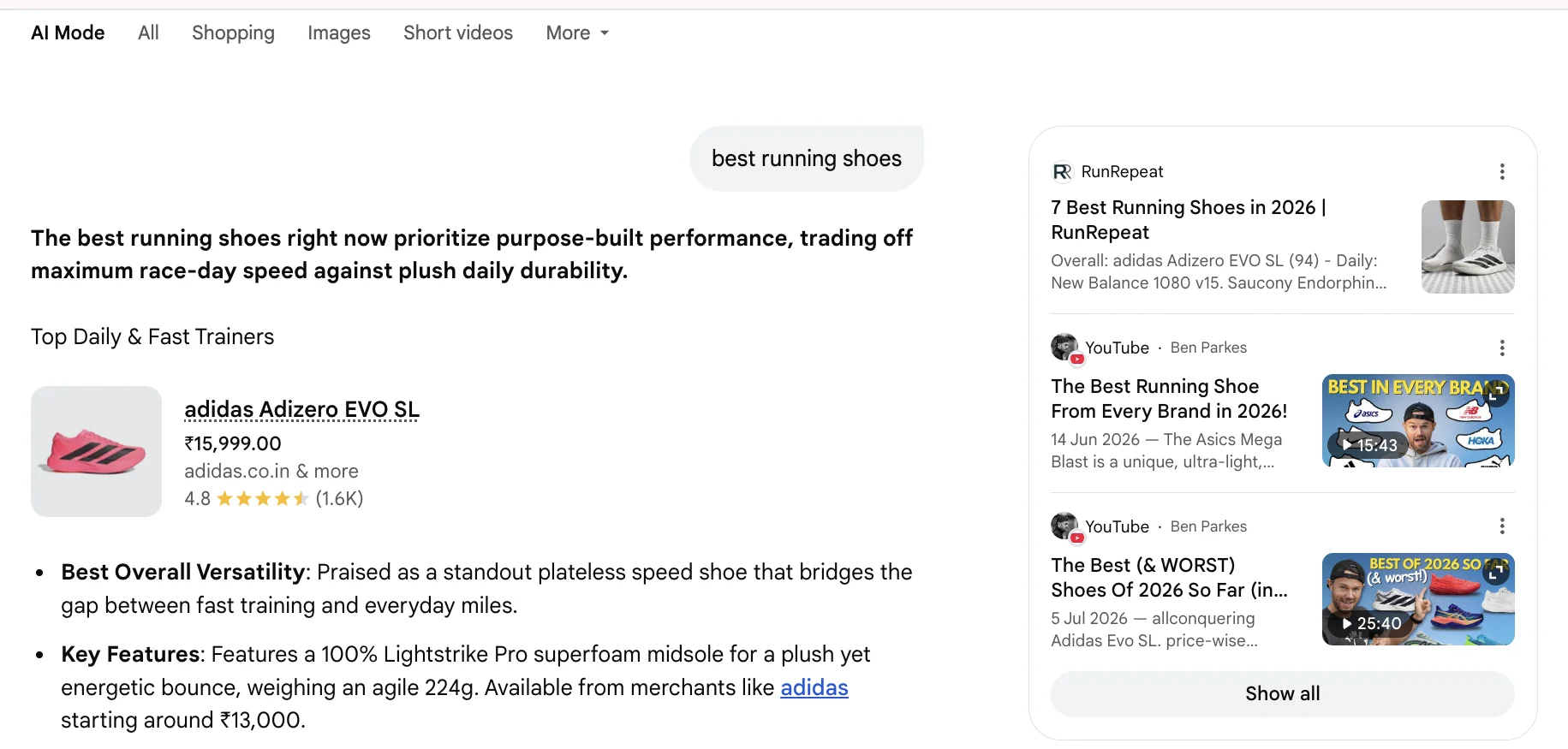
That difference matters for how visibility works in each one. On a normal results page, the AI Overview is just one part of the page. A site can still get clicks even if it isn't used as a source there. In AI Mode, the AI answer is the main part of the experience, so a page that isn't cited may be less visible for that search.
Google AI Mode history
Google introduced AI Mode in Search Labs in March 2025 and expanded it to more countries, territories and languages throughout 2025:
- March 2025: Google announced AI Mode as an experiment in Search Labs, first for Google One AI Premium subscribers in the US.
- May 20, 2025: at Google I/O, Google started rolling AI Mode out to everyone in the US, and described the query fan-out technique behind it.
- August 21, 2025: AI Mode expanded to more than 180 new countries and territories in English.
- October 7, 2025: Google added more than 35 languages and over 40 more countries and territories, bringing it to over 200 countries and territories in total.
Google keeps adding features, such as image search inside AI Mode and AI Mode in the Chrome address bar, so what you see may change over time.
How to use Google AI Mode
You can open AI Mode in a few ways:
- Go to google.com/ai.
- Search on Google as usual, then select AI Mode under the search bar.
- In the Google app, tap AI Mode on the home screen.
- In Chrome on a computer, select AI Mode on the right of the address bar, or press Tab then Enter. On Android and iPhone, tap the address bar and choose AI Mode.
Type a question the way you'd ask a person, including any details that matter. Then ask follow-up questions to narrow it down. Each answer shows links to the pages it used, so you can check the source.
You don't have to type. In AI Mode you can also ask with your voice, or add images or files, such as a PDF, to your question. In the Google app on Android and iPhone, Search Live lets you talk with AI Mode out loud and share what your camera sees: tap the Live icon under the search bar. What you can use depends on your device and location.
You don't need Search Labs to use AI Mode. AI Mode in Search Labs is a separate, opt-in experiment where Google tests early features. The regular AI Mode is what most people see.
AI Mode isn't available in every country or language yet. If you don't see the option, it may not have reached your location or language.
How to turn off Google AI Mode
There's no single switch that turns Google AI Mode off everywhere. AI Mode only runs when you open it, though, so the practical answer is to stay in regular Search:
- Leave AI Mode by selecting the All tab at the top of the results, or go to google.com and search as usual.
- In Chrome on a computer, you can hide the AI Mode button: right-click the address bar and unselect "Always show AI Mode."
- If you also joined the AI Mode experiment in Search Labs, you can switch that experiment off: open Search Labs, select Manage, and toggle off AI Mode. This turns off the experiment's early features, not regular AI Mode.
- To remove past AI Mode searches, open your AI Mode history and delete single searches or select Delete all.
Turning off AI Mode isn't the same as turning off AI Overviews. AI Overviews appear inside normal results, and Google doesn't offer a setting to hide them.
On Android
On Android, Google does not currently document a universal setting that removes AI Mode from Search. AI Mode appears as an option, not as the default, so you can avoid opening it: search from the regular search bar and stay on the All tab. Where it applies, you can also turn off the AI Mode experiment in Search Labs.
Why it matters for SEO
Ranking position isn't the whole story anymore. That's especially true when the search happens inside AI Mode instead of on the normal results page. A page can sit at position one for a keyword and still not appear anywhere in an AI Mode answer for that same query. AI Mode does not simply turn the top-ranking pages into an answer. Its cited sources can differ from the normal top 10 results, depending on the question.
One Semrush analysis of five SEO queries found that fewer than half of the domains cited in AI Mode also appeared in Google's top 10 results for those queries. That's a small sample, so it's one data point, not a general rule.
The opposite can also happen. A page that ranks lower in the normal results can still get cited in AI Mode for the same query.
See our guides on is AI recommending your competitor instead of you and generative engine optimization for more on that. Ranking well still matters, but being cited as a source can matter too.
What changes for your SEO strategy is mostly what you measure and how you write, not the basics. Pages still need to be indexed and useful. But because AI Mode answers many smaller questions at once, a page that answers one specific question clearly can be cited even if it doesn't rank for the main keyword. And some people will read the answer without clicking, so impressions and citations become worth watching alongside clicks. If impressions rise while clicks stay flat, see Lots of Impressions, No Clicks.
RankAnalyze's GEO Scan shows whether ChatGPT, Gemini, and Copilot cite your pages when answering questions in your space.
How to rank in Google AI Mode: what can help your page appear
Google does not publish a special checklist for getting into AI Mode. The same basic SEO practices that help pages appear in Google Search can also help make your content useful as a source:
- Answer the specific question directly. Use clear language that makes the answer easy to find instead of making the reader piece it together.
- Go beyond a basic summary. A page that explains a topic properly gives an AI system more useful information to work with.
- Use clear structure. State specific claims plainly instead of burying them in dense paragraphs.
- Back claims with real evidence. Numbers, examples, and specific details give an AI system clearer information to work with than vague statements.
- Keep following normal SEO best practices. Traditional rankings still matter, even though ranking and citation aren't the same thing.
- Build a presence beyond your own site. Trusted third-party sites can also appear as sources in AI-generated answers. Reddit and Wikipedia are examples, but this varies by AI system and query. This isn't a confirmed Google ranking signal.
What Google says about optimizing for AI Mode
Google's own guidance is short. To be shown as a link in AI Mode, a page must be indexed and eligible to appear in Google Search with a snippet. Google says there are no extra requirements and no special optimizations needed beyond that. Its guide on generative AI features adds a few things you don't need to do:
- No special files. Google Search ignores llms.txt files.
- No need to break your content into tiny pieces.
- No need to write in a special way for AI, and no need for structured data just for AI features.
If you'd rather limit what Google can show from a page, the normal snippet controls apply: nosnippet, data-nosnippet, max-snippet or noindex. Keep in mind they limit how the page appears in regular results too. To check that a page can be indexed at all, see our Technical SEO Audit guide.
How to measure SEO in Google AI Mode
Google Search Console doesn't give a separate AI Mode click count. AI Mode traffic is included in the Web search type in the regular Performance report. Search Console does now show part of the picture, though.
In June 2026, Google introduced a Generative AI performance report in Search Console, and as of August 31, 2026, Google says it has rolled out to all websites worldwide. It shows how many times links to your site appeared in AI Mode, and separately in AI Overviews. You can break that down by page, country, device and date.
It has limits worth knowing:
- It shows impressions only, not clicks.
- It doesn't show which searches triggered the impressions.
- It leaves out Search Labs experiments.
- Clicks from AI Mode are still counted in the regular Performance report, inside the Web search type, mixed in with normal results.
To fill the gaps:
- Search your main questions in AI Mode yourself and note which pages it cites, yours and others'. Repeat it every few weeks, since answers change.
- Compare the pages getting AI Mode impressions with their clicks in the regular Performance report.
- Watch for pages whose impressions rise while clicks stay flat.
RankAnalyze's GEO Scan does a similar check across ChatGPT, Gemini and Copilot, if you want to see AI answers beyond Google.
Search Console's generative AI control
New in Search Console: a Search generative AI control lets site owners choose whether their site's links and content can appear in AI Overviews, AI Mode and generative AI features in Google Discover. Sites are included by default, unless the property inherits a different setting from a parent property. Google says this control rolled out to all websites worldwide on August 31, 2026, and that it doesn't affect how your pages rank or appear in regular Search results. Exclusion usually takes 1 to 2 days after the control goes live, although some content may take longer.
A quick checklist
- Does the page directly answer a specific question, not just cover the topic broadly?
- Is the key answer stated plainly near the top, not buried several paragraphs in?
- Does it include specific evidence, numbers, or examples rather than only general claims?
- Does the page use clear headings that make the information easy to find?
- Does the page follow normal SEO best practices?
- Is the page indexed and allowed to show a snippet in Google Search?
Frequently Asked Questions
What is Google AI Mode?
Google AI Mode is a separate search experience from regular Google Search. It answers your question with one AI-generated response built from several sources, instead of a list of links. It launched in March 2025 and runs on Google's Gemini models.
Is Google AI Mode the same as an AI Overview?
No. An AI Overview is a box shown within a normal results page, with the regular results still available below it. AI Mode is a separate search experience where the AI answer is the main part of the page, with links to web sources and other search results depending on the query.
How do I access Google AI Mode?
You can access AI Mode at google.com/ai, from the AI Mode tab in Google Search, or through the Google app. Google first launched it as a Search Labs experiment for Google One AI Premium subscribers in March 2025 and later expanded access to a much wider audience.
Can I turn off Google AI Mode?
There's no single switch, but AI Mode only runs when you open it. Stay on the All tab in Google Search to use regular results. In Chrome on a computer, you can hide the AI Mode button by right-clicking the address bar and unselecting "Always show AI Mode." If you joined the Search Labs experiment, you can toggle AI Mode off in Search Labs.
Does Google AI Mode replace traditional search results?
Not entirely. The regular Google results page is still available separately from AI Mode. Google is continuing to add AI features to Search, but it's too early to say how much search activity will eventually move to AI Mode.
Will Google AI Mode hurt my website traffic?
It can. A Pew Research study found that when Google shows an AI Overview, people click a normal result about half as often, 8% of searches instead of 15%. That study looked at AI Overviews specifically, not AI Mode. There is no equivalent public click-through study for AI Mode yet. Pages that offer unique value, such as deeper information, a useful tool, or original data, may still give people a reason to visit the site directly.
Can I track how much traffic comes from Google AI Mode?
Partly. Google Search Console now has a dedicated report for generative AI features that shows impressions for AI Overviews and AI Mode separately, by page and by country. The current report focuses on impressions rather than clicks, so you can see when your pages appear in AI Mode but not a separate AI Mode click count. You can also test your target queries in AI Mode to see which pages Google cites.
How can I optimize a page for Google AI Mode?
Answer the specific question directly, near the top of the page. Back up claims with real specifics, not vague statements. Use clear headings, and make the content detailed enough to provide useful information.
Does ranking #1 on Google guarantee a citation in AI Mode?
No. Ranking and citation are related but separate. A page can rank first and still not be cited in an AI Mode answer. AI Mode can use sources that don't appear in the top 10 organic results for the same query.
What AI model powers Google AI Mode?
Google's Gemini models power AI Mode. They help it handle longer, more complex questions and follow-up conversations.
Is Google AI Mode available worldwide?
AI Mode is now available in many markets, but features and languages can vary by location. Google said in October 2025 that it had reached over 200 countries and territories. The easiest way to check is to look for the AI Mode option in Google Search or the Google app, or go directly to google.com/ai.
How is Google AI Mode different from asking ChatGPT directly?
AI Mode is built into Google Search and uses Google's search systems and web index. ChatGPT is a separate AI system and can use web search when that feature is available. The two systems work differently and may use different sources.
See whether ChatGPT, Gemini, and Copilot cite you or your competitors with GEO Scan.
 RankAnalyze