SEO Optimization Tools: What They Do and Which Ones You Actually Need
We use RankAnalyze's own tools on our own sites. This guide comes from that day-to-day use, not just research.
Search for "SEO optimization tools," or "search engine optimization tools," or "SEO marketing tools" as some sites call it, and you'll get mostly the same result: long lists sorting twenty tools from best to worst. There's little explanation of what each tool actually does. Even less on which problem it solves.
That's the wrong way to pick a tool. SEO covers a dozen different jobs, and most lists lump them under one label. Below, we break down what each type actually does, in plain terms, so you can figure out which ones answer the questions you actually have.
Not sure which job your site actually needs solved? RankAnalyze's Ranking Audit compares your page against what's actually winning for a keyword and tells you exactly what's missing.
What Are SEO Optimization Tools?
An SEO optimization tool is software that helps you improve how a page performs in search. You may also see these products called SEO software or SEO platforms. The names vary, but the basic idea is the same. It's a broad category because SEO itself involves many different jobs. SEO tools help you find keywords worth targeting, see what is currently appearing for a search, and check a page for technical problems.
They do more than that, too. They help you improve pages you've already published, and track where you stand over time. They study what competitors are doing, and monitor who links back to you. They also help you understand the traffic you're getting, and spot older pages worth revisiting.
Most tools aren't built to do all of those jobs equally well. Many focus on two or three of them rather than trying to cover everything. That's why the "best SEO tool" question doesn't really have an answer, the better question is which job you're trying to get done.
The Main Types of SEO Tools
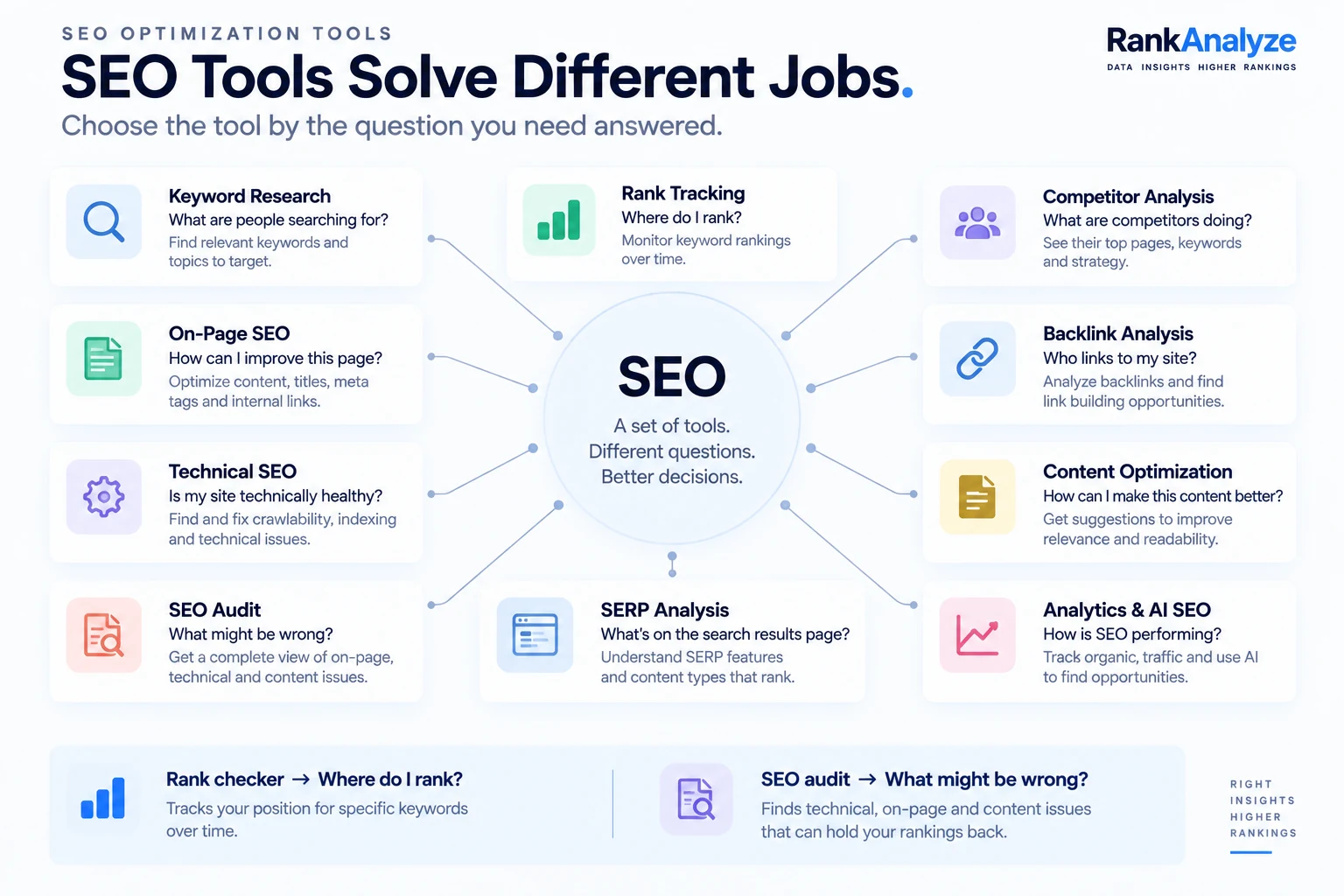
Keyword Research Tools
Keyword research tools help you understand what people are searching for, including search demand, related keywords, search intent, and longer, more specific phrases. They can also show how difficult a keyword may be to rank for and what questions people ask around it.
The most important thing a beginner needs to understand here is the difference between keyword volume and keyword difficulty. Volume is how many people search a term each month. Difficulty is how hard it is to actually break into the top results for it. Seeing a keyword with 10,000 searches a month feels like a win, but if the difficulty is high, that volume belongs to sites that have spent years earning it. A keyword with 200 searches a month and low difficulty may be a more realistic target than a 10,000-search keyword you have little chance of competing for. Lower volume, lower difficulty is often the better place to start, especially early on.
For example, a new website might find a keyword with 10,000 monthly searches, only to discover that the first page is dominated by established brands. A related keyword with 300 searches and much lower competition may be a more realistic place to start.
Google Keyword Planner is a common starting point, and it's free to use, though it technically lives inside Google Ads and shows broader volume ranges unless you're running an active campaign. It's still useful because the estimates come from Google's own advertising data.
Ubersuggest is another free option, with a smaller keyword database and a simpler interface than most paid tools. AnswerThePublic and AlsoAsked take a different angle: instead of volume and difficulty, they surface the actual questions people type around a topic, useful for finding subtopics a page should cover, not just keywords to target.
On-Page SEO Tools
On-page tools check the things that live directly on a page: title tags, meta descriptions, headings, how you're using your target keyword, the structure of your content, internal links, image alt text, URL structure, duplicate content, and whether there's enough real substance on the page.
One thing worth saying clearly: a good on-page tool tells you what's missing or weak. It doesn't tell you to repeat a keyword a certain number of times. Keyword density as a target number is outdated advice, Google says as much directly in its own spam policies, and chasing it just makes writing worse. Use these tools to catch what's actually absent, not to hit an arbitrary repetition count.
You don't need a paid tool to start. Chrome already has one built in: Lighthouse, found inside DevTools. It's free to run on any page. It checks a basic version of this, things like title tags, meta tags, and heading structure. It checks performance and accessibility at the same time.
Technical SEO Tools
Technical tools check whether search engines can actually access, read, and index your site properly. That breaks down into a few questions:
- Crawlability: can search engines reach your important pages, or are some of them accidentally blocked?
- Indexing: are the right pages actually in Google's index, and are canonical tags set correctly?
- Performance: is the site fast and usable on mobile, based on things like Core Web Vitals?
And a handful of specific technical issues worth checking directly: broken links, redirect problems, duplicate URLs, HTTPS issues, sitemap problems, and robots.txt mistakes.
Technical SEO is a different job from on-page or content work. A page can read beautifully and still be invisible to Google because of a technical block nobody noticed. A simple example: you publish a detailed product page, but a technical setting accidentally prevents search engines from indexing it. The content can be excellent and still struggle to appear in search.
Screaming Frog is the tool most people mean when they talk about a technical crawl: it walks your site the way Googlebot does and flags exactly which pages are blocked, redirected, missing tags, or duplicated, on a much larger scale than checking pages by hand.
SEO Audit Tools
An SEO audit looks at a website more broadly than one keyword or one page. It rolls technical issues, on-page issues, missing metadata, broken links, crawl issues, internal linking, page performance, and indexing problems into one combined picture.
This is a useful place to draw a clean line: a rank checker answers "where do I rank?" An audit answers "what might be wrong with my site?" Those are different questions, and a lot of confusion comes from expecting one type of tool to answer both. RankAnalyze's Ranking Audit, for example, pulls live results from Google for your keyword and lines your page up against what's actually beating it right now, not a cached snapshot from some earlier date. From there it looks at what those pages cover that yours doesn't — subtopics you're missing, thin sections, weak internal linking, structural gaps — and hands that back as a specific list, rather than a single score with no explanation behind it.
Want to see this applied to your own page?
Rank Checkers and Rank Tracking Tools
A rank checker tells you where a page sits for a keyword right now, a single snapshot. A rank tracker does the same basic job, but saves each result over time so you can see the trend build, instead of losing that context the moment you close the tab.
If a page drops from position 4 to position 18, a rank tracker tells you the drop happened. An audit helps you investigate what might have changed on the page or site. RankAnalyze combines both: a free check for where a page stands right now, and ongoing tracking for watching how that position moves over time.
Competitor SEO Tools
Competitor tools show you what other sites in your space are doing: the keywords they rank for, the pages bringing them traffic, their backlinks, gaps between their content and yours, their position changes over time, the topics they cover, and the keywords where you're competing with them.
Worth saying plainly: this data is for finding opportunities you missed, not for copying another site's page word for word. The value is in seeing what's working in your space, not in cloning it.
SimilarWeb is a common starting point here, since it estimates a competitor's overall traffic and where that traffic comes from, search, direct, social, referral, which is useful context you can't get from your own analytics.
Backlink Analysis Tools
A backlink is a link from another website pointing to yours. Backlinks can be a useful signal of a site's reputation and relevance. Links from relevant, trustworthy sites are generally more valuable than large numbers of low-quality links.
Backlink tools show you your referring domains, your actual backlinks, the anchor text used, links you've lost, new links you've gained, and what competitors' backlink profiles look like.
Ahrefs is the tool most associated with this category specifically, its backlink index is large enough that it's often used as a reference point even by people comparing other tools' link data against it.
Content Optimization Tools
This is a different job from keyword research. Keyword research helps you decide what to write about. Content optimization tools help you answer a different question: you've already decided what to write, so how do you make that specific page more useful and more competitive than what's currently winning?
These tools typically surface content gaps: what the top pages cover that yours doesn't, related concepts you haven't addressed, headings, and questions you haven't answered. Some also flag readability issues, internal-linking opportunities, and content that's gone stale and needs a refresh. The better ones do this by comparing your page directly with the pages currently winning for the same keyword, and showing exactly where the coverage gap is.
SERP Analysis Tools
Before you optimize a page for a keyword, it's worth looking at what Google is actually showing for that search right now. That's what SERP analysis does. It looks at the top pages, the intent behind the search, and the format Google favors: list, guide, comparison, or video. It also covers featured snippets, "People Also Ask" boxes, images, videos, local and shopping results, and increasingly, AI-generated answer summaries.
Don't optimize for a keyword without first looking at what's currently winning it. If every top result is a comparison table and you're planning a personal essay, that mismatch is worth knowing before you write, not after.
Local SEO Tools
If your business depends on people finding you nearby, local SEO tools matter: your Google Business Profile, local search standing, citations, reviews, local keyword variations, map visibility, and keeping your name, address, and phone number consistent across the web. Not every site needs this. If local search isn't where your customers come from, you can skip this category.
SEO Analytics Tools
Analytics tools answer a different question than everything above: after you make changes, what actually happened? They cover organic traffic, clicks, impressions, and click-through rate. They also show conversions, which landing pages perform best, which queries bring people in, and how traffic trends over time.
This is where an important distinction shows up: position, traffic, and business results are three different things. You can rank #1 for a keyword and still get disappointing results if it doesn't attract the right audience or lead to meaningful actions. That's a means, not the goal itself.
For example, placing first for a broad informational keyword might bring thousands of visitors but very few customers. A page sitting fifth for a more specific buying-related search could bring less traffic but more useful visitors.
Google Search Console and Google Analytics
These are the two free tools worth starting with before anything paid. Search Console shows you how your site performs in Google Search, along with indexing information and issues Google has detected. Analytics shows you what visitors do after they arrive, which pages they view, what actions they take, and where they leave.
If any of your traffic comes through Bing, Bing Webmaster Tools is the equivalent free starting point there, its own indexing reports and keyword data, run against Bing's index instead of Google's.
Third-party SEO tools build on top of what these two already give you for free: larger keyword datasets, historical trend data, scheduled tracking, competitor data you can't get from your own analytics, bigger site crawls, and automated reporting.
AI SEO Tools
AI has become a real category here: keyword clustering, content briefs, topic research, content-gap analysis, drafting assistance, content optimization, SERP analysis, and increasingly, AI search visibility, how AI answer engines describe and cite your site when someone asks them a question. This is different from classic Google positioning, so it's worth treating it as a separate area of SEO rather than assuming the same tactics work everywhere. RankAnalyze's GEO Scan is one example of a tool built for that last piece, checking whether AI engines cite and describe your site accurately, rather than tracking a Google position.
It's worth being upfront about the limits here: AI tools are genuinely useful for producing and analyzing content faster. They don't replace judgment about what's actually worth writing, what your audience actually needs, or whether a suggestion is even true for your situation.
A tool in this category should answer two clear questions. First: is your site actually named as a source when an AI system answers a question? Not just mentioned in passing, actually named as the source. Second: which competitors keep getting named in your place instead? A mention and a citation are not the same thing. Your brand can come up in an AI answer without ever being the source it points to. Mixing the two up is an easy way to think you're visible when you're really not.
Which SEO Tool Do You Need?
The right tool depends on the job you need it to do. There's no single list of the best SEO optimization tools that fits everyone, the best one for you is whichever answers the specific question you actually have:
- If you want to find keywords, look for a keyword research tool.
- If you want to check one page, look for an on-page SEO checker.
- If you want to find problems across your whole site, look for an SEO audit tool.
- If you want to check where you rank right now, look for a rank checker.
- If you want to watch your position change over time, look for a rank tracker.
- If you want to study competitors, look for a competitor SEO tool.
- If you want to analyze backlinks, look for a backlink tool.
- If you want to improve existing content, look for a content optimization tool.
- If you want to understand your organic traffic, look for an analytics tool.
- If you want to check indexing, start with Search Console.
In practice, one audit tool can answer several of these at once. RankAnalyze's Ranking Audit touches five of the questions above: keyword difficulty, on-page issues, the broader audit, your current rank, and how you compare to competitors, bundled into a single report. Rank Tracker adds a sixth, watching that rank over time. See current plans on the pricing page. It doesn't replace a dedicated backlink tool (referring domains factor into the difficulty score, but that's not a full backlink profile), a content optimization tool, or an analytics tool. For those, and for indexing, the categories above are still worth treating separately.
How to Use SEO Tools Together
Tools are more useful when you use them as part of a process. A practical workflow looks like this:
First, find a topic using keyword research, something with real demand and a difficulty you can realistically compete with.
Second, study the SERP for that keyword. See what's currently winning and in what format.
Third, check your existing page, if you have one, with an SEO or content audit.
Fourth, improve the page based on what the audit and SERP research actually showed you, content gaps first, technical issues second. This step works best with a tool that looks at your position and your page content together rather than separately, since that combination is what actually surfaces specific areas worth improving.
Fifth, check your position for the keyword after the changes settle.
Sixth, track the keyword over time instead of checking once and forgetting about it.
Seventh, measure what that change actually did to your traffic through Search Console or analytics.
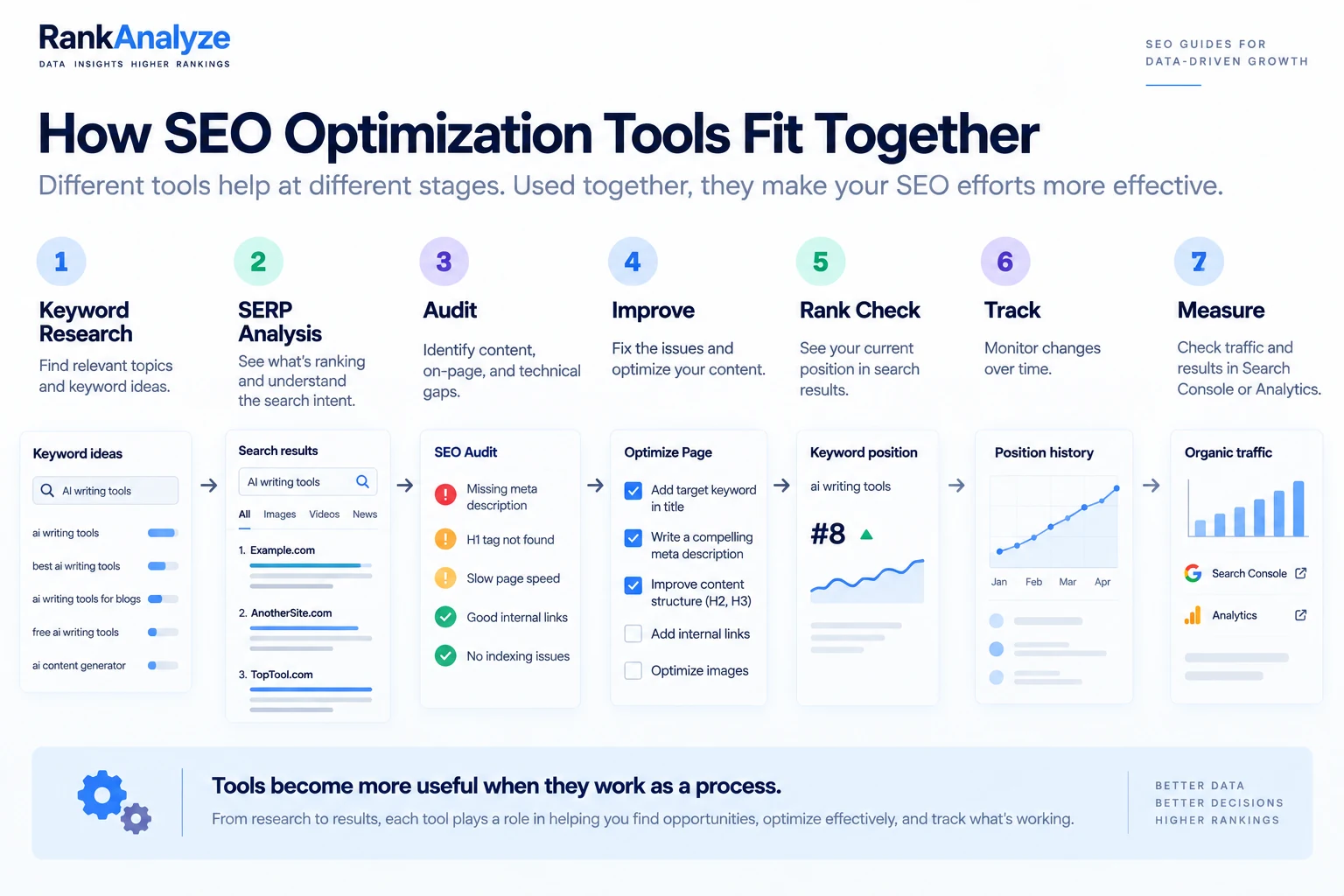
That sequence turns separate tools into a process you can actually follow. It's the same one we use on our own pages.
Free SEO Tools vs. Paid SEO Tools
What Free Tools Actually Cover
You can do a surprising amount for free: basic keyword research, indexing checks, basic rank checks, technical checks, traffic analysis, backlink checks, and content analysis all have solid free options, starting with Search Console and Analytics.
When Paid Tools Start Earning Their Cost
Paid tools start earning their cost when you need scale: larger keyword sets in one pull, historical data going back further than a free tool retains, scheduled tracking instead of manual checks, deeper competitor datasets, larger site crawls, and automated reporting for a team or client workflow. If you're running one site by yourself, free tools cover more of the job than most people expect. If you're managing multiple sites or clients, paid tools can become much more useful because manual checks start taking more time than they're worth.
Solo Site vs. Managing Multiple Sites or Clients
If you're managing one website and checking a handful of keywords, doing some of this work manually may be perfectly reasonable. If you're managing 20 websites and hundreds of keywords, the same approach quickly becomes a time problem.
SEO Tools for Small Business Owners and WordPress Sites
Running a small business site is not the same as running a large company's. You likely don't have a marketing team. You're watching every dollar. And there's a good chance your site runs on WordPress rather than something custom-built. That changes which tools actually make sense for you.
Start with the two free tools everyone should have: Search Console and Analytics. After that, look for tools that work as a plugin inside WordPress instead of a separate dashboard you have to remember to open. Yoast SEO and Rank Math are the two most common choices. Both have a free tier that checks your title, meta description, and basic on-page signals right inside the WordPress editor while you write, so the check happens as part of writing the page, not as a separate step you might skip.
You don't need an enterprise tool stack to compete. A keyword research tool, an on-page checker (often already built into your WordPress plugin), and an occasional full-site audit cover most of what a small site actually needs. Add a paid tool only when one specific, repeating task starts costing you more time than the tool would cost in money.
What SEO Tools Can't Tell You
Tools are good at surfacing data: your positions, your keywords, your backlinks, your technical errors, your traffic, your competitors' moves, your content gaps. What they can't do is hand you a guaranteed explanation. A tool can show you a position drop. It can't always tell you with certainty that a specific change caused it, sometimes several things shifted at once, or Google changed something on its end with no announcement. The data still needs a person to interpret it against everything else going on with the site. Treat tool output as evidence to reason from, not as a verdict.
You Don't Need Every SEO Tool
It's tempting to think more search engine optimization tools means more progress. Usually it just means more subscriptions and more dashboards nobody checks.
A small site or a solo operator usually only needs Search Console, Analytics, a keyword research tool, and occasional audits and rank checks. An agency managing multiple clients typically needs more: rank tracking across many sites, competitor analysis, automated reporting, backlink monitoring, technical crawling at scale, and often API access to tie it all together.
The right number of tools isn't "as many as possible." It's whatever answers the specific questions you actually have about your specific site. Start with the free tools, add a paid one only when you hit something free tools genuinely can't do, and stop there.
Frequently Asked Questions
Do I need a paid SEO tool, or can free tools cover it?
For a single site, often yes. Free options cover the basics well: keyword research, technical checks, rank checks, and traffic analysis through Search Console and Analytics. Paid tools start earning their cost once you need scale, like larger keyword pulls or reporting across multiple sites or clients.
What's the difference between a rank checker and an SEO audit tool?
A rank checker answers one question: where do you sit for a keyword right now. An audit answers a broader one: what might be wrong with your site, rolling technical issues, on-page issues, and content gaps into one picture. They're complementary, not interchangeable.
How many SEO tools does a small site actually need?
Usually just a handful: Search Console, Analytics, a keyword research tool, and occasional audits or rank checks. More tools doesn't mean more progress, it often just means more subscriptions nobody checks. Add a paid one only when you hit something the free tools genuinely can't do.
How is an AI SEO tool different from a regular SEO tool?
Regular SEO tools track how you perform in classic Google search results. AI SEO tools cover a newer question on top of that: how AI answer engines like ChatGPT or Gemini describe and cite your site when someone asks it something directly. It's a different measurement, not a replacement for rank tracking, since the two don't always respond to the same signals.
Where should I start if I've never used an SEO tool before?
Start with Google Search Console and Google Analytics. Both are free, and they give you a useful baseline before you add anything else. Other tools — keyword research tools, audits, rank trackers, and competitor tools — build on the baseline those two already give you.
See exactly how ChatGPT, Claude, Gemini, Perplexity and Copilot describe you today.