Website Content Audit: A Step-by-Step Framework (+ Where Most Audits Fall Short)
A website content audit is a systematic review of everything you've published, deciding what's still working, what needs updating, and what should come down. Many audits focus on performance: does this page still rank, does it still get traffic, is it worth keeping around? But performance isn't the whole story. A page can still rank and attract traffic while containing information that is no longer true.
Google's own guidance on creating helpful, reliable, people-first content covers similar ground from a different angle, and it's worth checking a page against directly rather than treating it as background reading.
What Is a Content Audit?
A content audit is a page-by-page review of the content on your website. For each page, you ask three questions: Is it getting results? Is it still up to date? Is it still true? Then you decide what to do with it.
That's what makes it different from just reading through your site. A full audit covers every relevant page, not only the ones you remember. It uses real data, not gut feel. And it ends with a decision for each page, not a list of notes.
A content audit is not the same as a technical SEO audit. A technical audit checks how your site works: speed, crawling, indexing and broken code. A content audit checks what your pages say. The two overlap, but they answer different questions. (For the technical side, see what a technical SEO audit should check.)
Most content audits cover:
- Every published page, including blog posts, guides, product pages, landing pages and help articles
- How each page performs in search and with readers
- Whether the information on it is current and correct
- What to do with each page: keep, update, merge, redirect or remove
Why Run a Website Content Audit?
Websites grow faster than anyone can keep track of. After a few years, most sites have pages nobody visits, pages that compete with each other for the same search, and pages that describe a feature or price that no longer exists.
A website content audit helps with three problems:
- Wasted effort. A page that already gets impressions, or ranks just outside the top results, may be worth improving before you write a new page from scratch.
- Pages competing with each other. Two pages on the same site can target the same search intent, making it worth checking whether both pages are really needed. Sometimes combining them into one stronger page makes more sense. (Here's how to spot keyword cannibalization in Search Console.)
- Lost trust. A reader who finds an old price or a feature that's gone doesn't just leave that page. They start doubting everything else on your site.
When to Run a Site Content Audit
There's no fixed rule, but these are good times to run a site content audit:
- Once or twice a year, as a full review of every page
- After a product launch, price change or rebrand
- When organic traffic drops and you don't know why
- Before a redesign or site migration, so you don't carry over pages you should have removed
- When your site gets too big to review from memory
Smaller checks fit in between. If your product or pricing changes often, check your important pages after each release instead of waiting for the next yearly audit. Step 6 below covers why.
How to Do a Content Audit, Step by Step
The process is straightforward: build a list of your pages, look at the data, check the content, and decide what to do with each page. Here are the six steps.
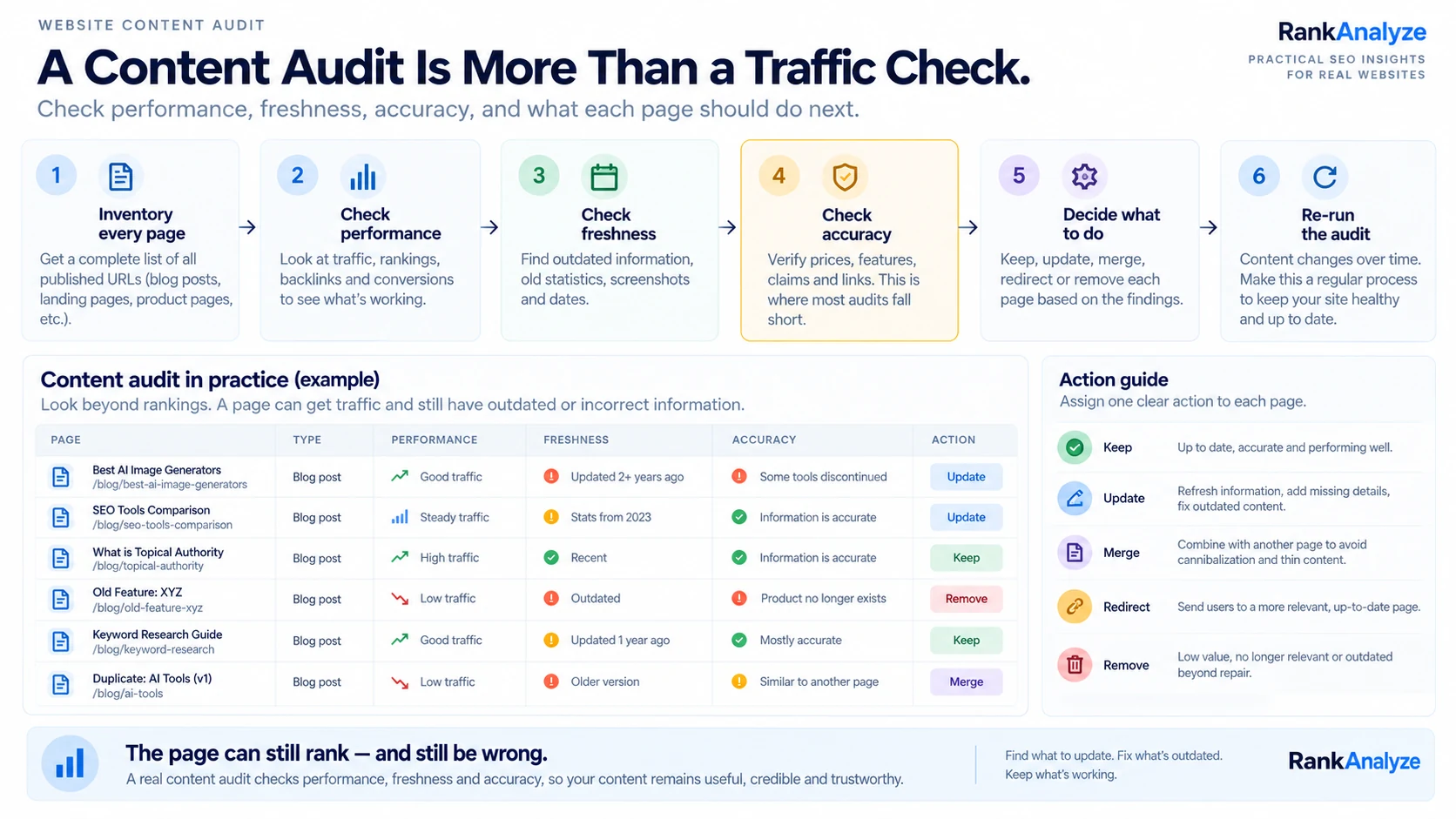
Step 1: Inventory everything you've published
Before judging anything, get a full list. Crawl your site or export a sitemap so you have every published page in one place, not just the ones you remember writing. Anything missed here doesn't get audited at all. You can use the content audit template further down this page to track each page as you go.
Step 2: Check performance
Pull traffic, ranking, and backlink data for each page. This is the part many content audits are built around. It helps you decide which pages are worth improving and which may no longer need to stay live.
- Organic traffic trend over the last 6–12 months
- Current ranking position for its target keyword, if any
- Backlinks pointing to the page
- Conversions or goal completions attributed to it
- Impressions and clicks from Google Search Console
Low traffic doesn't automatically make a page bad. A pricing or support page might get few visits and still matter a lot. Judge each page against the job it's meant to do.
Step 3: Check freshness
Look for the obvious signs of age: statistics from years ago stated as current, screenshots of an old product UI, references to a year that's already passed, or a tone that no longer matches how the brand talks. Freshness issues don't make a page wrong, exactly. They make it feel neglected, which readers notice even when they can't say why.
Step 4: Check accuracy, the step most audits skip
This is different from freshness. A page can look current and still contain something factually false: a price that changed, a feature that got deprecated, a claim about what the product does that hasn't been true for months, or a link that now leads nowhere. Performance tools generally won't tell you whether the claims on a page are still true. A page can continue ranking and attracting traffic even after some of its information has become outdated or incorrect.
This gets worse every time you ship. A new pricing tier, renamed feature, deprecated workflow, or new model version can leave every page that mentioned the old one out of sync. Search performance data won't directly tell you which pages contain those changes. Checking this by hand means re-reading published pages against your latest release notes, one page at a time, which becomes harder to maintain as the site grows.
- Does every price, plan, and number on the page match what's actually offered today?
- Does every feature mentioned still exist, under the same name?
- Do the outbound and internal links still resolve?
- Would a customer who read this page and then talked to sales hear a consistent story?
Not every fact needs the same reviewer. For pricing, legal, medical, financial or other sensitive information, have the right person check the page, not just whoever is running the audit.
Step 5: Decide an action for every page
An audit that ends in a spreadsheet full of observations hasn't actually accomplished anything yet. Every page needs one clear next step:
- Keep as-is, performing well, accurate, nothing to change.
- Update, good bones, but needs a refresh for freshness or accuracy.
- Merge, overlaps heavily with another page and may be better as one page.
- Redirect, no longer relevant, but the URL still gets traffic or links worth preserving.
- Remove, has no useful purpose and no strong reason to stay live.
One more option applies when two URLs show nearly the same content and both need to stay live, like the same product page appearing at multiple URLs because of tracking parameters. Adding a canonical tag tells search engines which URL you prefer as the main version.
Step 6: Re-run it, an audit is a habit, not a project
The moment a content audit finishes, it starts going out of date. Pages that ranked well can slip. New competitors publish competing versions of your pages. And there's a part performance tools miss entirely: the facts on your own pages can quietly stop being true as your product changes underneath them. Treat the audit as a recurring pass, not a one-time cleanup. Accuracy checks in particular are worth running far more often than a full performance audit, since content drift doesn't wait for a quarterly review.
SEO Content Audit: What to Check
An SEO content audit looks at your pages from a search point of view: whether they target the right topics, match what searchers want, and have a good chance of being found and understood by search engines. It uses the same page list as a full audit. For each page, check:
- Topic. Is it clear what search or topic the page is meant to answer? Are other pages on your site aimed at the same search intent?
- Search intent. Does the page give people what they want when they search that term? Someone searching "how to" wants steps, not a sales pitch.
- Title and meta description. Are they unique, accurate, and clear enough to describe the page? Google doesn't always show your meta description, but a clear one gives it a good option.
- Headings. Do the H2s and H3s cover the questions people actually ask about the topic?
- Internal links. Do related pages link to each other? Are any important pages buried with no links pointing to them?
- Depth. Does the page fully answer the question behind the search? Length alone doesn't make a page thin. A short page can be complete, and a long one can miss the point.
- Search Console data. Which pages get plenty of impressions but few clicks? Sometimes the fix is a clearer title rather than new content. (More on why pages get impressions but no clicks.)
For more detail on each of these, see the on-page SEO guide. If a page shows as "Crawled -- currently not indexed" in Search Console, our dedicated guide covers how to investigate it specifically.
Content Marketing Audit: How It's Different
A content marketing audit asks a different question. An SEO content audit asks whether your content can be found and perform well in search. A content marketing audit asks whether the content is helping the business.
It usually covers more than your website. It can include email newsletters, social posts, videos, case studies and downloadable guides. For each piece, it checks:
- Goal. Does it have a clear job, such as bringing in visitors, getting signups or helping sales close a deal?
- Readers. Is it written for the people you actually sell to?
- Stage of the buying process. Is there content for people just learning about the problem, people comparing options, and people ready to buy? You may find that your site has a lot of content for one stage but very little for another.
- Results. Does it lead to signups, demos or sales, not just page views?
- Gaps. Which questions do customers ask that you haven't answered anywhere?
Many teams run both together. The SEO audit shows how your content performs in search. The content marketing audit looks at whether that content supports your wider business goals. If you're planning what to create next, this guide on creating content people actually want picks up from there.
Content Audit Best Practices
A few habits make each audit more useful, and the next one easier:
- Start with a goal. "Grow organic traffic" and "fix outdated product pages" need different data. Decide what you're auditing for before you collect anything.
- Audit every relevant page, not a sample. The pages you forgot about can be the ones with outdated information or other problems.
- Keep everything in one place. Each page gets one row with its URL, data, findings and action, so nothing gets lost between tools.
- Judge pages by their job. A pricing page and a blog post succeed in different ways. Compare like with like.
- Check accuracy, not just performance. A page can rank well and still be wrong. (See Step 4.)
- Give each finding an owner and a deadline. Otherwise, problems can sit in the audit spreadsheet without getting fixed.
- Make it a habit. Re-run the full audit on a regular schedule, and check important pages after product or pricing changes.
Content Audit Tools and Software: What Each One Does
These get used interchangeably but usually mean different things. Content analysis tools such as Clearscope, MarketMuse and Grammarly help while a piece is being written. They can help with readability, topic coverage, structure and other aspects of content. Content audit tools are different. Screaming Frog crawls your site, and Semrush or Ahrefs pull the performance data, helping with the pruning pass described above. Neither category typically checks whether an already-published page's claims are still true. That's a separate, much less-covered problem than either writing quality or search performance.
Most audits use a few tools together, one for each job:
| Job | What it tells you | Common tools |
|---|---|---|
| List every page | URLs found during the crawl, plus broken links and redirects | Screaming Frog, your XML sitemap |
| Search performance | Impressions, clicks, CTR and average position for each page | Google Search Console, Semrush, Ahrefs |
| Visitors and results | How people use each page and, when conversions are configured, whether it contributes to signups or sales | Google Analytics 4 |
| Backlinks | Which pages other sites link to | Ahrefs, Semrush |
| Content quality | Readability, writing and topic coverage | Grammarly, Clearscope, MarketMuse |
| Accuracy | Whether prices, features and claims still match your product | RankAnalyze Post Publish Audit |
| Tracking decisions | One row per page, with an action, owner and deadline | A spreadsheet, or the template below |
How RankAnalyze Does Content Audit
Take a real case: a review page for a video-AI tool described voice cloning as needing a "10-minute training minimum." At some point the product changed, the actual requirement dropped to 30 seconds, but the page was never updated. Nothing about the page was broken. The link worked, it still ranked, it still got traffic. It was just wrong. Running Post Publish Audit against the product's current source of truth caught that specific claim, flagged it as contradicted, and surfaced the exact before-and-after text, without anyone having to remember that page existed or manually recheck it every time something shipped.
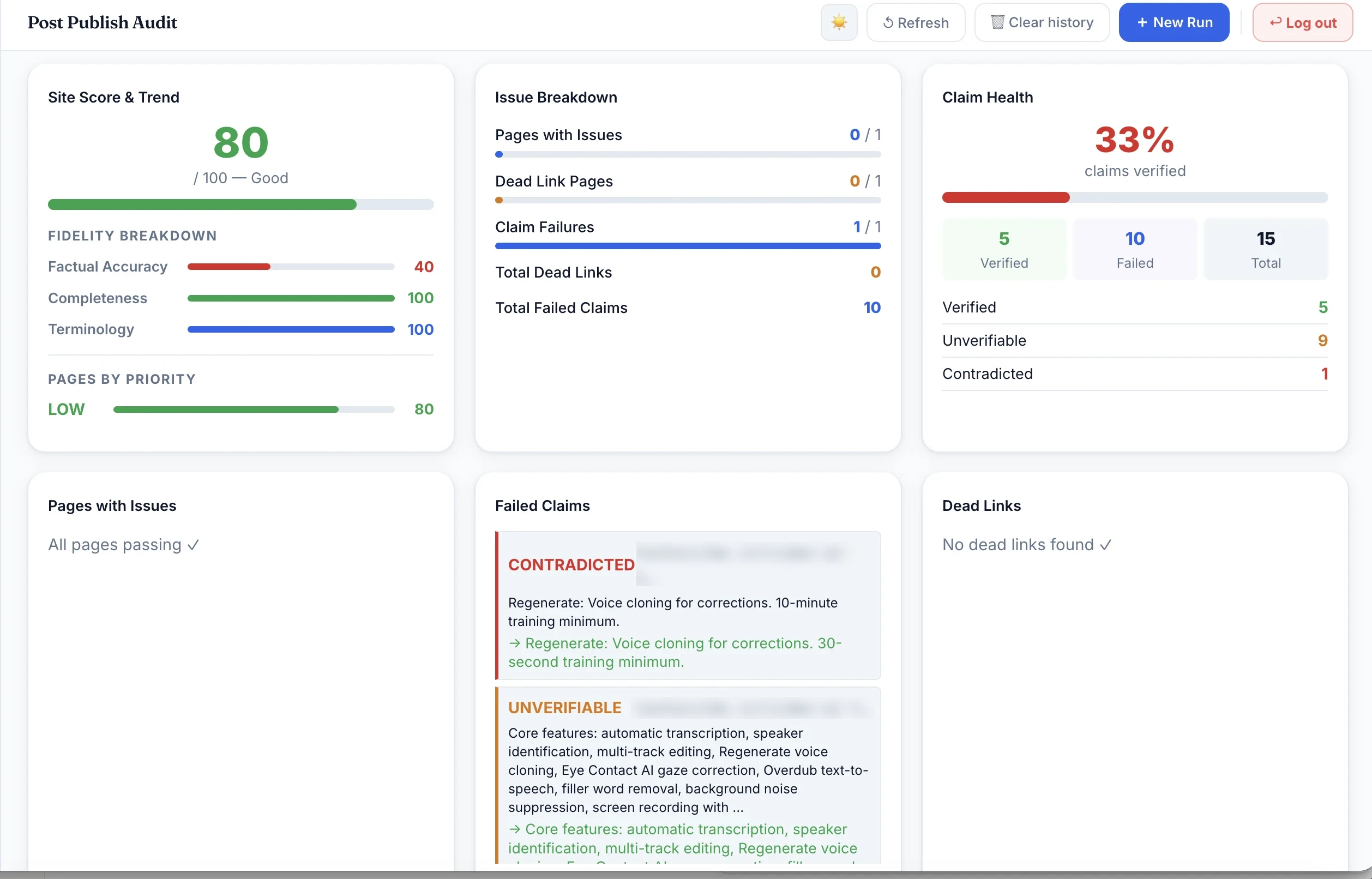
The run breaks into three parts. Site Score & Trend gives one aggregate number, 80/100 here. That number is built from three sub-scores: Factual Accuracy, Completeness, and Terminology. That's why a page can look "Good" overall while its accuracy score is much lower: 40/100 in this run, compared with 100 for both Completeness and Terminology. Issue Breakdown counts how many pages actually have a problem, how many have dead links, and how many individual claims failed. Claim Health is the core of the check. Each claim it finds on the page is marked verified, unverifiable, or contradicted against your source of truth. In this run, 5 claims were verified, 9 were unverifiable, and 1 was contradicted. Only 33% were verified overall. The full failed-claims list underneath shows the exact before → after text for each one, so you're not just told something's wrong. You're shown exactly what changed.
RankAnalyze's Post Publish Audit re-checks your live pages against release notes or product docs you provide, your source of truth for what's actually shipped. A new release doesn't leave your old pages quietly wrong. It finds the specific factual claims on each page and checks them against that source. Each one is marked verified, unverifiable, or contradicted, meaning confirmed, not mentioned in the source, or directly disproven by it. Stale features and outdated prices get flagged automatically, and broken links it finds on those pages are flagged in the same pass. Run it again after your next release, and it shows you exactly what changed since the last run instead of you re-reading every page by hand each time something ships.
Content Audit Template
You don't need special software to start. Most sites can run an audit from a simple table with one row per page. The template below lets you add your pages, record what you find, and choose an action for each one.
Your entries are saved in this browser, so you can return to them later on the same device and browser. When you're ready to share, use Copy table and paste it into Google Sheets or Excel.
Scroll sideways to see all 10 columns. The grey rows are examples showing the format. Edit them or clear them when you start.
What goes in each column:
- Page URL and page type, from your page list in Step 1.
- Target topic: the search or question the page is meant to answer.
- Clicks and conversions: from Search Console and Analytics, for the same date range on every page.
- Last updated: when the content last changed, not when it was published.
- Issues found: anything from the freshness and accuracy checks, like an old price or a broken link.
- Action, owner and deadline: the decision from Step 5, and who will do it by when.
Website Content Audit Checklist
- A full list of every relevant published page
- Search Console impressions and clicks for each page
- Traffic, ranking, backlink and conversion data for each page
- A clear topic and search intent for each page, with pages targeting the same intent flagged
- Freshness check: outdated statistics, screenshots, dates and product information
- Accuracy check: prices, features, claims and links
- Sensitive facts (pricing, legal, medical, financial) checked by the right person
- An action for every page: keep, update, merge, redirect, remove or set a canonical URL
- An owner and a deadline for every action
- A date for the next full audit, plus checks after product or pricing changes
Frequently Asked Questions
What's the difference between an SEO audit and a content audit?
An SEO audit is broader. It can cover technical health such as crawlability and site performance, along with content, links and other search-related factors. A content audit is narrower and focuses specifically on the pages themselves: what exists, whether it's still performing, and whether it's still accurate. In practice the two overlap, and a content audit is often run as one section of a larger SEO audit rather than as a fully separate exercise.
What are the steps in a content audit?
Start with an inventory of every published page, then layer in performance data (traffic, rankings, backlinks) to see what's actually working. From there, check freshness, outdated screenshots, old statistics, deprecated features, and accuracy, meaning whether the claims on the page are still true. Finish by assigning each page a clear action: keep, update, merge, redirect, or remove. Then schedule the next review so the audit doesn't become a one-time exercise.
What are the best practices for website content analysis?
Analyze content against a specific goal rather than everything at once. Traffic, conversions, and accuracy each call for different data. Group pages by type or topic before judging them individually, since a support article and a pricing page succeed on different metrics. And revisit the analysis on a schedule; a one-time pass tells you about a single moment, not an ongoing trend.
What tools are used for content auditing?
Crawlers like Screaming Frog map every page on a site for a full inventory. Analytics and SEO platforms like Google Search Console, Semrush, and Ahrefs supply the traffic and ranking data behind the performance check. Content analysis tools such as Clearscope, MarketMuse, or Grammarly focus on optimizing content before or during writing, rather than checking what's already live. Most of these tools stop short of verifying whether a published page's claims are still accurate. That's a separate, less-covered category of check.
Why does content performance tracking matter?
Without ongoing tracking, a content audit is a snapshot that starts going stale the moment it's finished. Rankings shift, traffic patterns change, and pages that used to perform well can quietly decline. Regular tracking turns a one-time cleanup into an early-warning system, so a drop in performance gets caught and addressed while it's still a small problem.
How often should you do a content audit?
For most sites, a full content audit once or twice a year is a sensible starting point. If your product or pricing changes often, check your most important pages after each release rather than waiting for the next full audit. It's also worth doing a quick review before a redesign or site migration.
What is a content marketing audit?
It's a review of all your marketing content, on and off your website, to see whether it supports your business goals. It checks who each piece is for, which stage of the buying process it serves, and whether it leads to real results like signups or sales, not just traffic.
See exactly how ChatGPT, Claude, Gemini, Perplexity and Copilot describe you today.
 RankAnalyze