Lots of Impressions, No Clicks: Why Your Page Isn't Getting Traffic
Lots of impressions but no clicks is one of the more confusing patterns in Google Search Console. A page can sit in a strong position, get shown to plenty of people, and still get almost no traffic. That's not a contradiction. Ranking and getting clicked are two different things, and mixing them up leads to fixing the wrong problem. Here's how to tell which one you actually have, and what to check once you know.
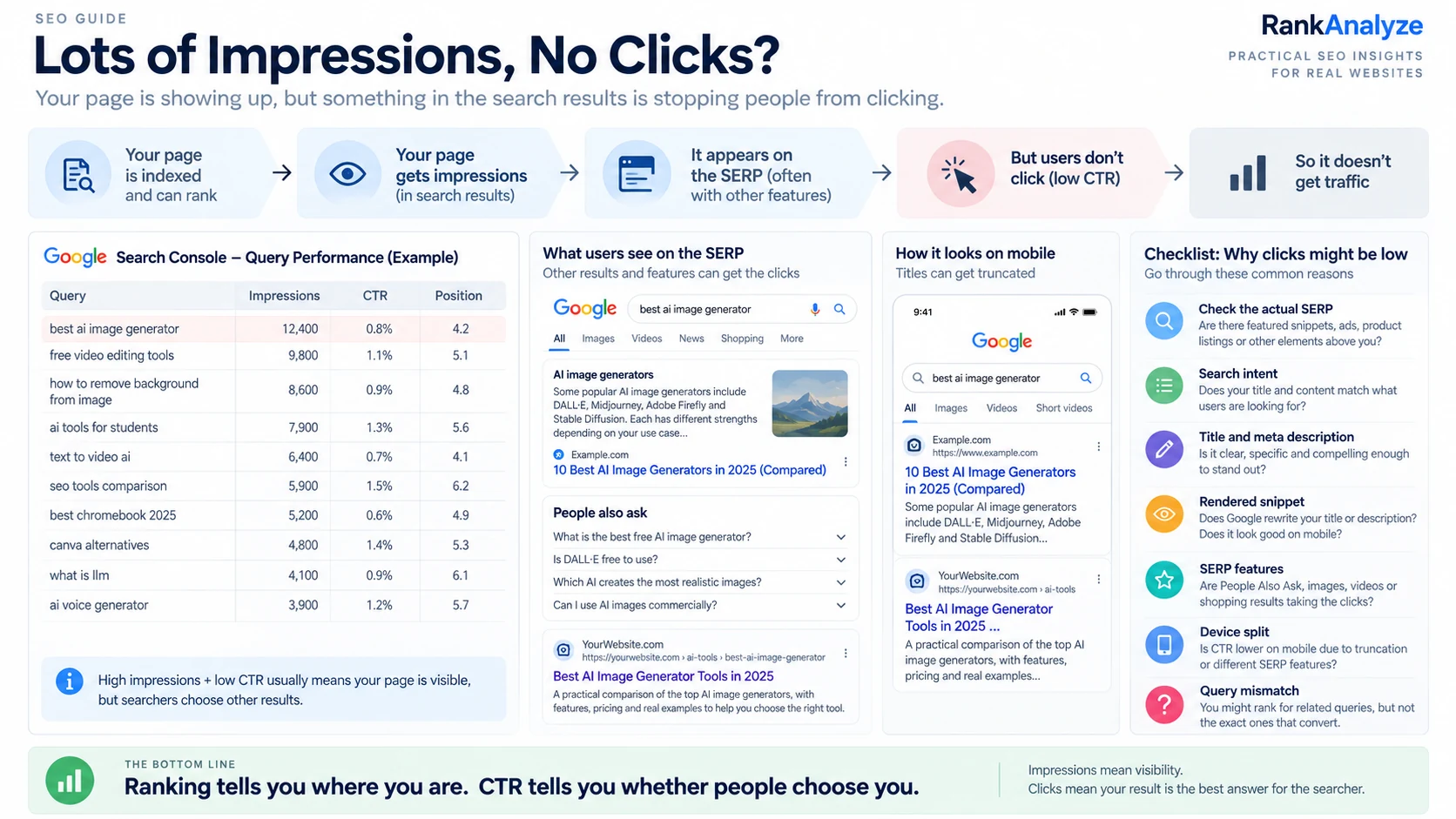
1. The funnel: ranking is only step one
Getting a click actually happens in five steps, and a page can fail at any one of them:
Ranking → Impressions → SERP appearance → Click-through rate → Clicks
- Ranking is your position for a query.
- Impressions are how many times your result was shown to someone, at that position, for that query.
- SERP appearance is what your result actually looks like on the page, the title, the snippet, any stars or extra elements next to it.
- Click-through rate (CTR) is the percentage of people who saw your result and clicked it.
- Clicks is the actual traffic that shows up.
Most people troubleshoot by staring at position alone. Position affects how prominently your result appears, but it doesn't tell you whether people will click it. After that, the click depends on what your result looks like and what the searcher wants. A page can rank well, get shown often, and still lose almost everyone at the CTR step.
2. Not every low-CTR page is a problem
Before investigating anything, rule out the cases where low CTR is normal and not a sign of anything broken.
Some queries just don't send many clicks to anyone, no matter who ranks there. A calculator query, a unit conversion, a quick factual lookup, these often get answered directly on the results page. Nobody needs to click through, so even the #1 result gets a small fraction of the impressions as clicks. If your page ranks #1 for "cm to inches" and gets a 4% CTR, that's not a broken page. That's just what that query does to every result on it.
The same goes for purely informational queries with no strong intent to click further. A "what is X" query at position 1 will usually get more clicks than the same query at position 8, but neither may get many clicks if the answer is already visible on the results page.
The check to run first: compare your page's CTR against other pages at a similar position for a similar type of query, not against some fixed target number. Compare it with similar queries and pages, because CTR varies heavily by query, search intent, device and SERP layout. A low CTR relative to the query's own nature isn't a problem. A low CTR relative to comparable queries is worth investigating.
3. How to check this in Google Search Console
Go to: Performance → Search results → Queries
Add Impressions, CTR, and Position as visible columns (Search Console shows Clicks by default, the other three need to be toggled on). Sort by impressions, descending, so you're looking at queries that actually get seen, not ones with a handful of impressions where the CTR number is just noise.
Look for the pattern that matters: decent position, real impression volume, but a CTR far below what similar queries and positions are getting. That's the specific shape worth digging into. A query with 40 impressions and a 2% CTR isn't a pattern yet, that's one click difference away from looking completely normal.
4. Signals to check, one at a time
Don't assume one of these is the problem. Check them one by one and stop when you find the explanation.
Position. Position 4 and position 11 can mean a very different amount of visibility, especially on mobile where fewer results may be visible at once. Check exactly where you rank, not just "top 10."
Also worth knowing before you check: Search Console reports an average position, not a fixed rank. A page showing an average position of 5 may have appeared at different positions for different searches, devices and locations. Before deciding that a page "ranks at #5," look at the individual queries behind that average, not just the summary number.
Search intent. If the query is informational and your page is a hard sales pitch, or the reverse, the snippet itself may be signaling "this isn't what you're looking for" before anyone even opens it. Read your own title and description as if you were the searcher, not the person who wrote the page.
Title. Does it actually match what the query is asking, in words the reader recognizes? A vague or generic title next to a competitor's specific, clear one loses the click even from the same position.
Meta description and snippet truncation. Check what's actually rendering in the real SERP, not just your meta description's character count. Google may rewrite your snippet using text from the page. If that happens, changing the meta description alone may not change what users see.
SERP features above you. Featured snippets, People Also Ask boxes, local results and ads can push the organic listing farther down the page and change how much attention it gets. A position 3 result can receive less visibility when several other search features appear above it.
Zero-click SERPs. As covered above, some queries get answered directly on the results page. No fix to your listing changes that.
Brand recognition. For a query where a well-known brand also ranks, an unfamiliar site can get skipped even from a similar position, simply because the searcher trusts the name they recognize. This isn't fixable with a title tweak, it's a trust problem that takes longer to solve.
Query mismatch. Sometimes a page ranks for a query it wasn't actually written for, close enough in wording to rank, but not what the searcher meant. Read the actual query text and ask honestly whether your page is the right answer to it.
Rich results. Some results can show additional visual elements, such as review information or breadcrumbs. Structured data can make a page eligible for some of these features, but it doesn't guarantee that Google will show them. Their absence isn't a bug, but their presence next to a competitor's listing can pull the eye away from yours.
Device split. Check Search Console's device breakdown for the same query. A title that displays fully on desktop can get cut off on mobile, dropping the exact words that would have earned the click.
A competing page on your own site. If another one of your pages shows up nearby for the same query, clicks can split between the two instead of concentrating on either one. This is the same overlap covered in our keyword cannibalization guide, worth checking here too.
Freshness cue mismatch. A title or snippet visibly referencing an old year or an outdated detail can make a page look stale before anyone clicks, even if the content itself is current.
RankAnalyze's Ranking Audit checks your page's title, meta description, and on-page signals against what's actually working for the pages ranking around you, so you're fixing the real cause instead of guessing.
5. What to actually do about it
Once you know what's causing the low CTR, the fix is usually pretty small:
- Weak title or description → rewrite it to match the query's actual wording and intent, not just to describe the page.
- Google rewriting your snippet → check why; often it means your meta description doesn't closely match the page's own opening content, so Google prefers something else.
- SERP features eating your position → there's often no direct fix, but it changes what "success" looks like at that position, and may mean the query isn't worth chasing as hard.
- Zero-click query → deprioritize it as a traffic target. It may still be worth ranking for brand visibility, just not for clicks.
- Own-page cannibalization → apply the same decision framework as any other overlap: keep, differentiate, or consolidate.
- Device-specific truncation → shorten the title so the important words land within the mobile-safe length, not just the desktop one.
6. Common mistakes
- Assuming low CTR always means the title or meta description is bad, without checking what's actually rendering in the SERP.
- Comparing your CTR to a generic industry benchmark instead of to similar queries on your own site.
- Rewriting a meta description that Google isn't even using.
- Chasing clicks on a query that's structurally zero-click, no matter what the listing says.
- Ignoring device split and optimizing only for how the result looks on desktop.
7. A practical example
Say a page ranks position 3 for "best budget espresso machine" with strong impression volume, but CTR sits well below other position-3 queries on the same site.
Checking the funnel:
- Position: confirmed, consistently around 3.
- SERP features: a featured snippet and a "People Also Ask" box both sit above the organic results for this query.
- Title: generic, "Best Budget Espresso Machines", no distinguishing detail.
- A competitor at position 2 has a more specific title that clearly states the price range and makes the page's value obvious.
Here, there are two problems: SERP features are pushing the organic result lower on the page, and the title is less specific than the result above it. The fix is narrow, sharpen the title to be more specific, since the SERP features aren't something a title change can remove.
The bottom line: ranking tells you where you are. It doesn't tell you whether anyone's clicking. When a page ranks well but underperforms on traffic, work backward through the funnel, position, SERP features, the actual rendered snippet, then device and intent, until you find the specific step where people are dropping off. Guessing at a title rewrite before checking is how effort gets spent on the wrong fix.
Frequently Asked Questions
What does it mean when a page has lots of impressions but no clicks?
It means your page is showing up in search results often, but the people who see it aren't clicking through. Ranking and getting clicked are two different things, so a page can hold a strong position and still get very little traffic if something in how it appears in the results isn't earning the click.
Is a low click-through rate always a problem?
No. Some queries, like calculators, unit conversions, or quick factual lookups, get answered directly on the results page, so even the top result gets a small fraction of its impressions as clicks. The right comparison is against similar queries and pages, not against a fixed target number, since CTR varies heavily by query, search intent, device, and what else is showing on the results page.
How do I check impressions and CTR in Google Search Console?
Go to Performance, then Search results, then Queries, and add Impressions, CTR, and Position as visible columns. Sort by impressions, descending, and look for queries with decent position and real impression volume but a CTR far below similar queries, that's the pattern worth investigating.
What causes a page to rank well but not get clicked?
Common causes include a weak or generic title, a meta description that doesn't match what's actually rendering in the search result, SERP features like featured snippets or People Also Ask boxes sitting above the result, low brand recognition against a well-known competitor, a mismatch between the query and the page's actual content, or a title that gets cut off on mobile.
Can changing the meta description fix a low CTR page?
Sometimes, but not always. Google may rewrite your snippet using text pulled from the page instead of your meta description. If that's happening, editing the meta tag alone won't change what searchers actually see, it's worth checking what's rendering in the real search result first.
Does Search Console's "position" mean my page always ranks there?
No. Search Console reports an average position across all the impressions a page received. A page showing an average position of 5 may have actually appeared at different positions for different searches, devices, and locations, so it's worth looking at individual queries behind that average rather than treating it as a fixed rank.
See exactly how ChatGPT, Claude, Gemini, Perplexity and Copilot describe you today.