Customer Journey Analytics: Understanding What People Do Before They Convert
A last-click report can tell you which channel got credit for a sale. It doesn't tell you everything that happened before that — the blog post someone read three weeks earlier, the comparison page they came back to twice, the email that finally got them to act.
Customer journey analytics is the practice of looking at that whole sequence instead of just the final step. Not to build a perfect model of every visitor's path, but to answer a much smaller, more useful question: what do people actually do before they take the action you care about?
The Stages of the Customer Journey
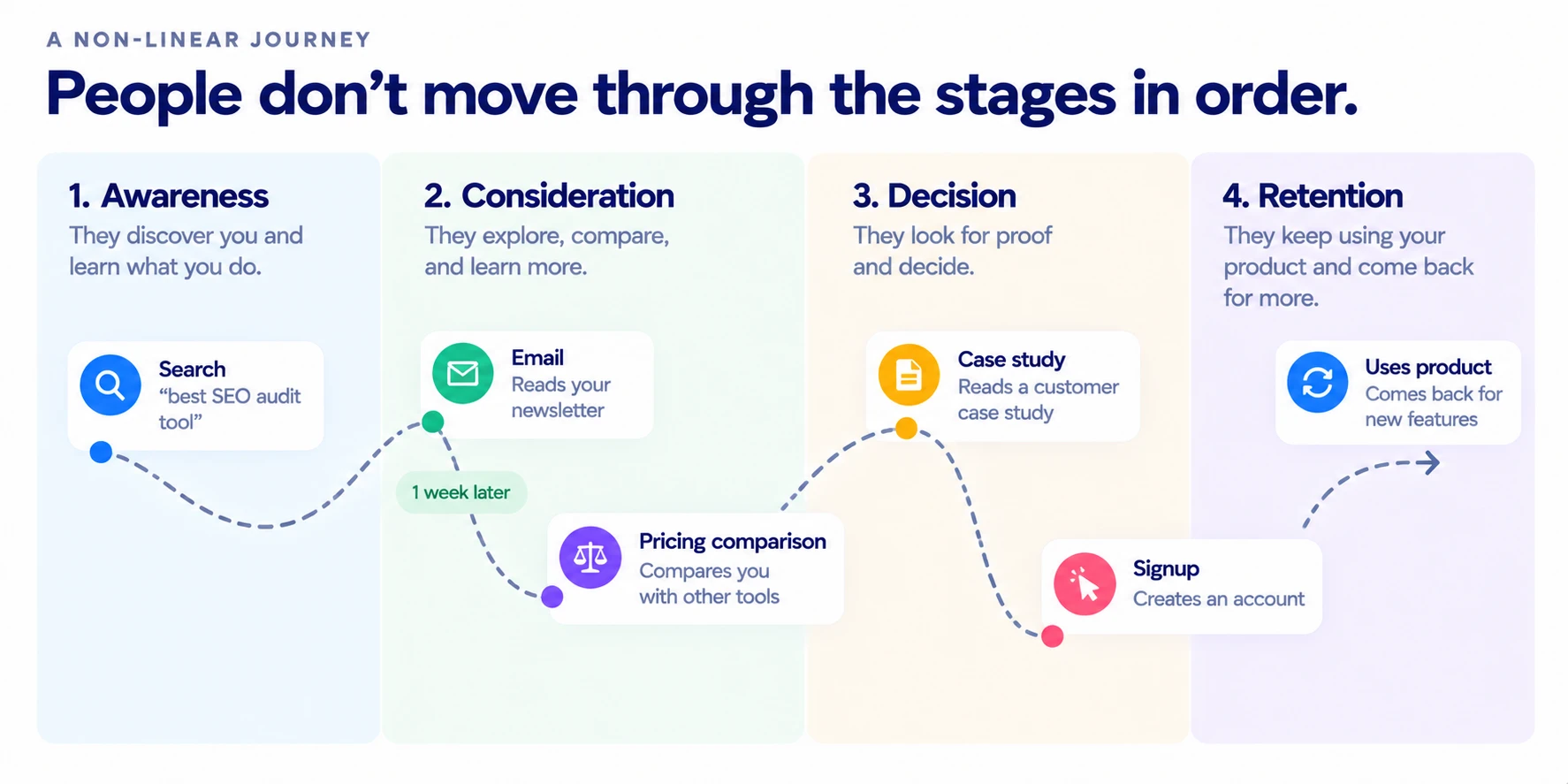
One simple way to think about it is awareness, consideration, decision, and retention. Someone discovers your business, compares it against alternatives, decides to act, and (if things go well) comes back.
Worth saying plainly: real journeys don't obediently move through those stages in order. Someone can land in consideration mode from a single search, skip straight to a purchase, or bounce back and forth between comparing and deciding for weeks. For example: someone might discover a software company through search, return a week later through an email, compare pricing, and then sign up after reading a case study. The four stages are a useful frame for talking about the journey, not a pipeline every visitor moves through in sequence.
Why the Last Click Doesn't Tell the Whole Story
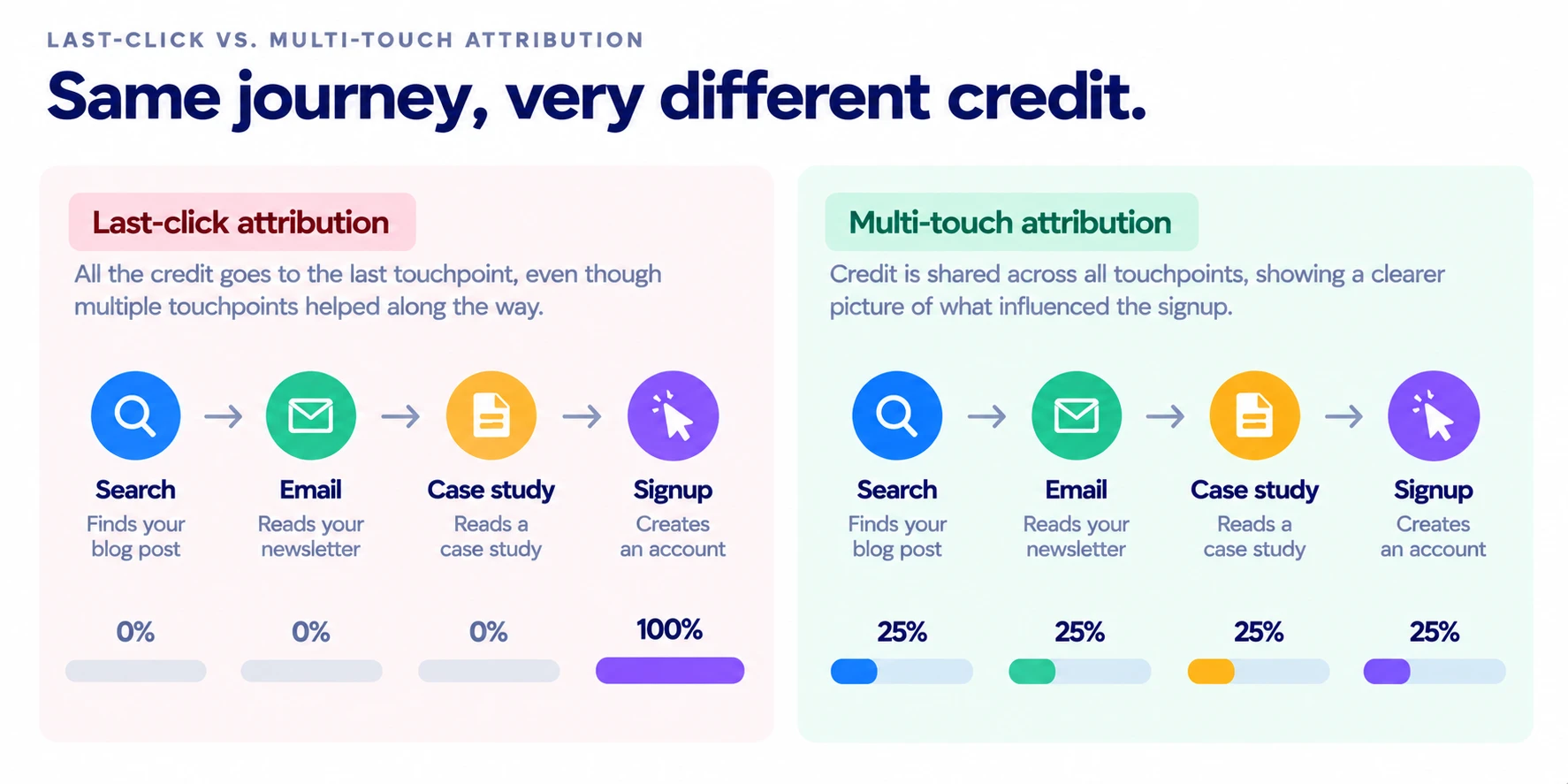
In a last-click attribution model, the last eligible interaction gets all the credit for the key event. Earlier touchpoints don't receive credit under that model.
GA4's attribution-path reports let you look at the different touchpoints that appear before a key event, instead of looking only at the last interaction.
Set Up GA4 to Capture the Journey
Before any report is useful, GA4 needs to actually be tracking the things worth analyzing:
- Events — the individual actions people take (a page view, a button click, a form start).
- Key events — the events that represent something meaningful to the business (a purchase, a signup, a demo request). In Google Analytics, important actions are now called key events. A conversion is a related term used when an important action is used for advertising measurement and optimization, including Google Ads — the two terms overlap but aren't identical.
- Useful page/screen and traffic dimensions — so you can actually segment the journey later, not just count totals.
- User-ID and reporting identity — these can affect how GA4 connects activity from the same user across sessions and devices.
This isn't a full implementation walkthrough — that's a separate, more technical article. The point here is just: journey analysis is only as good as what's actually being tracked underneath it.
The GA4 Reports That Actually Help You Understand the Journey
These three reports answer three different questions. Knowing which one to reach for matters more than knowing they exist.
Path exploration — What did people do before or after this page or event? You can start from a page/event and look forward, or work backward from an endpoint like a purchase. Paths in GA4 can span multiple sessions, not just a single visit.
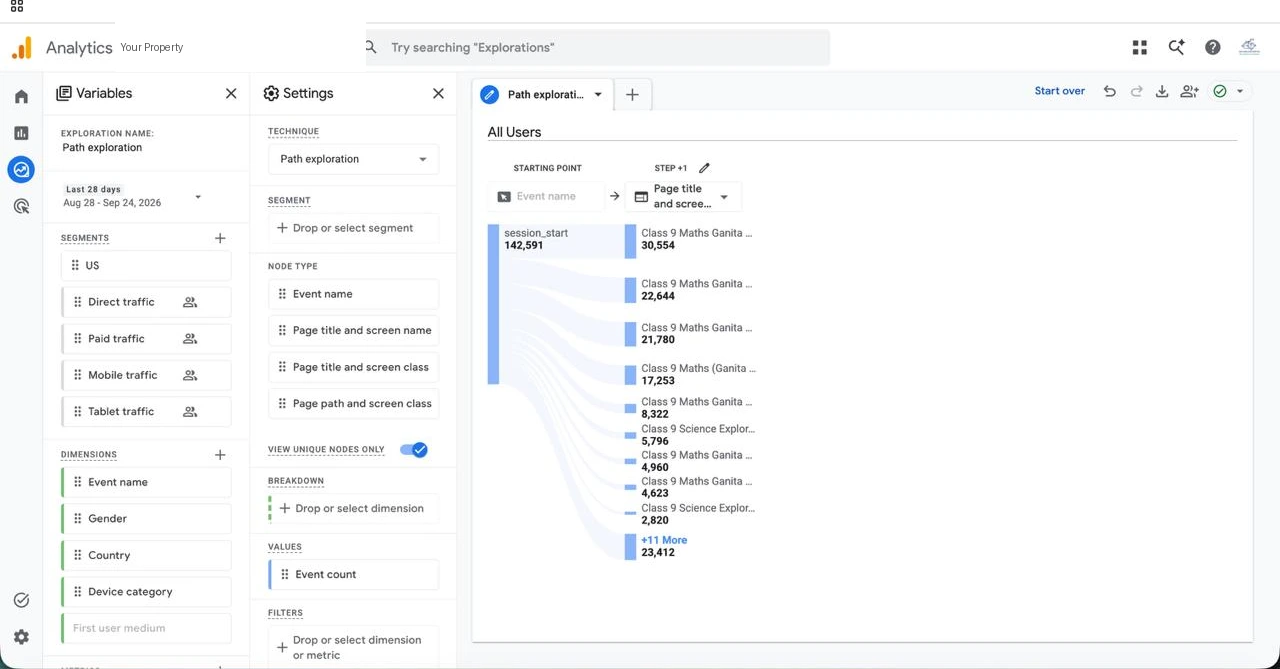
session_start, branching into what people did next. Browser chrome, dock, property name, and account ID removed.Funnel exploration — Where do people move forward, or drop out, in a defined sequence? Built specifically for examining the steps in a task (like checkout) and finding where the journey succeeds or breaks down.
Key event attribution paths — Which marketing touchpoints showed up on the way to a key event, and how is credit being assigned? This report shows the touchpoints, the paths, the time to key event, and how attribution credit is distributed across the journey.
Here's what that looks like put together. Imagine a SaaS company wants to understand why people who read its pricing guide sign up at different rates. Path exploration can show what people do after reading the guide. Funnel exploration can show where users drop out between the pricing page and signup. Attribution paths can show which marketing touchpoints appeared along the way to the key event. None of these proves that one page caused the signup — they give the team different pieces of the journey to investigate.
Start With the Question, Not the Report
It's easy to open a GA4 report without knowing what you're looking for. A better approach is to start with a question and then choose the report that can answer it:
| Question | GA4 approach |
|---|---|
| What do people do after reading this article? | Path exploration |
| What happens before a signup? | Backward path exploration |
| Where are people leaving checkout? | Funnel exploration |
| Which touchpoints appear before a key event? | Attribution paths |
| Do mobile and desktop journeys differ? | Breakdown / segments |
| Do returning users behave differently? | Segmentation |
Where Search Fits in the Customer Journey
Search doesn't sit in one fixed stage. It can introduce someone to your business early on, help them compare options mid-journey, or bring them back when they're finally ready to act.
A useful way to connect the two halves of this: search visibility → landing page → site behavior → key event. RankAnalyze can help you investigate the search side of that journey: how your content is being found, what competitors are ranking for, and where there may be gaps. GA4 picks up from there — what people actually do once they've arrived.
Common Mistakes
Mistake 1: Treating last-click attribution as the whole journey. It's one signal, not the full picture.
Mistake 2: Assuming every journey follows your website navigation. People arrive from search, social, email, and direct — often skipping the path you designed.
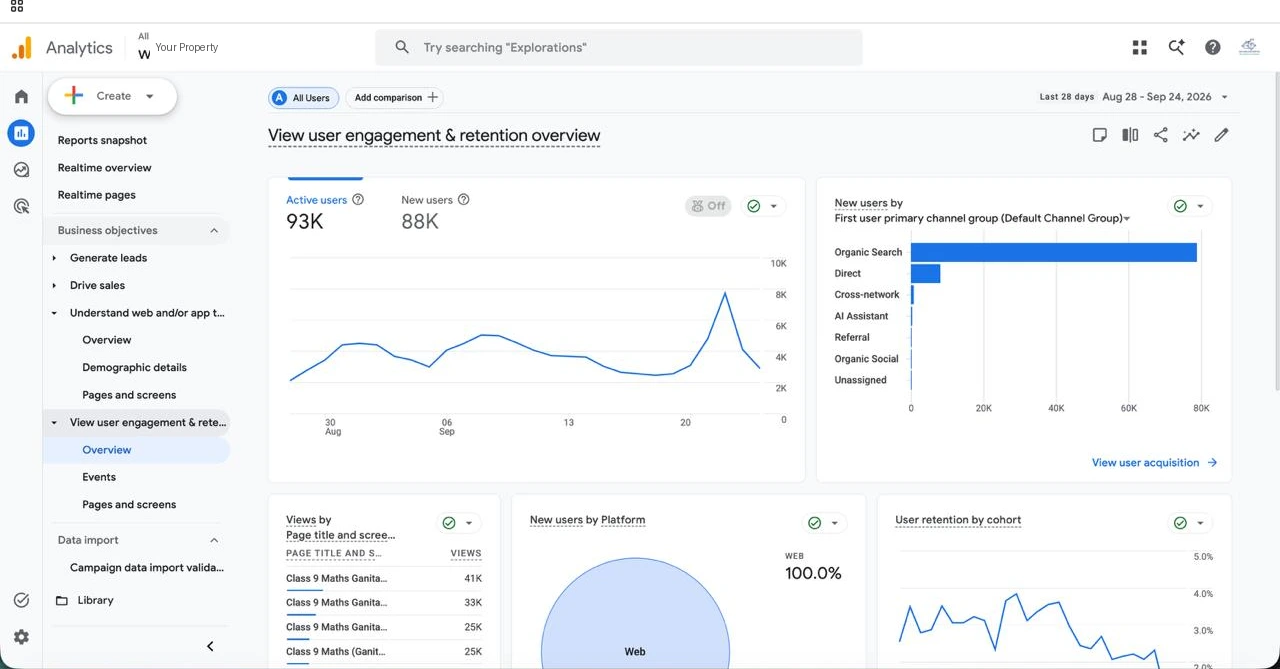
Mistake 3: Tracking lots of events without deciding what they mean. More events aren't automatically more insight. Track the interactions that help answer your questions, and mark the actions that matter to the business as key events.
Mistake 4: Looking at all users together. A journey that looks confusing in aggregate can look very different when you split it by new vs. returning users, device, or another useful audience group.
Mistake 5: Confusing correlation with causation. If GA4 shows a path like blog → pricing → signup, you can say the blog appeared on that path. You can't automatically say the blog caused the signup. That distinction is easy to skip past and important not to.
A Customer Journey Analytics Checklist
Before you analyze a customer journey, ask:
- Have I defined the action I care about?
- Are the important events being tracked as key events?
- Do I know where users enter the journey?
- Have I looked at what happens before and after important pages/events?
- Have I checked where users drop out?
- Have I compared important audience groups?
- Am I confusing a path with proof of causation?
- Am I looking beyond the last touchpoint?
Where RankAnalyze Fits
GA4 helps you understand what people do after they interact with your site. RankAnalyze looks at an earlier part of that journey: how people discover your content through search, and how your pages compare with the pages already competing for those searches. Used together, they let you look at two parts of the same journey: how people find you, and what they do after they arrive.
See where your customer journeys actually start. RankAnalyze shows you how your content is being found and how it compares with what's already ranking — the part of the journey before GA4 picks up the story.
Frequently Asked Questions
What is customer journey analytics?
It's the practice of looking at the full sequence of interactions someone has with a business — not just the channel that gets credit for a sale — to understand what people actually do before they take an action you care about.
What is the difference between customer journey analytics and customer journey mapping?
Customer journey mapping is a planning exercise: you sketch out the stages and touchpoints you expect a typical customer to go through. Customer journey analytics is the opposite direction — you look at real behavioral data to see what people actually did, which often doesn't match the map.
How does GA4 help with customer journey analytics?
GA4 tracks events and key events, and its exploration and attribution reports let you look at what happened before or after a given page, event, or key event. Depending on your setup, identity settings can also affect how activity is connected across sessions and devices.
What GA4 report shows the customer journey?
There isn't a single "customer journey" report. Path exploration, Funnel exploration, and Key event attribution paths each show a different slice of the journey, and which one to use depends on the question you're asking.
Can GA4 show the entire customer journey?
Not as one complete picture. GA4 can show you specific paths, sequences, and attribution touchpoints, but stitching those into a full journey narrative is still something a person has to do by combining what the different reports show.
What is the difference between path exploration and funnel exploration?
Path exploration is open-ended — it shows what people did before or after a page or event, in any order. Funnel exploration is structured — it tracks a specific sequence of steps you define and shows where people drop out of that sequence.
Why is last-click attribution limited?
Because it gives all the credit for a key event to the last eligible interaction and no credit to anything earlier. That can make channels like blog content or awareness-stage campaigns look like they aren't contributing, even when they're what brought someone into the journey in the first place.
See exactly how ChatGPT, Claude, Gemini, Perplexity and Copilot describe you today.