On-Page SEO: The Complete Guide
On-page SEO is everything you control directly on a page: the title tag, the headings, the words in the body, the images, the links to your other pages, and the code that describes what the page is about. It's different from off-page SEO (backlinks and signals from other sites) and from the technical side of how Google crawls and indexes a site at all -- those are covered in our Link Building and Technical SEO Audit guides.
This guide covers what's actually worth doing on the page itself, and just as importantly, what isn't -- a few of these areas carry more old folklore than current fact.
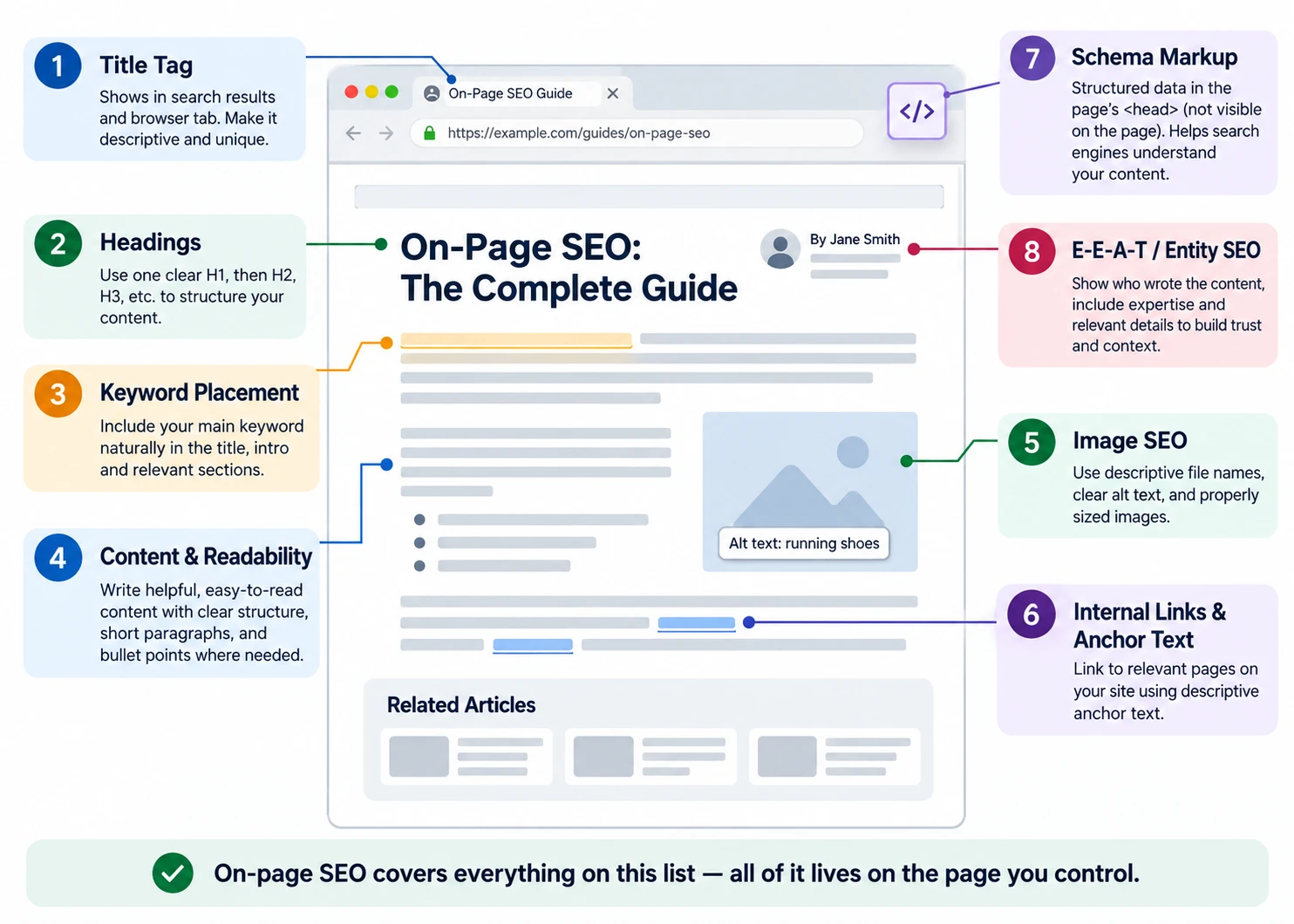
Title Tags
The title tag (the <title> element) is usually what shows as the clickable blue link in search results, and it's also what shows in the browser tab. It can influence whether someone clicks your result.
There's no fixed character limit. Google's own documentation explains that display length depends on pixel width and device, not a character count, so the same title can get cut off at a different point on different screens.
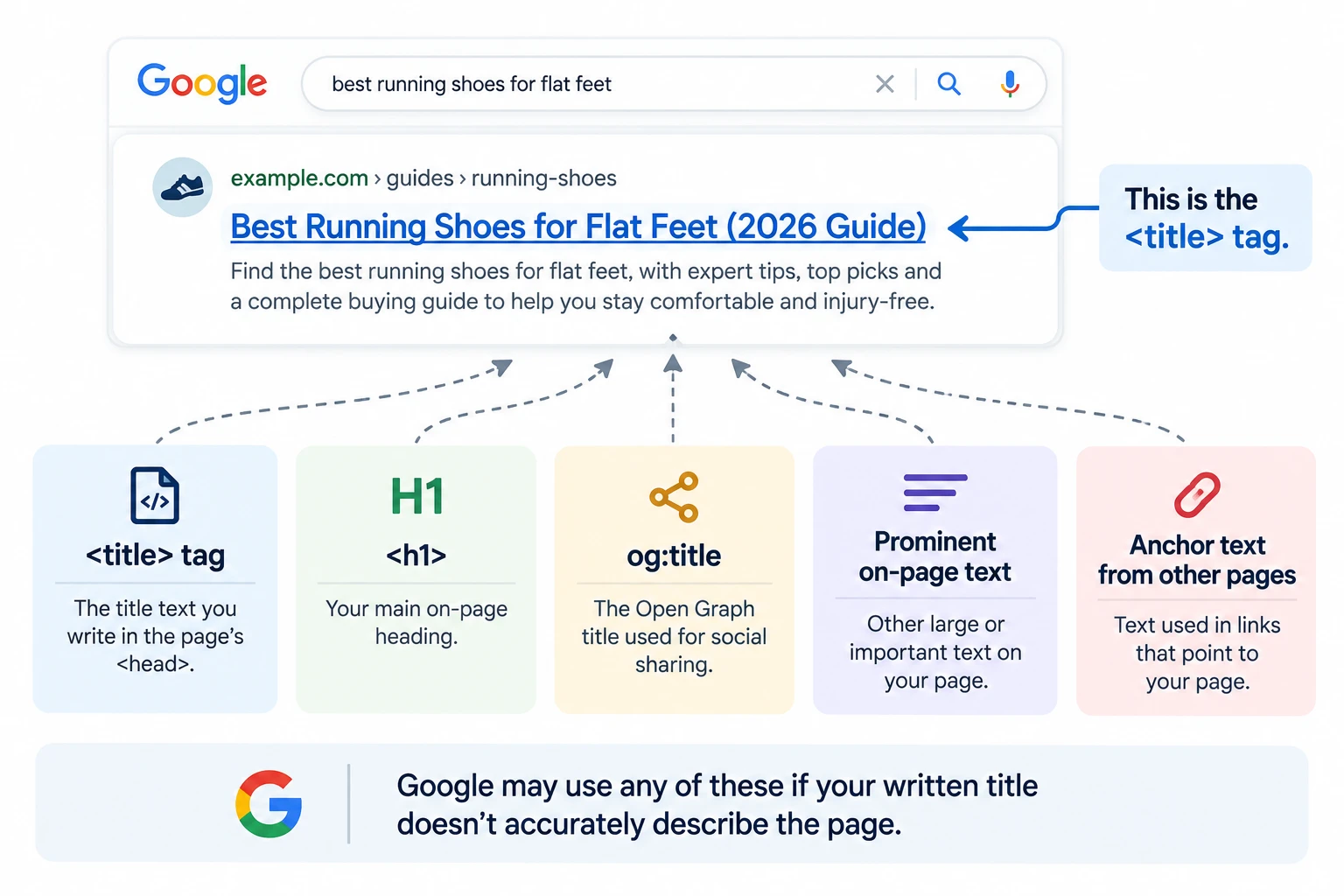
Google doesn't always use the exact text you write. It may rewrite your title if it detects a problem -- for example, if the title doesn't accurately describe the page, is outdated, incomplete, or doesn't match the page's language. Google's own documentation confirms this happens. When it does rewrite a title, it can pull from several places on the page: your <title> tag, your <h1>, the og:title tag, other large or prominent text, and even anchor text from links pointing to the page.
Google's own guidance for writing one: be descriptive and concise, avoid keyword stuffing, avoid repeating boilerplate text across many pages, and make it clear which part of the text is actually the title if you're appending a brand name.
Common mistakes: the same title copy-pasted across many different pages, stuffing the keyword phrase in more than once, or leaving the title blank and letting Google generate one entirely on its own.
Meta Descriptions
The meta description doesn't appear on the page itself -- it's a snippet of text that can show up under your title in search results. Google's documentation doesn't list it as a ranking signal. Its job is influencing whether someone clicks, not where you're positioned.
Google also doesn't always use what you write. If your actual body content answers the query more precisely, Google may pull the snippet from there instead and ignore your meta description entirely -- its own documentation says it "sometimes uses the meta description HTML element if it might give users a more accurate description of the page than content taken directly from the page." There's no fixed length limit on paper either; the snippet is "truncated in Google Search results as needed, typically to fit the device width."
A good description is unique to the page, describes what that specific page actually covers, and reads like a reason to click -- not a list of keywords. Google's guidance explicitly discourages "long strings of keywords" since they don't tell a reader anything concrete.
Common mistakes: the same description reused across many pages, or treating it as another place to repeat the target keyword instead of writing something a real person would want to click.
Heading Tags
Headings (<h1> through <h6>) structure a page so both readers and search engines can scan it. One clear <h1> per page works best -- it's the main heading a reader (and a screen reader, for accessibility) uses to confirm what the page is about. Google may also use your H1 if it decides to rewrite your title tag -- it's one of the sources it checks.
Below the H1, headings should nest in order of how specific they get -- an H2 for a major section, an H3 for a subsection inside it -- rather than skipping levels or using heading tags just to make text bigger.
Common mistakes: multiple competing H1s on one page, jumping from H2 straight to H4, or vague headings ("More Information") that don't describe what the section covers.
Keyword Placement
There's no keyword density formula to hit, and no evidence Google uses one -- this is one of the oldest pieces of SEO folklore still repeated. What matters is natural placement: does the keyword phrase, or a clear variant of it, show up in the title, the H1, and early in the body content, where it genuinely belongs -- not how many times it appears.
Worth placing deliberately: the title tag, the H1, and the opening paragraph -- so a reader can tell right away what the page is about -- and naturally in subheadings where the topic actually continues.
Where forcing it causes problems: repeating the exact phrase throughout the body regardless of whether it reads naturally, cramming it into the URL on top of the title and headings, or working it into every heading even where it doesn't fit.
Content Optimization
This is about improving a page that's already published, not writing something new. It's a different job than a first draft, and it's easy to do badly -- padding a page with more words, or repeating the keyword more often, isn't optimization.
Good content optimization usually means:
- Filling a genuine subtopic gap -- something the page should cover but doesn't, not an unrelated addition
- Updating information that's gone stale or incorrect since the page was published
- Improving structure so the page is easier to scan
- Tightening the opening paragraph so it answers the question faster
Whether a page is a good candidate for this kind of work in the first place -- or whether it would be better merged with another page, or left alone -- is part of a bigger decision process. See our Content Audit guide for that framework.
Make the Page Easy to Read
Good formatting helps people find and understand the information they came for. That's the main reason to do it -- not because Google rewards short paragraphs on their own.
What this looks like in practice: short paragraphs instead of dense blocks of text, descriptive headings instead of vague ones, bullet points where a list is actually a list, tables when comparing more than two or three things, plain explanations instead of unnecessary jargon, and the most important information placed where someone scanning the page will actually see it.
Search Intent
Before optimizing a page, make sure it's the right type of page for the search in the first place. Someone searching "how to clean white shoes" wants instructions. Someone searching "best white running shoes" wants options to compare. If a page doesn't match the reason behind the search, changing its title or adding more keywords won't fix that. See our full Intent-Based Search Optimization guide for a deeper look at matching pages to the right kind of search.
Image SEO
A few separate things get lumped under "image SEO," and they matter for different reasons:
- Alt text exists primarily for accessibility -- it's what a screen reader announces in place of an image -- and it also helps Google understand what the image shows for image search. It should describe the image accurately, not list keywords that happen to relate to the page.
- Filenames that describe the image ("running-shoe-sole-comparison.webp") can give search engines a bit more context than a generic camera-generated name ("IMG_4821.jpg"), though this matters much less than the alt text and the content around it.
- Compression and dimensions matter for page speed, not just image quality -- large, unoptimized images can slow down a page and can affect Core Web Vitals.
- WebP and AVIF are newer image formats that typically produce smaller file sizes than JPEG or PNG at similar visual quality, which is why most modern sites (this one included) serve images as
.webp. - Responsive images mean not sending the same large image to every device. Using
srcsetlets the browser pick an appropriately sized image for the screen it's actually on, instead of downloading a desktop-sized image on a phone. - Width and height attributes let the browser reserve the right amount of space for an image before it finishes loading, which stops the page from jumping around as it loads -- one of the things Core Web Vitals measures directly.
- Lazy loading (the native
loading="lazy"attribute) defers loading images until a visitor scrolls near them. It shouldn't be applied to the first image visible when the page loads, since delaying that one can slow down how fast the page feels to load.
Internal Linking
An internal link connects two pages on your own site. Google discovers most pages by following links from page to page, so a page with no internal links pointing to it (an orphan page) can be harder for search engines to discover, crawl, and understand how it fits into the rest of the site.
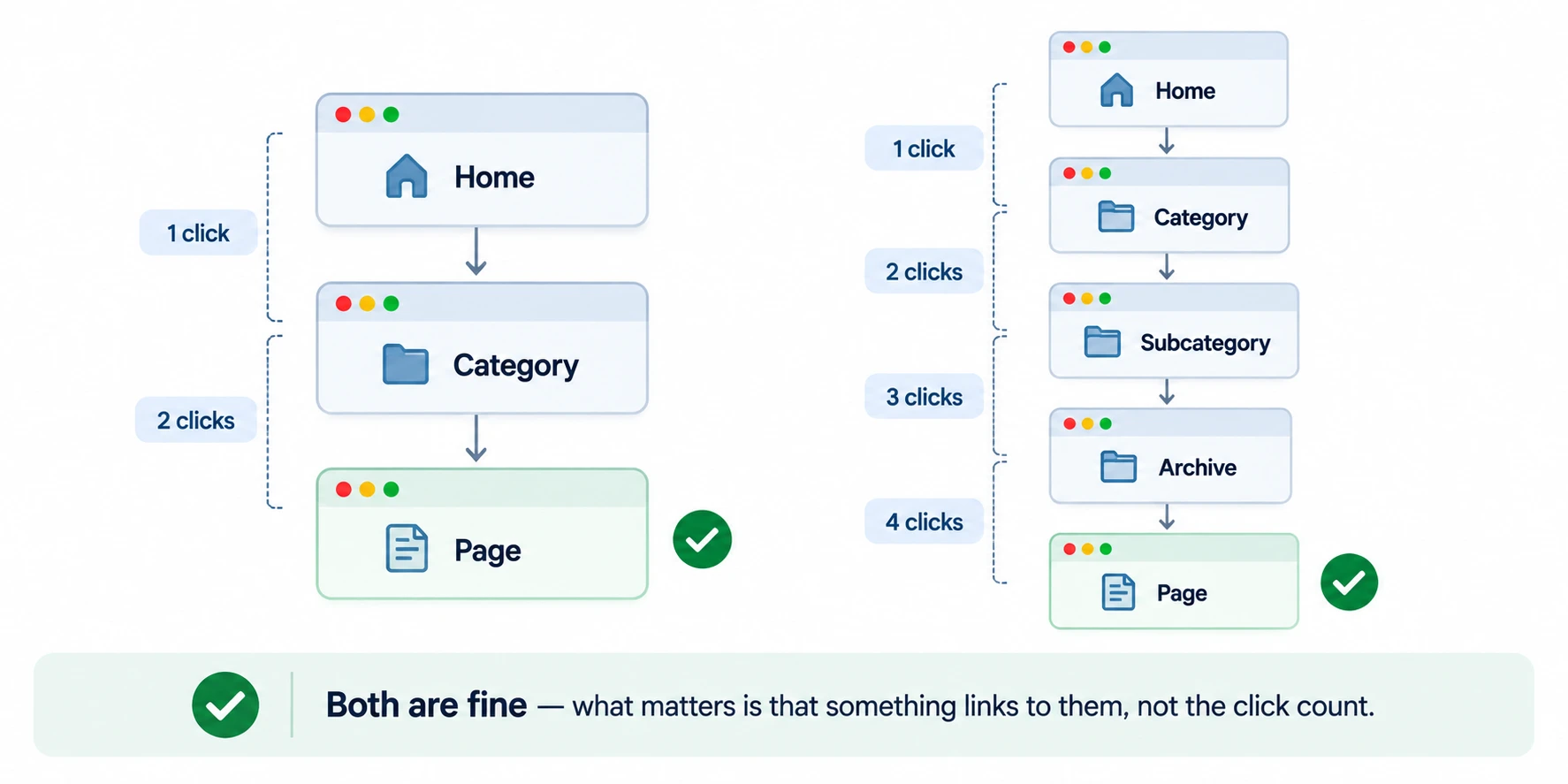
There's no fixed number of clicks that makes a page "too deep" -- don't treat three clicks from the homepage as some kind of penalty threshold, because there isn't one. The actual goal is a clear site structure where your important pages are easy for both visitors and search engines to reach.
Anchor Text
Anchor text is the clickable text of a link. This section is about anchor text on your own internal links. Anchor text in backlinks from other sites is a different topic, covered in our Link Building guide.
Descriptive anchor text ("see our content audit framework") tells a reader what the destination page is about before they click. A generic anchor ("click here," "read more") tells them nothing. Anchor text is also one of the signals Google's own documentation lists as something it may use to understand what a linked page is about.
Common mistake: using the exact same keyword-stuffed anchor text for every internal link to one page, which reads as manipulative rather than natural.
External Links
Linking out to another website isn't automatically bad for SEO. If another page provides real evidence, a clear definition, original research, or the actual source behind a claim, linking to it can genuinely help the reader -- this guide does that throughout, linking directly to Google's own documentation rather than just describing it secondhand.
The mistake isn't linking out -- it's linking out carelessly: adding links just to make a page look more authoritative, or linking to low-quality or irrelevant sites that don't add anything for the reader.
Schema Markup
Schema markup (structured data, usually written as JSON-LD) is code that explicitly tells Google what's on a page -- that a page is an article, that a list of questions is an FAQ, that a breadcrumb trail represents the site's navigation. Structured data can make a page eligible for certain rich search features, when Google supports that specific markup and the page meets its requirements. It doesn't guarantee a rich result will actually appear, and structured data itself isn't a ranking signal, according to Google's own documentation.
Some common types include Article or BlogPosting, FAQPage, BreadcrumbList, and Organization, depending on what the page actually is. This page uses the first three -- BlogPosting, FAQPage, and BreadcrumbList -- plus an Organization entry nested inside the BlogPosting for authorship.
Common mistake: marking up content with schema that doesn't actually appear visibly on the page. Google's guidelines require structured data to reflect real, visible content, not describe something that isn't there.
E-E-A-T
E-E-A-T stands for Experience, Expertise, Authoritativeness, and Trust. It comes from Google's Search Quality Rater Guidelines -- the framework human raters use to judge search quality as part of evaluating Google's systems. It's not a score Google computes and attaches to your page, something our own What Is SEO guide already covers as one of the more persistent SEO myths.
That doesn't mean the idea is useless. The same things that build genuine E-E-A-T -- clear authorship, citing real sources, showing actual first-hand experience with what you're writing about, and keeping information accurate and current -- are the same qualities that make content genuinely useful to a reader, whether or not Google scores them directly.
Entity SEO
An entity, in this context, is a specific, identifiable thing -- a person, organization, product, place, or concept -- as opposed to just a string of text. Entity SEO is about helping search engines understand exactly what a person, company, product, or place is, connected to Google's broader Knowledge Graph of real-world entities.
In practice, this comes down to consistency and clarity more than a separate technique: using the same name for your product or brand throughout a site instead of varying it, using Organization or Person schema to explicitly identify entities where relevant, and naming things clearly in headings and early content instead of relying on pronouns. This is a newer, less precisely documented area than title tags or schema -- treat specific claims about exactly how it affects rankings with some caution, since Google hasn't published detailed mechanics here the way it has for titles or structured data.
Content Freshness
Whether updating an existing page actually helps -- versus leaving something that's already working alone, or updating it in a way that quietly makes it worse -- has real tradeoffs on both sides. That's covered in full in our Content Audit guide.
Content Pruning
Deciding whether an underperforming page should be improved, merged into a stronger page, redirected, or removed entirely is part of the same content audit process as freshness decisions above. See the Content Audit guide for how to make that call page by page.
How RankAnalyze Does On-Page SEO
Take a real run: a guide targeting the focus keyword "seo optimization tools." RankAnalyze's Ranking Audit checks the page against 15 individual on-page signals, not a single pass/fail score -- in this run, 10 of 15 passed.
The keyword fundamentals were solid: it showed up in the URL, the title, the H1, the headings, and the opening content. The meta description was the right length, the canonical tag was present, and Open Graph tags were set. But five signals failed: the keyword was missing from the meta description itself, structured data wasn't present, image alt text was missing, the keyword wasn't in the image alt text, and an external link on the page wasn't using a dofollow source.
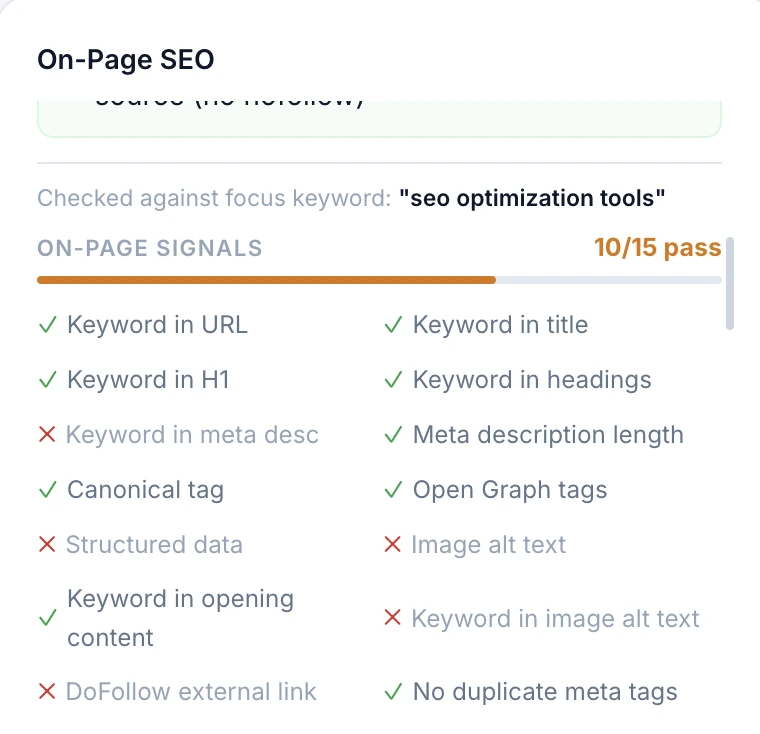
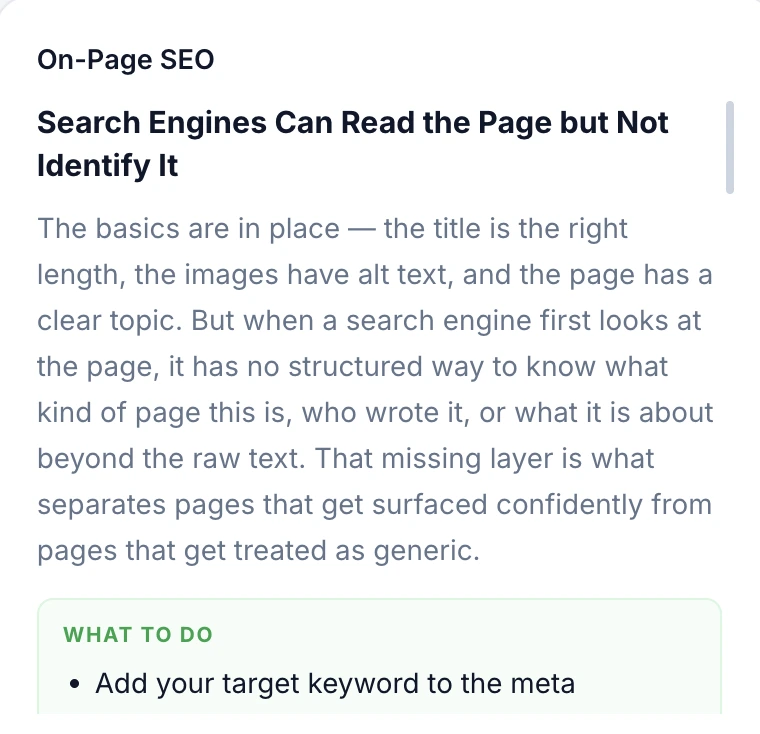
That structured-data gap is exactly the kind of issue this guide's Schema Markup section describes in the abstract, showing up here as a real flagged issue: "Search Engines Can Read the Page but Not Identify It." The title was the right length, images had alt text, the page had a clear topic -- by surface appearance, the basics were covered. But without structured data, a search engine has no structured way to know what kind of page it is, who wrote it, or what it's about beyond the raw text. RankAnalyze flags that gap specifically, rather than only scoring the page overall, and tells you what to add.
Want to see which of these your own pages are actually missing? RankAnalyze's Ranking Audit checks a page against what's really ranking for your target keyword, not a generic checklist.
Frequently Asked Questions
Is there an ideal title tag length?
No fixed number. Google truncates titles based on pixel width and device, not a character count, so the same title can display differently on different screens. Put what matters most near the front.
Does changing a title tag improve rankings?
Not by itself. A title change can affect whether people click your result, which may affect performance over time, but Google's own documentation doesn't describe the title tag as a direct ranking signal on its own.
Do meta descriptions affect rankings?
Google's own documentation doesn't list it as a ranking signal. Its job is influencing whether someone clicks, not where you're positioned -- and Google often rewrites or ignores it anyway if it thinks page content describes the page better.
Should I use the same keyword in every heading?
No. Forcing the same phrase into every heading reads as repetitive and doesn't match how people actually write about a topic, which naturally varies its wording.
How many times should I use my keyword on the page?
There's no density target to hit. Natural placement in the title, headings, and early content matters more than repetition count.
Should I add keywords to image alt text?
Alt text should describe the image accurately first. If the keyword naturally fits that description, include it -- don't add it if it doesn't actually describe what's in the image.
Do URLs affect SEO?
A clear, descriptive URL helps people and search engines understand what a page is about, but it's a smaller factor than the title and content. See our Technical SEO Audit guide for the full URL structure breakdown.
Is E-E-A-T something Google actually scores on a page?
No. It's a framework human quality raters use to judge search quality, not a number attached to any individual page.
Does schema markup directly boost rankings?
No. It makes a page eligible for richer result formats when supported -- it doesn't guarantee one will appear, and it isn't a ranking signal itself.
Should every image on the page use lazy loading?
Not the first image visible when the page loads. Lazy loading is useful further down the page, but applying it to the first visible image delays how fast the page feels to load.
See exactly how ChatGPT, Claude, Gemini, Perplexity and Copilot describe you today.