Crawled Currently Not Indexed: 10 Reasons and How to Fix It
Google Search Console shows "Crawled currently not indexed" next to a URL, but the URL is not in Google's index. There is no clear explanation of what to fix.
This guide explains what the status means, the common reasons Google may crawl a page without indexing it, and a step-by-step process for investigating the problem. Rather than offering generic SEO tips, it helps you check the available evidence, narrow down likely causes, make targeted changes, and monitor the result.
By the end, you will know how to interpret the signals in Search Console, which possible causes to investigate, and what to do next.
What Does "Crawled Currently Not Indexed" Mean?
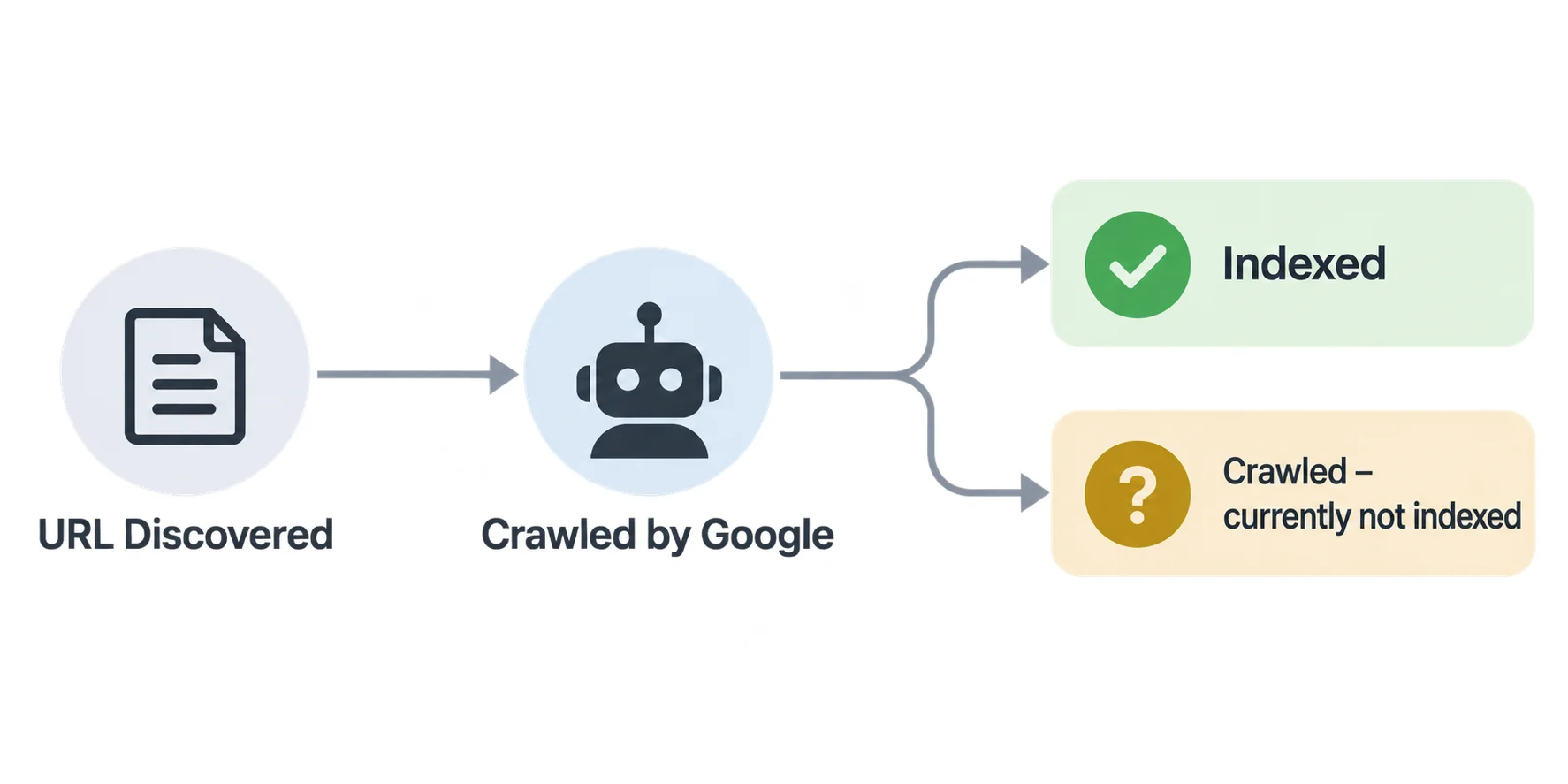
"Crawled currently not indexed" means Google crawled the URL but has not included it in its index. The status does not, by itself, tell you exactly why the page was excluded. It cannot appear in Google Search as an indexed result for that URL while it remains unindexed.
What happens when Google crawls a page
Crawling is when Googlebot requests a URL and fetches its contents. Google may then render the page to process content that depends on JavaScript. Crawling alone does not mean the page will be indexed. For the fuller walkthrough of how crawling, indexing, and ranking fit together as three separate steps, see our What Is SEO guide.
Why crawling does not guarantee indexing
After a page is crawled, Google evaluates the content, duplication against other pages, canonical signals, and other indexing factors before deciding whether to add it to the index. A page can pass the crawl step and still not be selected for indexing. Indexing is never guaranteed, even for a page that follows Google's guidelines, as Google's own How Search Works documentation explains.
Is this status an SEO penalty?
This status is not, by itself, evidence of a manual action or an SEO penalty. It means Google crawled the URL but has not indexed it. Investigate the page and its indexing signals before deciding whether anything needs fixing.
How to Confirm the Problem in Google Search Console
Before changing anything, confirm which URLs are actually affected and how current that information is.
Find affected URLs in the Page Indexing report
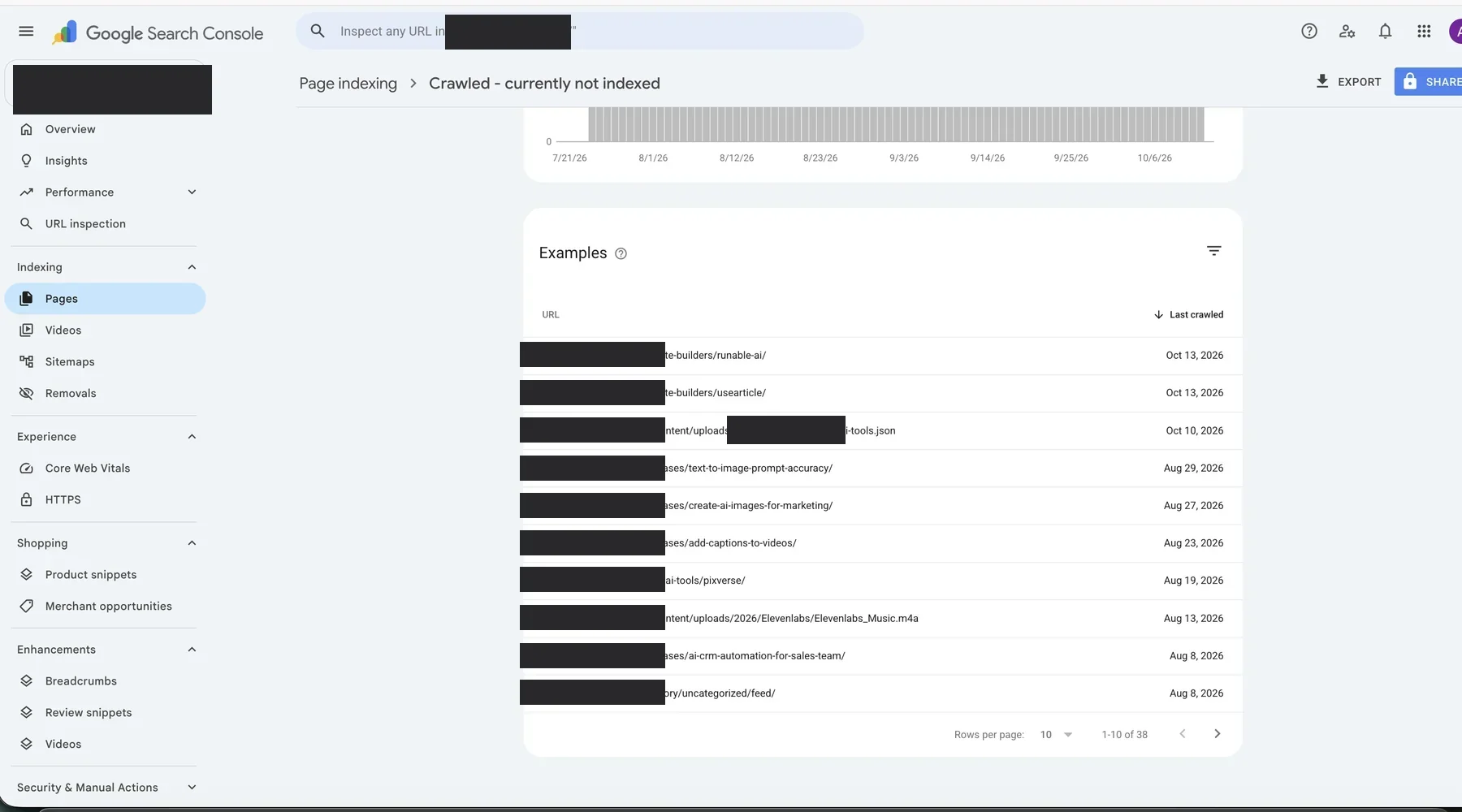
In Search Console, open the Page indexing report (under Indexing) and look for the "Crawled currently not indexed" row. Clicking it gives an overview of affected URL groups and example URLs carrying the status -- it is not necessarily a complete list of every single affected URL, since the examples table has its own limits. Record a sample of affected URLs, grouped by page type or template, rather than trying to check every URL individually. Use that sample as the starting point, then confirm individual URLs with URL Inspection.
Inspect an individual URL using URL Inspection
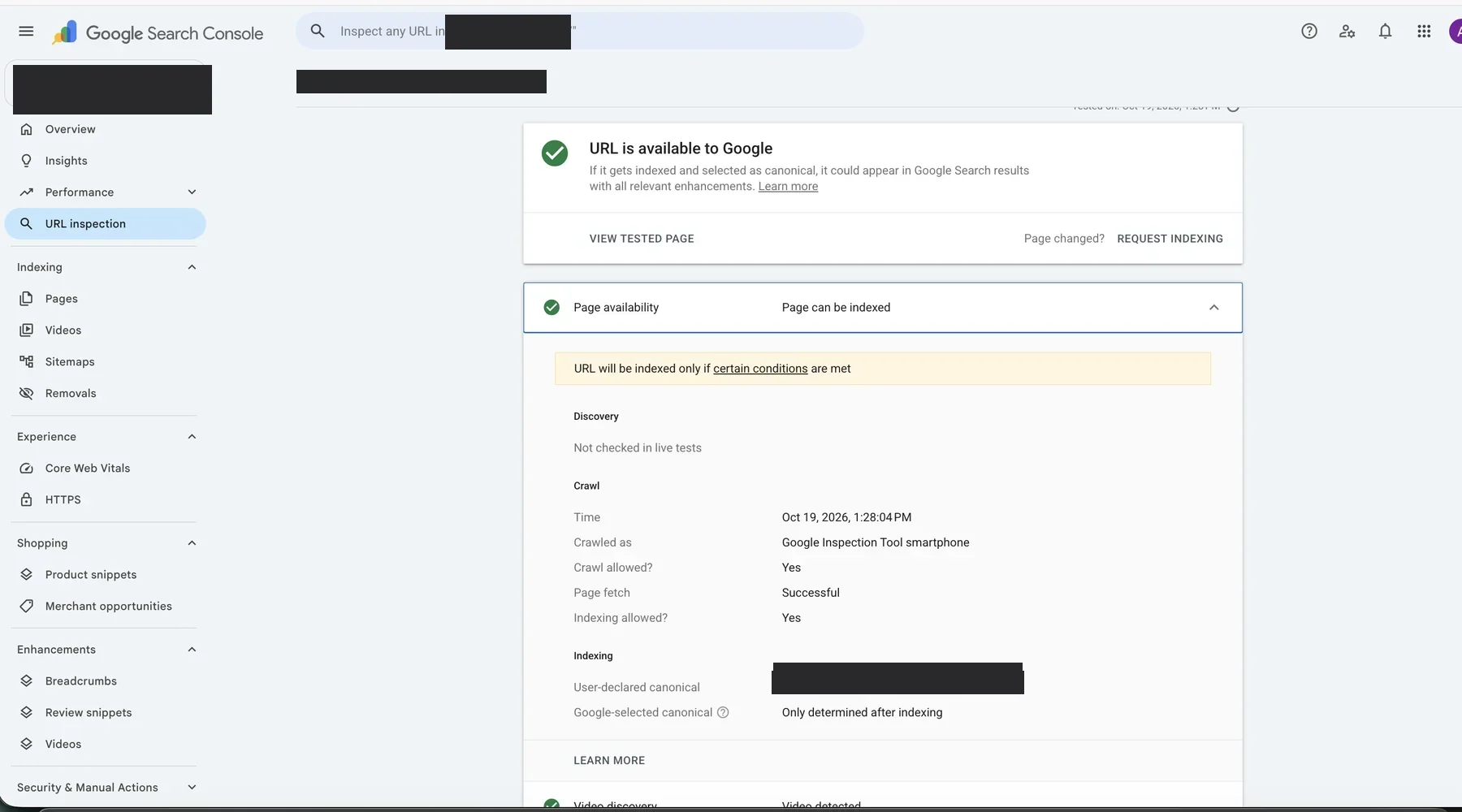
The URL Inspection tool provides information about the version Google last processed, including its crawl date and, where available, the Google-selected canonical. The live test checks the current page for detectable access and rendering issues. It does not reproduce every indexing decision or guarantee that Google will index the URL. Use URL Inspection on a handful of affected URLs before acting on the whole list.
Check the last crawl date and indexing information
Search Console may not immediately reflect changes made after Google's last crawl. Compare the last crawl date with the date of your change. If Google has not crawled the updated version, the report may still reflect the earlier page. If it has crawled the new version, continue investigating why the URL remains unindexed.
Distinguish this status from "Discovered currently not indexed"
With "Discovered currently not indexed," Google knows the URL exists but has not yet crawled it. With "Crawled currently not indexed," Google has crawled the URL but has not indexed it. Crawl capacity and crawl demand can matter, especially on very large sites, but discovery status alone doesn't prove crawl budget is the cause, and crawled status alone doesn't prove a quality problem. Investigate the evidence for each URL rather than assuming either status has one universal cause. Our technical SEO audit guide covers the full set of crawling and indexing checks a thorough audit should run.
Confirm the URL is actually meant to be a page
Before troubleshooting an affected URL, confirm it is a real page you want to appear in Search results, rather than a feed, script, asset, or other resource that does not need its own search listing. This is an edge case, not the typical reason for this status, but worth ruling out early on an unfamiliar URL.
Why Google Crawls a Page but Does Not Index It
This status does not identify the reason a URL was left out of the index. Start with the evidence available for that URL, then compare its content, canonical signals, internal links, and rendered version. The following are possible explanations to investigate, not a list of causes that can be confirmed from the status alone.
1. The page provides little original or useful information
If the page restates things already covered elsewhere, in less depth or with no new angle, that's one possible reason Google may not select it for indexing.
2. The content overlaps with other pages on your website
This is where canonicalization comes in -- Google's process for choosing one main URL to represent a group of duplicate or very similar pages. Google groups similar URLs and selects a canonical URL to represent the group, as explained in Google's canonicalization documentation. If several pages on your site serve essentially the same purpose, check whether they need to remain separate and whether their canonical signals are consistent. Our content audit guide walks through how to find this kind of overlap across a whole site.
3. The page may not satisfy the search intent
A page can be well written and still miss what people actually want when they search a term it targets -- for example, a product page where searchers expect a comparison, or a short definition where searchers expect a full guide. This is worth checking as a content gap, not assumed as the direct cause of the status. Our keyword research guide covers how to check what a query's existing results actually satisfy before you target it.
4. Google considers another URL a better canonical version
Google sometimes chooses a different URL as canonical than the one set in the page's own canonical tag, based on duplicate content signals. URL Inspection shows "Google-selected canonical" when this happens. A self-referencing canonical tag is correct for a page meant to stand on its own; a page that is intentionally a near-duplicate of another URL may correctly canonicalize to that other URL instead -- though a self-referencing canonical doesn't guarantee Google will actually choose it. If Google selects a different canonical, open that URL and compare the two pages. Check whether the pages are genuinely duplicates, whether internal links and the sitemap point to the preferred URL, and whether the canonical tag matches your intended setup.
5-6. Weak internal linking, including orphan pages
Pages with few relevant internal links can be harder to discover and may be poorly connected to the rest of the site. An orphan page has no internal links pointing to it at all. For an already-crawled URL, weak linking does not prove why Google left it out of the index, but it is still worth checking whether the page belongs in the site's navigation or related content. Our link building guide covers how internal structure and earned links work together to make a page easier to find.
7. The page contains mostly boilerplate or templated content
Using a shared template is not, by itself, the issue. What deserves investigation is whether pages built from that template end up substantially duplicated or without enough unique value -- for example, a large batch of near-identical location or category pages with only small differences between them. Building genuine topical authority around a subject, rather than many thin variations of the same page, is usually the more durable fix.
8. Technical issues to rule out: crawl access, indexing directives, and rendering
These are three separate technical checks. They affect crawling, indexing, or Google's ability to process the page in different ways, so they should not be treated as interchangeable problems.
- A robots.txt rule can stop Googlebot from fetching the page at all.
- A noindex directive (in the page's HTML or an X-Robots-Tag HTTP header) tells a crawler that CAN access the page not to index it -- this is normally reported as its own separate indexing reason when Google detects it, not folded into this status.
- Rendering problems can occur when important content depends on JavaScript and does not appear correctly in the version Google processes. Separately, content that requires a login is not publicly accessible to Googlebot at all -- that's an access problem, not a rendering one.
A robots.txt block added after the last successful crawl is unlikely to explain a status based on that earlier crawl. These checks matter most for catching a technical problem introduced after Google's last crawl, or one the report hasn't reflected yet. Check the current live URL and compare it with the last crawled/indexed information in URL Inspection.
9. A new page may still be awaiting an indexing decision
New pages may take time to be processed, and Google does not guarantee that every crawled page will be indexed, regardless of site age. If a page remains excluded, investigate its content, canonical signals, accessibility, and internal links rather than assuming the site is simply too new.
10. Large batches of similar or low-value pages
When a site publishes many similar pages, especially through templates or automated processes, compare the affected URLs for duplicate content and distinct user value. The number of pages alone does not establish why Google has not indexed them -- treat a large batch as a pattern worth investigating, not a proven cause. Start by comparing a small sample of affected URLs with indexed pages from the same template.
Quick diagnostic table: what you observe, what to investigate, what to do next
| What you observe | What to investigate | Next action |
|---|---|---|
| One category is mostly unindexed | Template similarity, content, and canonical patterns | Compare affected pages with indexed pages from the same category |
| Only one or two URLs are affected | Page-specific content, rendering, and canonical signals | Inspect those URLs individually |
| Google selected a different canonical | Duplicate pages and conflicting signals | Decide which URL should represent the content, then align the signals |
| The live test says the URL is available | Remember the test does not guarantee indexing | Review canonical data where available, duplication, and unique value |
| The report still shows the old status | Last crawl date and report freshness | Compare the report with URL Inspection before making another change |
How to Fix "Crawled Currently Not Indexed" Step by Step
Step 1: Inspect the URL and confirm its current status
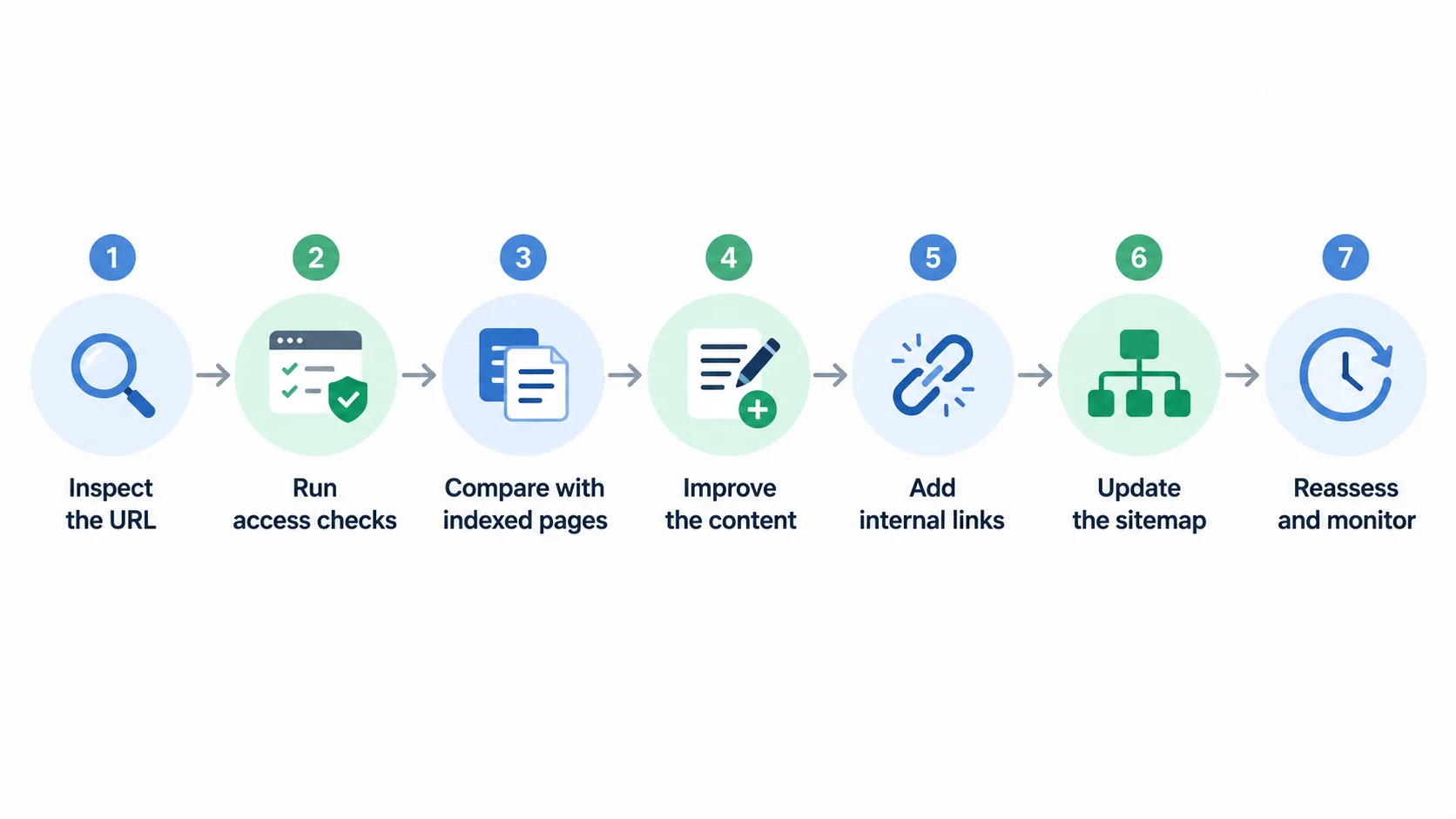
Start with URL Inspection on the specific URL, not the summary report. Record the current status and the last crawl date.
Step 2: Run the crawl-access and indexing-directive checklist
- HTTP status and redirects: Does the URL return a successful response, redirect to another URL, or return an error? Confirm which URL Google actually evaluates -- a redirecting URL is often reported under a different, redirect-specific status rather than this one.
- Robots.txt: does any rule block Googlebot from fetching this URL?
- Noindex / X-Robots-Tag: is there a deliberate instruction not to index this page, added by mistake or left over from staging? (Usually reported as its own separate indexing reason, not this status.)
- Rendered content: In the live test, open the tested page's screenshot or HTML where available. Confirm the main content is present and readable, not just that the URL returns a successful response.
- Canonical tag: does it point where it should -- to itself for a standalone page, or intentionally elsewhere for a true duplicate?
These checks help rule out technical problems, but not every one of them directly causes the "Crawled currently not indexed" status specifically. If the page passes all five, move on to content, duplication, and canonical analysis instead of repeating the same technical tests.
Step 3: Compare the page with indexed pages targeting similar queries
Look at pages already indexed for a similar topic, on your site or elsewhere. Ask what those pages cover that this one does not, in terms of information, not just word count. Use this to find genuine gaps, not as a formula for copying competitors.
Step 4: Improve the page's unique value and completeness
Add information that helps the reader make progress: a missing step, a verified example, original data, a comparison, or an explanation the existing page does not provide. Remove repeated sections that add no new information. Do not add paragraphs simply to increase word count.
Step 5: Add relevant internal links from important pages
Find relevant indexed pages that already discuss the topic and add a contextual link where it genuinely helps the reader. Check that the destination URL is the preferred canonical URL. See the internal linking section of our On-Page SEO guide for how to do this well.
Step 6: Update the sitemap if the URL belongs there
A sitemap should list the canonical URLs you want indexed. If this URL is meant to be indexed and isn't already listed, add it. Listing a URL in the sitemap does not guarantee indexing either way -- it is a discovery aid, not a directive, as Google's own sitemaps documentation notes.
Step 7: Allow Google to reassess the page; request indexing selectively
After making a meaningful change, let Google recrawl and reassess the URL. You do not need to request indexing just because this status appears. For an important page that has materially changed, you can request indexing once, but it does not guarantee a faster recrawl or inclusion. Avoid repeatedly submitting the same unchanged URL. Focus on correcting the underlying issue, then monitor the page's indexing status.
A Worked Example: One Unindexed Blog Post
This is a hypothetical walkthrough, not a real case study -- it shows how the steps above fit together, not a promise of the same result.
A site has a blog post stuck on "Crawled currently not indexed" for three weeks. The Page Indexing report shows it in a group with several other posts published around the same time. URL Inspection on this one URL shows: crawled nine days ago. URL Inspection does not show a different Google-selected canonical, where that information is available. The page has no detected noindex directive, returns HTTP 200, and is accessible in the live test.
With the technical checks clear, the next step is to assess content and internal linking. In this hypothetical example, competing pages cover a useful step that the post omits. The post also has few relevant internal links. These are identifiable weaknesses in the example, so the owner addresses them first; the status alone would not establish that either issue caused the exclusion. The site owner adds the missing information and links to the post from two closely related articles. The owner then monitors the URL to see whether its indexing status changes, without assuming that these edits will guarantee indexing.
How to Diagnose Different Types of Affected Pages
The right next step depends on what kind of page is affected, and how many.
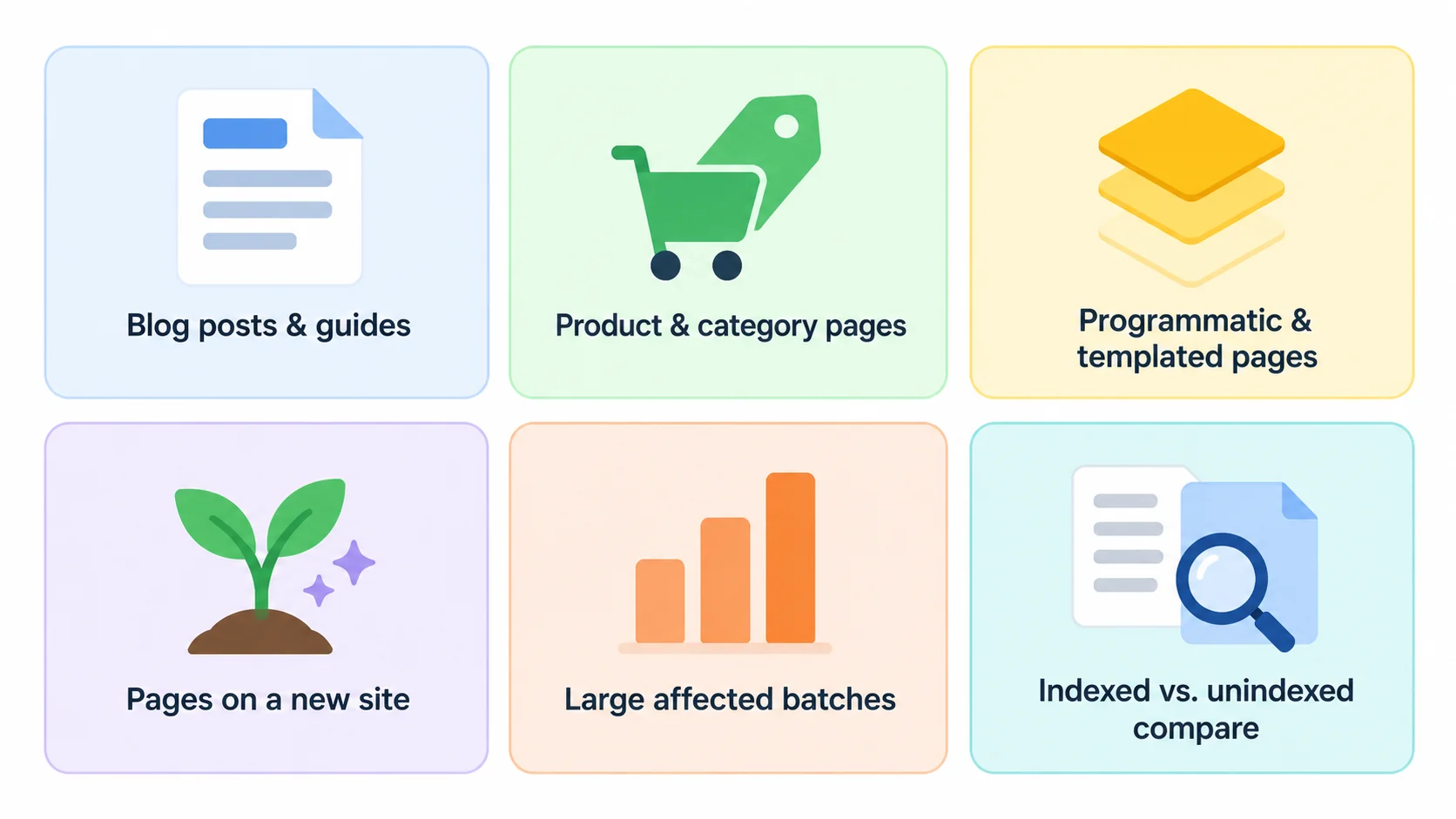
Blog posts and informational guides
Compare the page with relevant results to identify missing information and unanswered questions. Use that comparison to improve the page for readers, not to reproduce every section competitors have.
Product pages and category pages
These often struggle with thin content (little text beyond a title, price, and stock status) or duplication (many product variants with nearly identical descriptions). Unique product detail and clear differentiation between variants help more than more text for its own sake.
Programmatic SEO pages and large URL collections
Large sets of templated pages are one useful place to investigate when many URLs share this status. Check whether the pages offer genuinely distinct information and whether the template produces near-duplicates. Choose a sample of pages generated by the same template. If replacing the location, product, or category name leaves nearly identical pages with little distinct information, review whether every URL deserves a separate page.
Pages on a new website
A new website may have pages that are still being discovered, crawled, or evaluated for indexing. Check the actual status of each URL rather than assuming that site age explains the exclusion. Newness alone does not guarantee that a page will be indexed later.
What it means when hundreds of pages are affected
A large number of affected URLs, especially within one section, is a useful pattern to investigate. Compare the page templates, content types, canonical signals, and publication process to see whether a common issue might explain the pattern. Treat it as a lead, not a confirmed cause.
How to compare indexed and unindexed pages on the same website
Pull a sample of indexed pages and a sample of unindexed pages from the same category or template. Compare content depth, internal links pointing to each, and how each renders. Consistent differences between the two groups help narrow down the likely cause faster than inspecting pages one at a time.
How to identify patterns across templates, categories, and publication dates
Group affected URLs by template, category, and publish date in a spreadsheet. A pattern tied to one template can point to a template-level content, rendering, or duplication issue. A pattern tied to one time period may be associated with a change made around that date, such as a template update, bulk import, or internal-linking change. Compare the evidence before deciding what caused the pattern.
How Long Does Google Take to Index a Page After Fixing It?
What to expect after requesting indexing
There is no reliable universal timeline. Google does not publish one, and recrawling can happen quickly or take considerably longer, depending on the site's overall crawl frequency and the scale of the fix.
When to inspect the URL again
Avoid inspecting the same URL repeatedly within a short window -- frequent re-checks will not speed up recrawling and may simply show the same status again. Check back periodically instead of on a fixed deadline.
What "Validation Failed" means and what to do next
"Validation Failed" means Search Console could not confirm that the reported issue had been resolved for the affected URLs. Open the validation details to see which URLs still show that issue, then compare them with current URL Inspection results. The report may not reflect the latest state of every URL immediately.
For "Crawled currently not indexed," a failed validation does not identify the underlying reason the page was not indexed, and validation itself does not cause indexing. Check the current URL Inspection data, review the page and its canonical signals, and decide whether there is a genuine problem to fix. If the page remains in this status, Google may simply not have selected it for indexing at that time, even though it is technically accessible.
Why some pages remain unindexed despite improvements
Some pages stay unindexed even after real improvements. Indexing is never guaranteed, even for a page that follows Google's guidelines -- the explanation may not be identifiable from the status alone.
How to Monitor and Prioritize Unindexed Pages
Separate important URLs from low-value or unnecessary URLs
Not every URL needs to be indexed. Start with URLs that have a clear business or search purpose and are meant to be indexed. Investigate those before spending time on duplicates, filters, utility URLs, or pages that do not need their own search listing.
Look for patterns across affected page groups
Review the pattern analysis above periodically rather than treating each new affected URL as a one-off.
Track changes after fixes instead of repeatedly requesting indexing
Keep a simple tracking sheet instead of a vague note. Useful columns: URL, page type, last crawl date, preferred canonical, Google-selected canonical (if available), change made, date changed, indexing request (yes / no / not needed), and latest status. "Date changed" helps you compare your fix against the last crawl date. Check back on that list instead of re-requesting indexing on pages with no actual changes.
Common Mistakes When Fixing Crawled Currently Not Indexed
Submitting the same URL repeatedly
Requesting indexing again and again on an unchanged page does not make Google crawl the URL faster.
Rewriting content without addressing its underlying weakness
Do not rewrite every affected page automatically, and do not add arbitrary word count just to make pages longer. A longer page with the same lack of unique value faces the same outcome.
Adding every URL to the sitemap regardless of quality
A sitemap entry does not guarantee inclusion in the index. List canonical URLs you actually want indexed, not every URL on the site "just in case."
Changing canonical tags without understanding the intended URL
Do not change canonical tags without a clear reason. A canonical tag is a signal Google weighs, not a command -- and an incorrect change can push Google toward indexing the wrong URL instead of the right one.
Assuming every unindexed page is a technical problem
Many cases require investigating content, duplication, or canonical selection rather than fixing a technical error. The checklist above matters, but it is only one of several things to check, not the default explanation. Our SEO tips checklist covers the broader set of fundamentals worth double-checking before assuming any one explanation.
Frequently Asked Questions
Is "Crawled currently not indexed" bad for SEO?
Not necessarily. It means the URL is not currently indexed and therefore cannot appear in Google Search as that indexed URL. The status alone does not mean your site has been penalized.
Can a page rank if Google has not indexed it?
No. A page must be indexed to appear as a normal organic search result. If the URL is not indexed, investigate its status rather than trying to improve its rankings directly.
Does thin content cause this status?
Thin content is one possibility, not a confirmed explanation from the status alone. Also investigate duplicate content, canonical selection, internal links, and whether Google can process the page's main content correctly.
Should I request indexing after every content update?
No. Request it selectively, after a meaningful change, not after every small edit -- and there's no need to resubmit a URL solely because it carries this status.
Can too many unindexed pages hurt my website?
A large share of thin or unindexed pages from one template is worth investigating as a pattern. Treat it as a lead to follow, not a confirmed effect on your other, indexed pages.
Should I delete pages that Google does not index?
Delete a page only when it has no meaningful purpose and cannot be improved or consolidated with another page. If it provides unique value, investigate the reason for its exclusion before removing it.
What is the difference between crawled and discovered but not indexed?
"Crawled" means Google already visited the page. "Discovered" means Google knows the URL exists but hasn't crawled it yet. Investigate each URL's actual evidence rather than assuming one fixed cause for either status.
What does "Validation Failed" mean?
It means Search Console could not confirm that the reported issue had been resolved. Check the validation details and compare them with current URL Inspection data; a failed validation does not, by itself, explain why a URL is unindexed.
Conclusion: Fix the Cause, Not Just the Status
"Crawled currently not indexed" is a prompt to investigate, not a diagnosis. Confirm the URL's current status, compare the available evidence with the possible explanations above, and make a targeted change where you find a genuine weakness. Then monitor the result without assuming that a fix or indexing request guarantees inclusion.
RankAnalyze's Ranking Audit checks a page's content depth and duplication signals against what's already ranking, so you can fix the actual weakness instead of guessing.
 RankAnalyze