Technical SEO Audit: What It Should Actually Check
What Is a Technical SEO Audit?
A technical SEO audit is a check of the parts of a site that control whether search engines can reach, read, and properly rank its pages -- crawlability, indexing, site architecture, page speed, mobile usability, and security -- as distinct from content or keyword work. A good audit does not just confirm each piece exists; it checks whether each one is actually working correctly.
Most technical SEO problems are invisible from a normal read-through of a page. A page can look finished and still be unreachable, mis-indexed, or quietly dropping out of search results, and nothing about how it reads would tell you that. A technical SEO audit tool exists to surface exactly that kind of problem -- but a lot of tools stop at a handful of surface checks (is there an SSL certificate, does the title tag exist) and miss the issues that can affect crawling, indexing, performance, or search visibility. This is what a genuinely useful technical SEO audit tool should check, organized the way the problems actually show up: crawling and indexing, URLs and site architecture, rendering and performance, and security and infrastructure.
What a Technical SEO Checklist Covers
A thorough technical SEO checklist breaks down into four areas, covering 19 checks in total:
- Crawling & indexing -- crawling vs. indexing vs. ranking, robots.txt, XML sitemaps, noindex vs. nofollow vs. disallow, crawl budget, and indexing & exclusion checks
- URLs & site architecture -- URL structure, canonical tags & duplicate URLs, site architecture & orphan pages, pagination, redirects, and HTTP status codes
- Rendering & performance -- JavaScript rendering, Core Web Vitals, mobile-first indexing & mobile usability, and structured data validation
- Security & infrastructure -- HTTPS & mixed content, server & DNS issues, and hreflang
The sections below go through each one in detail -- what to check and why it matters, not just a box to tick.
Crawling & Indexing Checks
-
The Basics: Crawling vs. Indexing vs. Ranking
Before anything else, a good audit tool should make clear which of these three a flagged issue actually affects -- crawling (can Google reach the page), indexing (did Google store and process it), or ranking (where it shows up for a search). These are different problems with different fixes, and a tool that lumps them into one generic "issue" count makes diagnosis harder, not easier. See our What Is SEO guide for the fuller walkthrough of all three steps.
-
Robots.txt
- What to check:
- Is robots.txt syntactically valid?
- Which specific paths it blocks
- Are any of those blocked paths pages you actually want indexed?
Robots.txt controls crawling, not indexing -- Google is explicit that it "is not a mechanism for keeping a web page out of Google." A page blocked by robots.txt can still appear in search results if other sites link to it, just without a description. A tool should flag that distinction directly, not just report "X pages blocked" as if that settles the question.
- What to check:
-
XML Sitemaps
- What to check: not just whether a sitemap exists, but whether it matches reality -- two directions this breaks:
- URLs listed in the sitemap that actually 404, redirect, or are noindexed (wasted crawl attention on pages that shouldn't be there)
- Important, live pages that are missing from the sitemap entirely
Google's own guidance is clear that a sitemap "doesn't guarantee that all the items in your sitemap will be crawled and indexed" -- so a tool checking sitemap presence alone isn't checking much. The mismatch is the actual signal.
- What to check: not just whether a sitemap exists, but whether it matches reality -- two directions this breaks:
-
Noindex vs. Nofollow vs. Disallow
- What to check:
- the specific, easy-to-make mistake of a page being both disallowed in robots.txt and carrying a noindex tag. Google's own documentation is direct: "For the
noindexrule to be effective, the page... must not be blocked by a robots.txt file." If robots.txt blocks the page, Google never crawls it to see the noindex tag, so the page can still appear in results -- the exact opposite of what someone setting both was trying to do. A good tool flags this contradiction by name, rather than reporting "page noindexed" and "page disallowed" as two separate, unrelated facts.
- the specific, easy-to-make mistake of a page being both disallowed in robots.txt and carrying a noindex tag. Google's own documentation is direct: "For the
- What to check:
-
Crawl Budget
- What to check:
- this mostly matters for larger sites -- Google's own guidance centers it on sites with a million-plus pages updated regularly, or tens of thousands updated daily, and sites with a lot of URLs sitting in "Discovered – currently not indexed." A tool shouldn't present crawl budget as something every site needs to manage; it should flag it specifically when crawl stats show real signs of strain (slow server response pulling down crawl capacity, or a large volume of duplicate URLs eating into crawl demand).
- What to check:
-
Indexing & Exclusion Checks
- What to check: a full breakdown of indexed vs. non-indexed pages, with the reason for each exclusion:
- Noindexed
- Canonicalized to a different URL
- Crawled but not indexed
- Duplicate without a user-selected canonical
Google Search Console's own Page indexing report is built around exactly this breakdown, not just a total count. This is arguably the single most useful report a technical audit tool can produce, because it turns "why isn't this page showing up" from a guessing game into a direct answer. A tool that only reports a total indexed-page count without the breakdown is giving you a number, not a diagnosis.
- What to check: a full breakdown of indexed vs. non-indexed pages, with the reason for each exclusion:
URLs & Site Architecture Checks
-
URL Structure
- What to check:
- Are URLs descriptive and readable, rather than ID-based or parameter-heavy?
- Is formatting consistent -- hyphens, not underscores or spaces?
- Does the folder structure reflect the actual site hierarchy?
A clear, descriptive URL also helps people understand the page before they click it (see our On-Page SEO FAQ, which points here for the full breakdown).
- What to check:
-
Canonical Tags & Duplicate URLs
- What to check:
- every common source of accidental duplication --
wwwvs. non-www,httpvs.https, trailing slash vs. no trailing slash, and tracking or sorting parameters appended to an otherwise identical page. A canonical tag is a hint, not a command -- Google's own documentation says that with unclear or conflicting signals, it decides on its own "which version of the URL is objectively the best version to show to users in Search." So a tool should flag not just duplicate URLs, but cases where the declared canonical conflicts with other signals (internal links pointing to the non-canonical version, for example), since that's what actually causes Google to override your choice.
- every common source of accidental duplication --
- What to check:
-
Site Architecture & Orphan Pages
- What to check:
- pages with zero internal links pointing to them at all -- orphan pages. These are often invisible in a normal site review because the page works fine once you're on it; the problem is nothing on the rest of the site points to it, which can make it harder for both search engines and visitors to discover. This is the site-wide architecture version of the page-level Internal Linking guidance in our On-Page SEO guide; a good tool checks this at the structural level across the whole site, not just link-by-link.
- What to check:
-
Pagination
- What to check:
- Paginated pages (page 2, page 3 of a listing) should link to each other with real, crawlable links, and each one should have its own URL and genuinely different content, not just a repeat of page 1.
rel="next"/rel="prev"tags don't need to be present -- Google stopped using that signal years ago, so a tool that still flags them as missing is checking for something that no longer matters.- A common mistake is paginated pages that all canonical back to page 1, which can cause Google to drop pages 2+ from the index entirely, even though they hold distinct content.
- What to check:
-
Redirects
- What to check:
- 301 (Permanent Redirect)
- Use for permanent moves
- 302 (Temporary Redirect)
- Only for genuinely temporary ones -- Google treats a 302 as a weaker signal and may keep favoring the original URL
- Redirect chains
- Where one URL hops through several redirects before reaching its final destination; each hop adds another request and can slow crawling, so a tool should report the full chain length, not just confirm "this URL redirects"
- 301 (Permanent Redirect)
- What to check:
-
HTTP Status Codes (Site-Wide)
- What to check: a crawl-wide report of status codes, not a one-page spot check:
- 404 (Not Found) / 410 (Gone)
- Reported together as pages Google will stop indexing over time
- 5xx (Server Error), repeated
- Google slows crawling in response, and can eventually drop previously indexed pages
- 200 (OK) on an actual error page -- a "soft 404"
- Leaves Google unsure whether the content is real, and the page often lingers half-indexed
- 404 (Not Found) / 410 (Gone)
- What to check: a crawl-wide report of status codes, not a one-page spot check:
Rendering & Performance Checks
-
JavaScript Rendering
- What to check: Does the rendered page actually include the content, links, and metadata Google needs? JavaScript being used at all isn't the issue -- Google renders JavaScript as a normal part of crawling and indexing. Specific failure patterns worth flagging:
- Single-page apps where client-side routing prevents a real HTTP status code for "not found" states
- Hash-based (
#section) navigation, which can prevent Google from discovering those as separate, crawlable URLs
- What to check: Does the rendered page actually include the content, links, and metadata Google needs? JavaScript being used at all isn't the issue -- Google renders JavaScript as a normal part of crawling and indexing. Specific failure patterns worth flagging:
-
Core Web Vitals
- What to check: the three Core Web Vitals, measured at the 75th percentile of real visits across mobile and desktop:
- LCP (loading) -- good at 2.5 seconds or under
- INP (interactivity) -- good at 200 milliseconds or under
- CLS (visual stability) -- good at 0.1 or under
Just as important: a tool should track these over time, not report a single snapshot score. A page that's been slowly degrading for three months looks identical to a consistently-fine page if you only ever see today's number. And a good tool should make clear that passing Core Web Vitals doesn't guarantee higher rankings, and failing them doesn't automatically block a page from ranking -- they measure page experience, not a standalone ranking formula.
- What to check: the three Core Web Vitals, measured at the 75th percentile of real visits across mobile and desktop:
-
Mobile-First Indexing & Mobile Usability
- What to check: two different things:
- Mobile-first indexing parity -- whether the mobile version of a page provides the same important content, links, and structured data as the desktop version, since Google's crawler primarily uses the mobile version to decide how a page gets indexed
- Mobile usability -- a comprehensive technical SEO audit can also check this separately: a viewport that's not configured correctly, tap targets too small or too close together, and text too small to read without zooming
A page can pass one of these checks and fail the other.
- What to check: two different things:
-
Structured Data Validation
- What to check:
- Schema markup present on a page should actually be valid, not just present. This is a narrower, technical companion to our On-Page SEO guide's Schema Markup section, which covers what structured data is and why it's used -- this check is specifically about catching broken or malformed markup that would otherwise silently fail to make a page eligible for the rich result it was meant to support.
- What to check:
Security & Infrastructure Checks
-
HTTPS & Mixed Content
- What to check:
- Do HTTP URLs redirect correctly to HTTPS -- a 301, not a 302?
- Do any HTTPS pages still load images, scripts, or stylesheets over plain HTTP? That's mixed content, which browsers flag as insecure.
- Do internal links point directly to the HTTPS version, instead of relying on a redirect for every click?
HTTPS itself isn't a major direct ranking lever at this point, but these specific technical gaps are worth catching.
- What to check:
-
Server & DNS Issues
- What to check: the kind of problem that gets misdiagnosed as a content or SEO issue when it's actually infrastructure:
- DNS failures (Google can't resolve the domain at all)
- Slow or inconsistent server response times (which directly shrinks crawl capacity)
- Repeated 5xx errors
- CDN misconfiguration that can sometimes cause different responses or errors for crawlers versus regular visitors
- Hosting outages
A good audit tool checks these before assuming a crawl drop is an SEO problem rather than an infrastructure one.
- What to check: the kind of problem that gets misdiagnosed as a content or SEO issue when it's actually infrastructure:
-
hreflang (if the site serves multiple languages or regions)
- What to check:
- return-tag errors -- the most common real-world hreflang bug, where page A declares itself as the alternate for page B, but page B doesn't declare the same relationship back. If the alternate pages don't point to each other, Google may ignore those hreflang annotations. hreflang isn't a ranking signal and doesn't determine what language Google thinks a page is written in, so a tool shouldn't frame hreflang issues as a ranking problem -- the actual cost is showing the wrong regional or language version to the wrong searcher. If a site serves one language and region, this check doesn't apply.
- What to check:
How RankAnalyze Does Technical SEO
RankAnalyze's Ranking Audit checks page performance and on-page signals together rather than as separate tools. Take a real Page Speed run: Performance scored 9.4/10, Accessibility 9.3/10. Core Web Vitals on mobile all came back good -- LCP at 2.44 seconds, Total Blocking Time (used as a lab proxy for INP) at 0 milliseconds, and Cumulative Layout Shift at 0. By the numbers alone, this page looks fine.
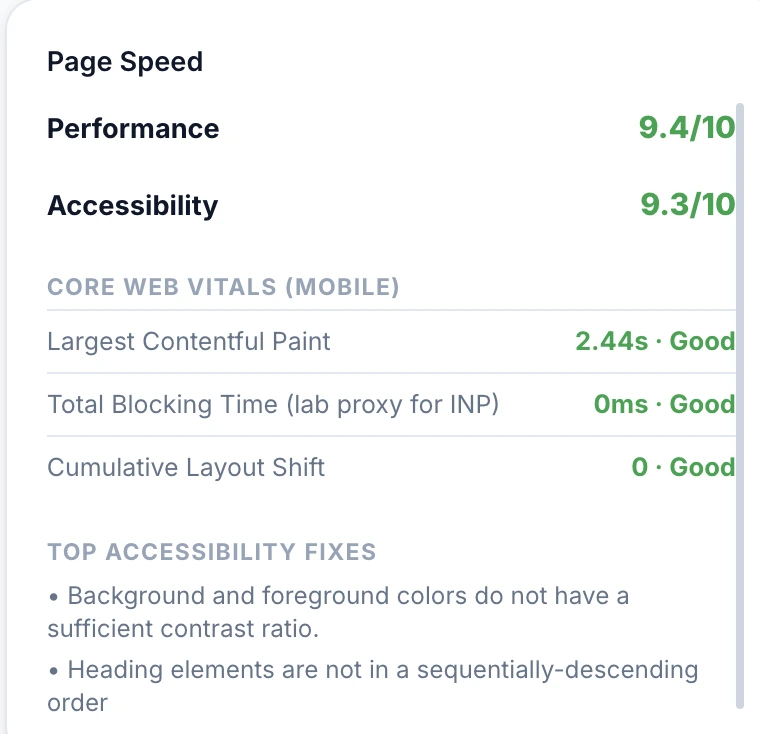
But the same run still surfaced two concrete accessibility fixes: background and foreground colors without enough contrast, and heading elements that weren't in sequential order -- skipping from an H2 straight to an H4, the exact heading-hierarchy mistake our On-Page SEO guide warns about. Good Core Web Vitals scores and real, fixable issues can exist on the same page at the same time, which is the point of checking both rather than treating a passing performance score as a clean bill of health.
The same audit also runs the on-page signals checklist covered in our On-Page SEO guide -- keyword placement, meta description length, structured data presence, image alt text, and more -- in the same run, so a page's technical performance and its on-page fundamentals show up together instead of requiring two separate tools.
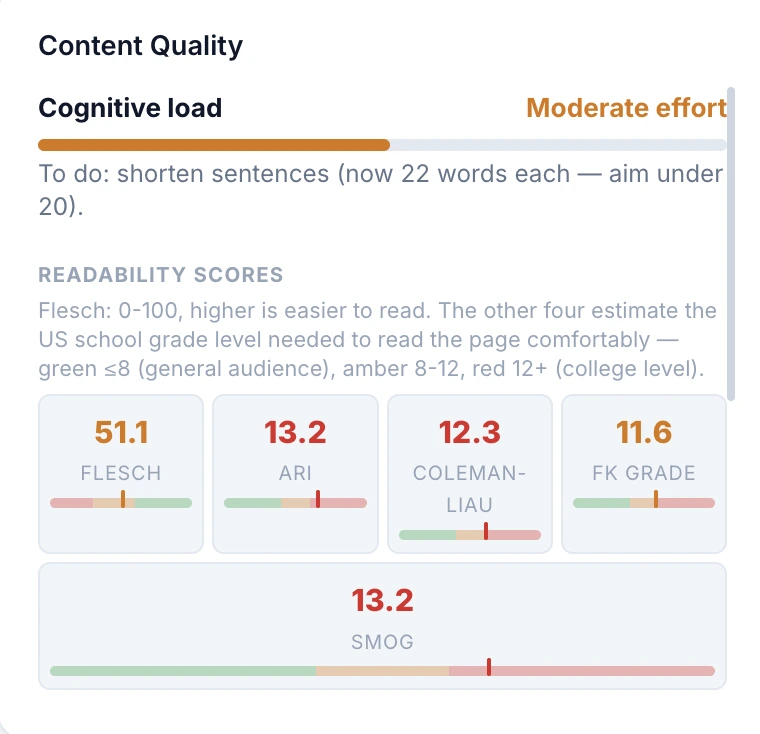
It also scores content readability on the same page. That run came back with cognitive load at Moderate effort and a direct to-do -- shorten sentences, which were averaging 22 words against a recommended under-20 target -- alongside the underlying readability scores: Flesch 51.1, ARI 13.2, Coleman-Liau 12.3, FK Grade 11.6, and SMOG 13.2. A page can pass every crawlability and performance check and still be harder to read than it needs to be, which is its own kind of finding, not something a purely technical audit would catch.
Want to see what your own pages are missing? RankAnalyze's Ranking Audit checks page performance and on-page signals together, not as two separate tools.
Frequently Asked Questions
Does a passing sitemap check mean my sitemap is actually working?
Not by itself. The more useful check is whether the sitemap matches reality -- no dead or redirecting URLs listed in it, and no important live pages missing from it. A sitemap existing and a sitemap being accurate are two different things.
Why does an index coverage breakdown matter more than an indexed-page count?
A total count tells you how many pages are indexed. A breakdown tells you why the rest aren't -- noindexed, canonicalized away, crawled but not indexed, or duplicate without a chosen canonical. Each of those has a different fix.
Does nofollow stop Google from following a link?
Not necessarily. Google treats nofollow as a hint rather than a strict instruction. Use it when you don't want to imply endorsement or pass normal link credit, but don't rely on it as a guaranteed crawl-blocking mechanism.
Should I noindex and disallow the same page?
No. Disallowing a page in robots.txt prevents Google from ever crawling it, which means Google never sees the noindex tag either. The page can still appear in results through other signals. Noindex the page and let Google crawl it.
Is a canonical tag a guarantee Google will use that URL?
No. It's a strong hint, not a command. If your signals are unclear or conflicting, Google decides on its own which version to treat as canonical.
Does Google actually render JavaScript?
Yes, as a normal part of crawling and indexing. The real risk isn't JavaScript itself -- it's whether important content and links are actually present once rendering finishes.
Is HTTPS a hard ranking requirement?
No. HTTPS is recommended, but there isn't a single direct ranking penalty simply because a site uses HTTP. The important technical checks are correct HTTP-to-HTTPS redirects, avoiding mixed content, and using HTTPS URLs consistently.
What's a one-directional hreflang error?
When page A declares page B as its alternate-language version, but page B doesn't declare the same relationship back to A. If the alternate pages don't point to each other, Google may ignore those hreflang annotations.
Is this the same as a technical SEO checklist?
It covers the same ground as a typical technical SEO checklist -- crawling, indexing, URLs, performance, and security -- but the focus here is on what to check and why it matters, not just a list of boxes to tick. A checklist that only confirms a sitemap exists or robots.txt is present misses whether either one is actually correct, which is the distinction this guide is built around.
See exactly how ChatGPT, Claude, Gemini, Perplexity and Copilot describe you today.