SEO Report: What Actually Determines Page Ranking
An SEO report generator is supposed to help identify what may be holding a page back. A weak one can reduce that down to a single score with no real explanation, which is close to useless: a "72/100" doesn't tell you whether the problem is thin content, a slow page, missing internal links, or something else entirely. A report that's actually worth acting on breaks performance into distinct, specific signals, each with a reason attached, rather than compressing everything into one number and leaving you to guess.
What Is an SEO Report?
An SEO report is a summary of how a website, or a single page, is doing in search. It usually shows how much traffic search brings in, which pages and searches that traffic comes from, what's improved or dropped since the last report, and what to fix next.
There are two common kinds:
- A performance report looks back over a period, like the last month. It's mostly about results: clicks, rankings, traffic and conversions.
- An audit report looks at what's on the page or site right now: content, technical issues, speed and links. It's mostly about what may be affecting where a page ranks.
An SEO report generator is a tool that pulls this data together automatically, so you're not copying numbers from several tools by hand. The rest of this guide covers what a good one should check, and what a good report should contain.
The signals an SEO report should evaluate
Google doesn't rank a page on one factor, so a report that only checks one is only telling part of the story. The signals worth evaluating individually:
- Content quality and depth, readability, whether the page delivers its value proposition above the fold, and how thoroughly it actually covers the topic.
- On-page SEO fundamentals, title tags, meta descriptions, keyword placement and density, heading structure, and structured data (schema).
- Internal linking, whether the page is well-connected to related content, with anchor text that actually helps both users and crawlers.
- Page speed and Core Web Vitals, load performance measured against Google's actual ranking-relevant thresholds, not just a generic speed score.
- Topic coverage, how completely the page covers the important subtopics that appear across pages currently ranking for the same search.
- Trust and credibility signals, the kinds of experience, expertise, authoritativeness and trust signals Google's quality guidance discusses, such as clear sourcing and claims that can be supported.
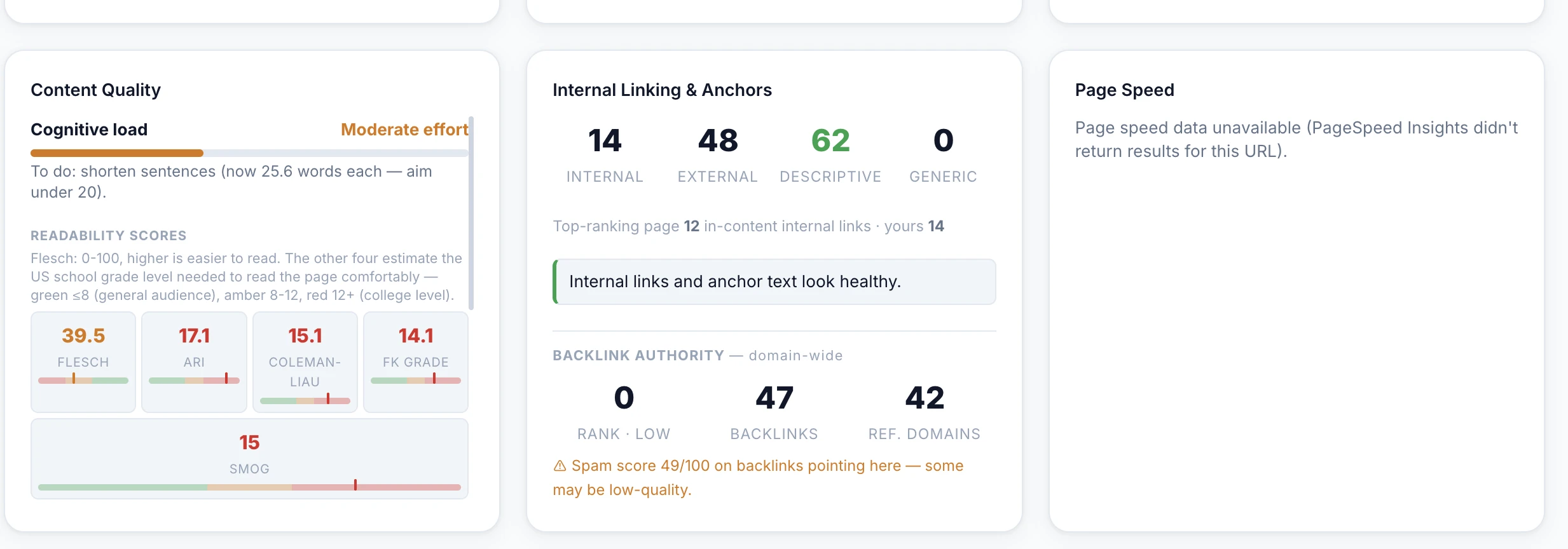
A page can score well on one of these and badly on another, strong writing sitting on a slow page, or thorough content with none of the on-page fundamentals in place, and a report that flattens all of this into a single number hides exactly the kind of mismatch that's actually fixable.
Why "compare against what's ranking" matters
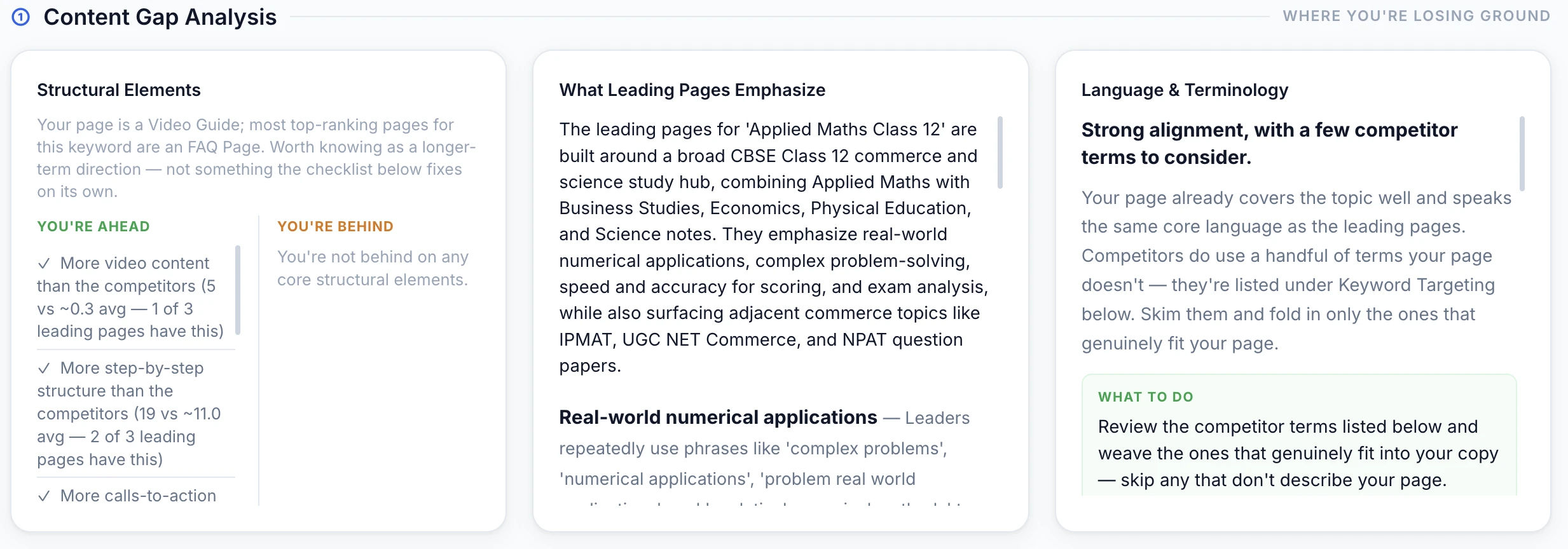
A page's own metrics only mean something in context. A report that just checks a page in isolation can't tell you whether its content depth is competitive, because "good" is relative to what's currently winning that search result. The more useful version of a report evaluates a page against the content that's actually ranking for its target keyword. It shows where the coverage gaps are, what related subtopics get missed, and what the page would need to add to close the distance, rather than grading it against a generic, one-size-fits-all rubric.
Turning signals into one rankability read
Once the individual signals are measured, they can be combined into a single directional read, weighted toward how completely the topic is covered, how deep the content actually goes, and how strong the trust signals are. There's still one number to glance at, but it's built from explained parts rather than replacing them. The individual breakdown underneath is what makes it actionable; the combined score is just a fast way to track whether it's moving in the right direction over time.
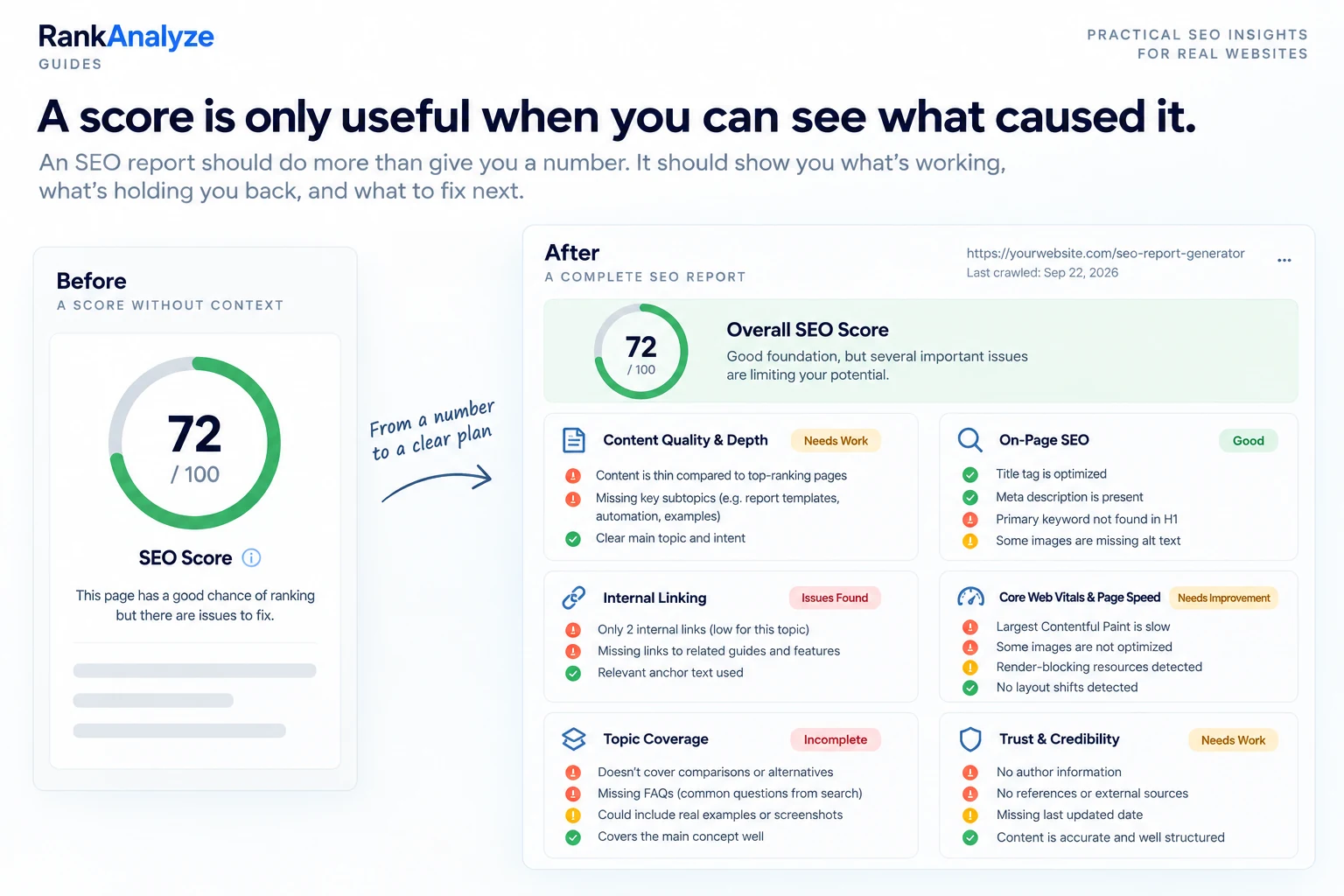
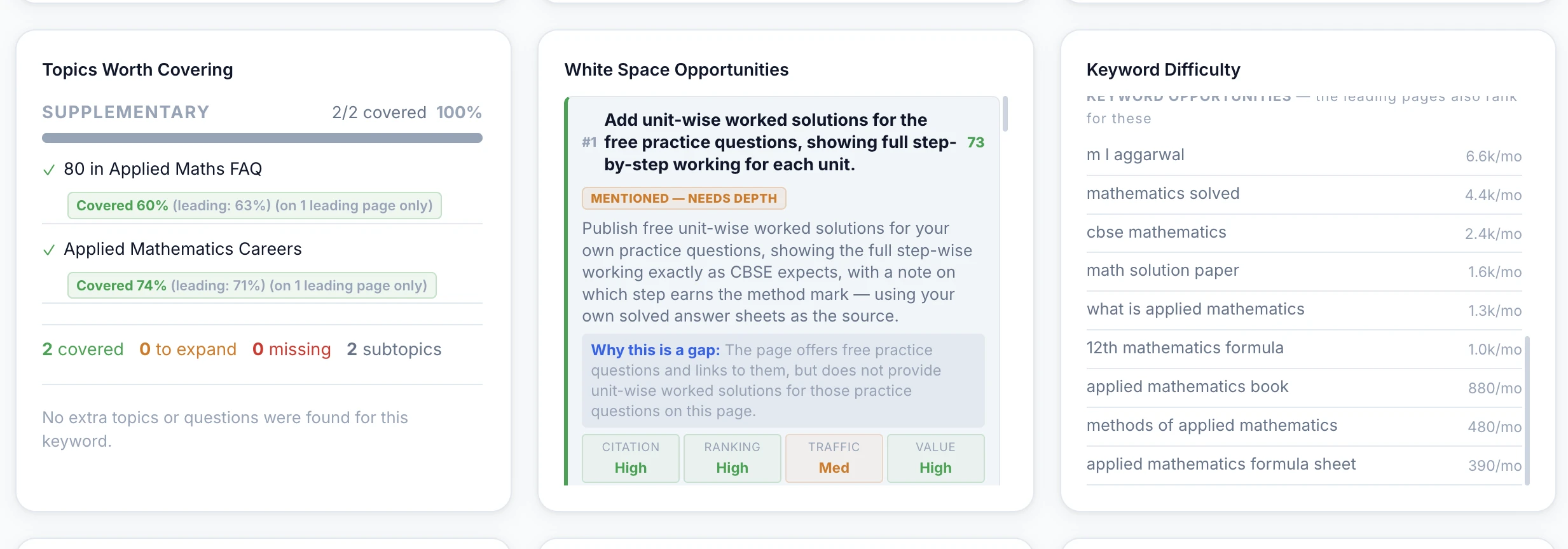
RankAnalyze's Ranking Audit checks a page against everything above, content quality, on-page SEO, internal linking, Core Web Vitals, topic coverage against what's actually ranking, and trust signals, and hands back a specific, fixable reason for every score.
What to Include in an SEO Report (Template)
A useful SEO report answers three questions: what happened, why it happened, and what to do next. Most good reports include:
- A short summary at the top: the main win, the main problem and the next step, in plain language.
- Key search numbers, compared with the previous period: clicks, impressions, click-through rate (CTR) and average position from Google Search Console, plus organic sessions and key events (conversions) from Google Analytics.
- Top pages: which pages brought in the most search traffic, and which ones gained or lost the most.
- Search terms: the queries the site is showing up for, and any important ones that moved. Choosing which searches to target in the first place is keyword research, a separate planning step.
- Issues found: technical problems, slow pages, broken links or pages that dropped.
- Next steps: what will be done, by whom and by when.
You can fill in the template below right on this page. Your entries are saved in this browser, so you can return to them later on the same device and browser. When you're done, use Copy report and paste it into Google Docs, Sheets or an email, or save it as a PDF.
| Metric | This period | Previous period | Change | Delete |
|---|
The Change column fills in automatically. For average position, a lower number is better. For CTR, the change is shown in percentage points.
| Page | Clicks | Change | Note | Delete |
|---|
Grey text shows example values. Type over them, or clear them when you start.
Start with the numbers that match your goal. A shop might care most about key events, a blog about clicks and top pages. You don't need every row.
SEO Report Example
Here's what a short monthly report might look like for a small online plant shop. The shop and the numbers are made up to show the format.
Summary. Search clicks grew this month, mostly from the new plant care guides. One product category page dropped after a competitor updated theirs. Next step: refresh that page and add the missing care information.
| Metric | This month | Last month | Change |
|---|---|---|---|
| Organic clicks | 4,200 | 3,800 | +11% |
| Impressions | 96,000 | 90,500 | +6% |
| CTR | 4.4% | 4.2% | +0.2 points |
| Average position | 14.1 | 15.3 | Better |
| Key events (orders) | 62 | 58 | +7% |
Top change. The "Indoor plants for low light" guide moved onto page one and brought in 600 new clicks.
Main issue. The "Succulents" category page dropped from position 6 to 11. The pages now above it cover watering and soil, topics this page doesn't.
Next steps. Test whether adding useful care information improves the page (content team, by the 15th). Re-check its position next month.
It's short on purpose. The person reading it should know what happened and what's being done about it in under a minute.
How to Create an SEO Report
- Decide who it's for. A business owner wants results and next steps. A developer wants the technical issues. Write for the reader.
- Pick the period and what to compare it with. Last month against the month before is common. Comparing with the same month last year helps for seasonal businesses.
- Pull the search data. Google Search Console gives clicks, impressions, CTR and average position. Google Analytics gives sessions and key events.
- Check the pages that matter. Look at content, on-page basics, speed and links, ideally against the pages that rank above yours. This is where an SEO report generator saves the most time.
- Explain what changed and why. Numbers alone don't help much. Add the reason when you know it: an update you made, a competitor's new page, a seasonal dip.
- List the next steps. Each one should have an owner and a date.
- Share it the same way each time. A shared link, a PDF or a doc in the same format every month makes it easy to compare.
A generator can handle steps 3 and 4 quickly. Steps 5 and 6 still need a person who knows the business.
Monthly and Client SEO Reports
A monthly SEO report tracks the same numbers every month, so trends are easy to spot. Keep the format the same each time, and compare with the previous month and, where it matters, the same month last year.
Reports for clients need a bit more care:
- Start with what matters to them, usually leads or sales, not rankings for their own sake.
- Explain drops honestly, with a reason and a plan.
- Show the work done that month, so results connect to effort.
- Keep jargon out of the summary. Put the detail further down for anyone who wants it.
Agencies often send white-label reports, which carry the agency's own branding instead of the tool's. Many reporting tools offer this, along with scheduled emails and PDF export. An automated SEO report saves time, but read it before it goes out. Automation can pull the numbers, but it can't explain a drop.
Free vs Paid SEO Report Generators
Free SEO report generators are a good place to start. Most free versions are limited in some way. Common limits include:
- A one-time check, with no tracking over time
- A small number of pages or reports
- No connection to your own Google Search Console or Analytics data
- Little or no comparison against the pages that rank above you
- The tool's branding on the report
Paid tools usually add scheduled reports, history and trends, more pages and sites, white-label options and data connections. The right SEO report generator for you depends on the job: a one-off check of a page, ongoing reporting for your own site, or reports for clients.
Whichever you use, apply the checks in the next section before trusting the score.
What to look for before trusting any SEO report generator
Not every report is built the same way, and a few questions separate a useful one from a vanity score:
- Does it explain why each score is what it is, with a specific, fixable reason, not just a number?
- Does it check page speed against Google's actual Core Web Vitals thresholds, not a generic speed test?
- Does it compare content coverage against pages that are actually ranking for the target keyword, or only check the page in isolation?
- Does it re-run cleanly on the same page without the score drifting for no reason?
- Does it separate distinct signals (content, technical, trust) instead of blending everything into one opaque number?
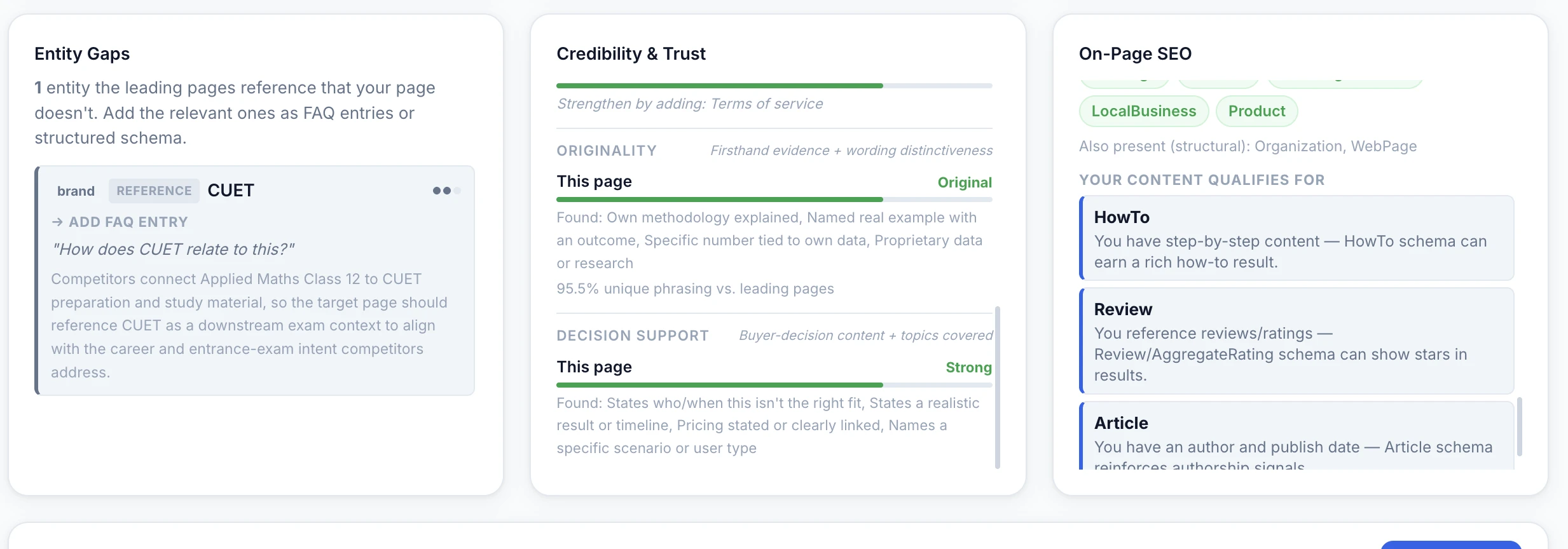
A quick SEO report generator checklist
- Content quality and depth, scored separately from technical SEO
- On-page fundamentals, titles, meta, headings, keyword placement, schema
- Internal linking coverage and anchor text quality
- Page speed measured against real Core Web Vitals thresholds
- Topic coverage compared against what's currently ranking
- Trust/credibility signals, not just keyword and technical checks
- A specific, fixable reason behind every score, not just a number
Frequently Asked Questions
What is an SEO report generator?
An SEO report generator analyzes a page (or a whole site) and produces a structured breakdown of what's helping and hurting its search performance, things like content depth, on-page signals, page speed, internal linking, and how well the content covers what searchers actually want. The output is a readable report rather than raw data, meant to be acted on directly.
What should a good SEO report actually include?
More than a single score. A useful report breaks performance into distinct signals, content quality and depth, on-page SEO fundamentals, internal linking, Core Web Vitals and page speed, topic coverage against what's actually ranking, and trust/credibility signals, each with a specific, fixable reason attached, not just a number with no explanation of what to do about it.
How is page ranking determined?
No single factor decides it. Google weighs how thoroughly a page covers the topic a searcher is actually looking for, on-page fundamentals like title tags and keyword placement, page speed and Core Web Vitals, internal linking that helps both users and crawlers, and trust signals like author expertise and evidence backing the content's claims. A page ranking report should evaluate these individually rather than compress them into one unexplained number.
What's the difference between an SEO report and a rank tracker?
A rank tracker tells you where a page currently sits in search results for a keyword over time. An SEO report looks at the content, technical and trust signals that may be contributing to that performance, and what you could improve.
How often should I generate an SEO report for a page?
Re-run it whenever the page changes meaningfully, whenever a competitor materially updates the page currently outranking you, or on a regular cadence (monthly is common) for pages that matter commercially. Search results shift as other pages get updated, so a report is a snapshot of that moment, not a permanent verdict.
Is a high SEO score the same as ranking #1?
No. A report score measures how well a page is built relative to what's currently ranking for its target keyword. It's a useful indicator of ranking potential, not a guarantee of position. Domain authority, backlink profile, and factors outside any single page also affect where it actually lands, which is why a report should always be read as "here's what to fix on this page," not as a promise of rank.
Is there a free SEO report generator?
Yes. Several tools offer a free SEO report, usually as a one-time check with limits on pages or features. RankAnalyze's free plan includes one Ranking Audit a month. Free reports are useful for spotting problems on a page. Ongoing tracking and client reporting usually need a paid plan.
Can I get an SEO report as a PDF?
Most reporting tools let you export a report as a PDF or share it as a link. If yours doesn't, you can paste a report into a document and save it as a PDF. The template above includes a Copy report button for this.
Run a full report on any page, content, technical, and trust signals, with a fixable reason behind every score.
 RankAnalyze